DPA:错误消息“错误 401:UI 中显示“未经授权的操作”
Summary: 用户保持登录数小时后,Data Protection Advisor (DPA) UI 中显示 401 Unauthorized Action(401 未经授权操作)错误;这是由于会话由于不活动而自动关闭造成的。
This article applies to
This article does not apply to
This article is not tied to any specific product.
Not all product versions are identified in this article.
Symptoms
用户在 DPA UI 上看到错误消息,必须再次重新登录:
Error 401: Unauthorized Action Cause
当用户一次登录到 DPA UI 数小时,并且打开的会话由于不活动或其他一些环境因素关闭会话时,会发生此错误。
Resolution
可以忽略此错误,因为它对 DPA 功能没有影响。
用户可以再次登录到 DPA 并正常继续。
可以在 UI 上配置以下设置,以在特定时间段后强制完全注销:
AdministrationUser > & > SecuritySecurity SettingsSession
Expiration 参数可以设置为 example 6 小时(默认值为 off):
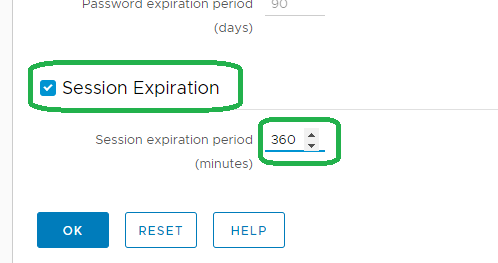
提醒:上述功能是在 18.2 中引入的。
有关详细信息,请与支持人员联系。
有关详细信息,请与支持人员联系。
Affected Products
Data Protection AdvisorProducts
Data Protection AdvisorArticle Properties
Article Number: 000173588
Article Type: Solution
Last Modified: 10 Jun 2026
Version: 5
Find answers to your questions from other Dell users
Support Services
Check if your device is covered by Support Services.