Alienware Update, Dell Update e Dell Command Update non sono in grado di verificare la disponibilità di aggiornamenti
Summary: Informazioni sugli errori di aggiornamento quando si utilizza Alienware Update, Dell Update o Dell Command Update.
This article applies to
This article does not apply to
This article is not tied to any specific product.
Not all product versions are identified in this article.
Symptoms
Dopo aver cliccato su "Check for Updates" in Alienware Update, Dell Update o Dell Command Update, viene visualizzato il messaggio "Unable to retrieve computer inventory information". Di seguito è riportato un esempio del messaggio: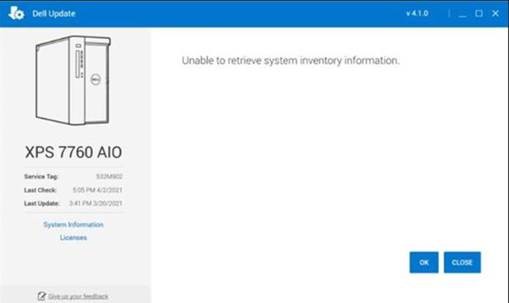
Cause
Ciò si verifica perché un componente integrante del software sta riscontrando un problema durante il completamento di una scansione del computer.
Resolution
Utilità Dell Update Recovery
Per risolvere questo problema, installare ed eseguire Dell Update Recovery Utility. Questa operazione deve essere eseguita su tutti i computer interessati che ricevono questo messaggio.
Affected Products
Alienware Update, Alienware, Dell All-in-One, Dell Pro All-in-One, Dell Pro Max Micro, Dell Pro Max Slim, Dell Pro Max Tower, Dell Pro Micro, Dell Pro Slim, Dell Pro Tower, Dell Slim, Dell Tower, Inspiron, OptiPlex, Vostro, XPS, G Series, G Series
, Alienware, Dell Plus, Dell Pro, Dell Pro Max, Dell Pro Plus, Dell Pro Premium, Inspiron, Latitude, Dell Pro Rugged, Vostro, XPS, Fixed Workstations, Mobile Workstations, Dell Command | Update, Dell Pro Max Micro XE FCM2250, Dell Pro Max Slim XE FCS1250, Dell Pro Max Tower T2 XE FCT2250, Dell Pro Max 16 XE MC16250, Dell Pro Micro Plus XE QBM1250, Dell Pro Slim Plus XE5 QBS1250, Dell Pro Tower Plus XE5 QBT1250, Dell Update
...
Article Properties
Article Number: 000185515
Article Type: Solution
Last Modified: 15 May 2025
Version: 4
Find answers to your questions from other Dell users
Support Services
Check if your device is covered by Support Services.