Na de upgrade ontbreken navigatieknooppunten of menupictogrammen in de admin-UI na de upgrade
Summary: Controleer na het upgraden van de admin-ui menu-items of knooppunten, of de algemene eigenschappen ontbreken in het bestand.
This article applies to
This article does not apply to
This article is not tied to any specific product.
Not all product versions are identified in this article.
Symptoms
Navigatieknooppunten of menu-items die ontbreken in de Admin UI
Home
Discovery And
Config hadden ontbrekende navigatieknooppunten voor waarschuwingen, Oplossingspakketten, Groepen en tags, Update System, Instellingen.
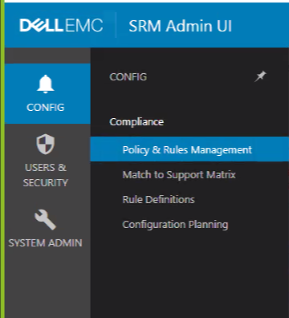
Home
Discovery And
Config hadden ontbrekende navigatieknooppunten voor waarschuwingen, Oplossingspakketten, Groepen en tags, Update System, Instellingen.
Cause
De Frontend host had ontbrekende URL voor de modules onder opt\APG\Web-Applications
Resolution
Op de Frontend host [winscp zou het handigzijn omde onderstaande stappen uit te voeren];
Ga naar \opt\APG\Web-Applications check the module/navigation node that's missing in the UI
Example:
\Centralized-Management\centralized-management\conf\common.properties
the file was missing the url as below:
apg.centralized-management.url=
Add the URL:
apg.centralized-management.url=/centralized-management/
And SAVE the file.
Andere knooppunten die de url in mijn geval misten, staan hieronder:
apg.alerting-frontend.url=
apg.compliance-frontend.url=
apg.device-discovery.url=
De URL is als volgt verstrekt:
apg.alerting-frontend.url=/alerting-frontend/apg.compliance-frontend.url=/compliance-frontend/apg.device-discovery.url=/device-discovery/
Start tomcat APG/bin/manage-module opnieuw op. (sh/cmd) service restart tomcat standaard
Ga naar \opt\APG\Web-Applications check the module/navigation node that's missing in the UI
Example:
\Centralized-Management\centralized-management\conf\common.properties
the file was missing the url as below:
apg.centralized-management.url=
Add the URL:
apg.centralized-management.url=/centralized-management/
And SAVE the file.
Andere knooppunten die de url in mijn geval misten, staan hieronder:
apg.alerting-frontend.url=
apg.compliance-frontend.url=
apg.device-discovery.url=
De URL is als volgt verstrekt:
apg.alerting-frontend.url=/alerting-frontend/apg.compliance-frontend.url=/compliance-frontend/apg.device-discovery.url=/device-discovery/
Start tomcat APG/bin/manage-module opnieuw op. (sh/cmd) service restart tomcat standaard
Affected Products
SRM, SRMArticle Properties
Article Number: 000187298
Article Type: Solution
Last Modified: 03 Nov 2021
Version: 4
Find answers to your questions from other Dell users
Support Services
Check if your device is covered by Support Services.