升級後系統管理員 UI 遺失導覽節點或功能表圖示
Summary: 升級後,系統管理員 UI 遺失功能表項目或節點,請檢查檔案中的 url 是否遺失一般內容。
This article applies to
This article does not apply to
This article is not tied to any specific product.
Not all product versions are identified in this article.
Symptoms
在 Admin UI 中的導覽節點或功能表項目遺失
首頁
探索
且組態的警示、Solution Pack、群組與標籤、更新系統、設定等遺失導覽節點。
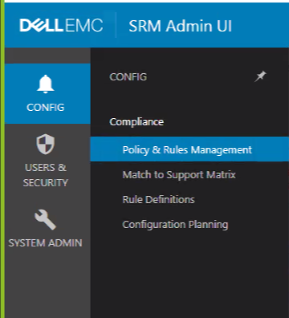
首頁
探索
且組態的警示、Solution Pack、群組與標籤、更新系統、設定等遺失導覽節點。
Cause
前端主機在 opt\APG\Web-Applications 下的模組遺失 URL
Resolution
在前端主機上 [winscp 會很方便執行下列步驟];
前往 \opt\APG\Web-Applications 檢查 UI 中遺失的模組/導覽節點
範例:
\Centralized-Management\centralized-management\conf\common.properties
檔案遺失 url,如下所示:
apg.centralized-management.url=
新增 URL:
apg.centralized-management.url=/centralized-management/
然後儲存檔案。
在我的案例中遺失 url 的其他節點如下:
apg.alerting-frontend.url=
apg.compliance-frontend.url=
apg.device-discovery.url=
提供的 URL 如下所示:
apg.alerting-frontend.url=/alerting-frontend/
apg.compliance-frontend.url=/compliance-frontend/
apg.device-discovery.url=/device-discovery/
重新啟動 tomcat APG/bin/manage-module.(sh/cmd) 服務重新啟動 tomcat 預設值
前往 \opt\APG\Web-Applications 檢查 UI 中遺失的模組/導覽節點
範例:
\Centralized-Management\centralized-management\conf\common.properties
檔案遺失 url,如下所示:
apg.centralized-management.url=
新增 URL:
apg.centralized-management.url=/centralized-management/
然後儲存檔案。
在我的案例中遺失 url 的其他節點如下:
apg.alerting-frontend.url=
apg.compliance-frontend.url=
apg.device-discovery.url=
提供的 URL 如下所示:
apg.alerting-frontend.url=/alerting-frontend/
apg.compliance-frontend.url=/compliance-frontend/
apg.device-discovery.url=/device-discovery/
重新啟動 tomcat APG/bin/manage-module.(sh/cmd) 服務重新啟動 tomcat 預設值
Affected Products
SRM, SRMArticle Properties
Article Number: 000187298
Article Type: Solution
Last Modified: 03 Nov 2021
Version: 4
Find answers to your questions from other Dell users
Support Services
Check if your device is covered by Support Services.