PowerStore: How to repurpose a PowerStore installed with DRE Single Parity (SP) to DRE Dual Parity (DP)
Summary: Upgrading to PowerStoreOS V2 from V1 does not provide users with the ability to online convert an appliance from Single Drive Failure Tolerance (or Single Parity) to Double Drive Failure Tolerance (or Dual Parity). This KB explains how to repurpose a single appliance cluster. ...
This article applies to
This article does not apply to
This article is not tied to any specific product.
Not all product versions are identified in this article.
Instructions
Description:
- PowerStoreOS V2 introduced a new feature that allows users to choose from two Tolerance Level options.
- PowerStoreOS V1 only offered Single Drive Failure Tolerance (or Single Parity), but with PowerStoreOS V2, it also offers Double Drive Failure Tolerance (or Dual Parity).
- This Dual Parity protection feature is only available for a system that is freshly installed with PowerStoreOS V2.
- Upgrading to PowerStoreOS V2 from V1 does not provide users with the ability to online convert an appliance from Single Drive Failure Tolerance (or Single Parity) to Double Drive Failure Tolerance (or Dual Parity).
How to repurpose a single appliance cluster
Preconditions
- This procedure is not relevant for Multi Appliance cluster!
- Ensure to backup any data from the appliance as THIS PROCESS IS DESTRUCTIVE.
- Ensure that the appliance has at minimum seven drives (the minimum that is required for DRE DP).
Steps to repurpose the appliance
- Upgrade your appliance to PowerStoreOS V2.
- Enable SSH to the appliance using the UI.
- Follow the instructions in KB article 180964: PowerStore: How to reinitialize a PowerStore system to factory state using the svc_factory_reset command to revert an appliance back to its factory-delivered state.
ATTENTION: This command wipes all data on the appliance, and prepares the appliance for a fresh installation.
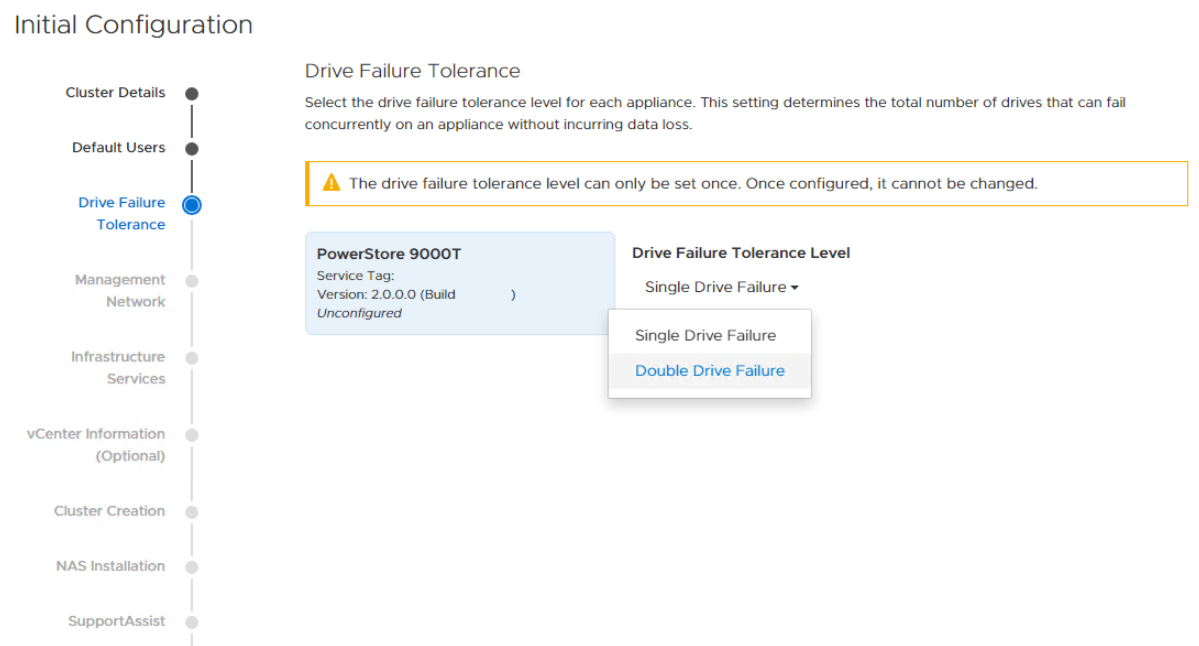
- Re-create the cluster using ICW and select in the wizard, Double Drive Failure:
Affected Products
PowerStoreArticle Properties
Article Number: 000189814
Article Type: How To
Last Modified: 13 Jun 2025
Version: 5
Find answers to your questions from other Dell users
Support Services
Check if your device is covered by Support Services.