NetWorker NVP-vProxy: I backup hanno esito negativo con l'errore: VDDK Error: 13: "Non disponi dei diritti di accesso a questo file." "Impossibile allocare l'ID di destinazione SCSI"
Summary: I backup basati su vProxy di Dell EMC NetWorker che utilizzano la modalità di trasporto Hotadd mostrano una o più macchine virtuali in errore con un errore VDDK 13 sui diritti di accesso ai file VMDK. ...
This article applies to
This article does not apply to
This article is not tied to any specific product.
Not all product versions are identified in this article.
Symptoms
I registri delle sessioni di vProxy mostrano una o più macchine virtuali con esito negativo con il seguente errore:
2021-10-12T22:11:52Z ERROR:  [@(#) Build number: 78] 654f8808-ce2a-4472-9f50-e037ab7038b3:vm-231097:VCENTER: Failed to open source VMDK '[DATASTORE_NAME] VM-NAME/VM_NAME_#.vmdk': VDDK Error: 13: You do not have access rights to this file.
2021-10-12T22:11:52Z ERROR:  [@(#) Build number: 78] 654f8808-ce2a-4472-9f50-e037ab7038b3:vm-231097:VCENTER: Failed to initialize Block Reader.
2021-10-12T22:11:52Z ERROR:  [@(#) Build number: 78] 654f8808-ce2a-4472-9f50-e037ab7038b3:vm-231097:VCENTER: Failed to backup virtual disk "Hard disk 2".
L'abilitazione della registrazione di debug per il VDDK vProxy mostra il seguente errore nel vbackupd-vddk.log:
2021-10-12T18:11:52.409-04:00 error -[02778] [Originator@6876 sub=transport] Cannot use mode hotadd to access [DATASTORE_NAME] VM-NAME/VM_NAME_#.vmdk: Cannot mount using this method. (Mounting 421dd75d-c2a2-ff69-69d3-5b8f7cde98ca using transport hotadd failed : Failed to allocate SCSI target ID..)
Cause
La causa è sconosciuta. Il vProxy viene implementato dal file OVA per impostazione predefinita con quattro controller SCSI. Non sono disponibili opzioni di configurazione per modificare il numero di controller SCSI quando viene implementato vProxy.
Tuttavia, quando si esaminano le impostazioni hardware per uno o più vProxy implementati, viene visualizzato un solo controller SCSI. L'errore VDDK si verifica perché il vProxy non dispone dell'impostazione predefinita prevista di quattro controller SCSI e sta esaurendo lo spazio per il mounting di dischi client aggiuntivi durante il backup.
Tuttavia, quando si esaminano le impostazioni hardware per uno o più vProxy implementati, viene visualizzato un solo controller SCSI. L'errore VDDK si verifica perché il vProxy non dispone dell'impostazione predefinita prevista di quattro controller SCSI e sta esaurendo lo spazio per il mounting di dischi client aggiuntivi durante il backup.
Resolution
Per risolvere il problema, è possibile effettuare le seguenti operazioni:
Al termine, le impostazioni hardware del vProxy dovrebbero essere simili alle seguenti:
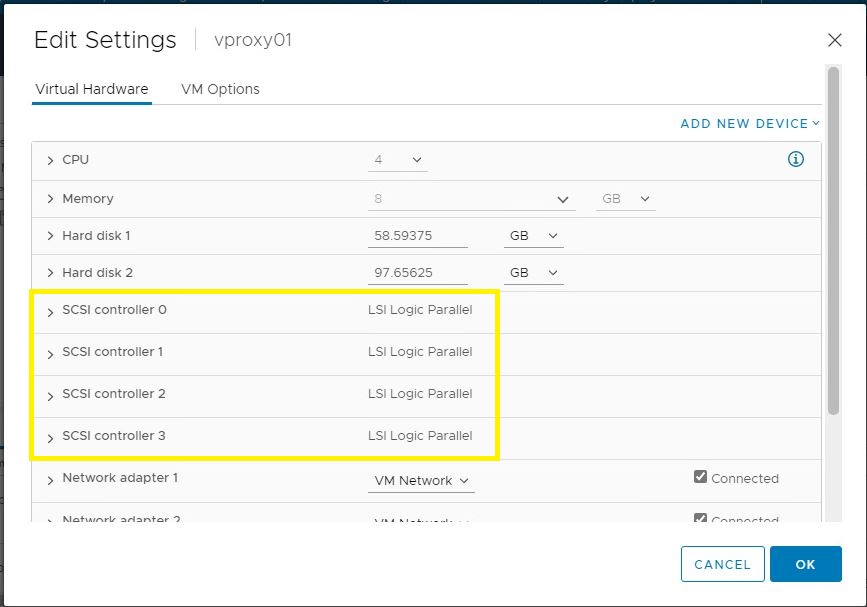
1. Accertarsi che non siano in esecuzione backup vProxy in NetWorker Management Console (NMC).
2. Arrestare la VM vProxy in VMware.
3. Passare a Edit Settings e aggiungere i controller SCSI mancanti al vProxy interessato in modo che siano presenti 4 in totale.
4. Riavviare il vProxy. Rileva e configura automaticamente i nuovi controller.
2. Arrestare la VM vProxy in VMware.
3. Passare a Edit Settings e aggiungere i controller SCSI mancanti al vProxy interessato in modo che siano presenti 4 in totale.
4. Riavviare il vProxy. Rileva e configura automaticamente i nuovi controller.
Al termine, le impostazioni hardware del vProxy dovrebbero essere simili alle seguenti:
Additional Information
NVP-vProxy: Come abilitare la registrazione
di debugNota: L'errore "You do not have access rights" può essere visualizzato per altri motivi, in questo caso il messaggio era associato a "Impossibile allocare l'ID di destinazione SCSI". Per ulteriore documentazione sull'errore "non si dispone dei diritti di accesso", consultare:
- Problema HotAdd: NVP vProxy: I backup delle VM hanno esito negativo con "VDDK error: 13: Non disponi dei diritti di accesso a questo file."
- Problema della porta: NVP vProxy: La risoluzione dei problemi dei backup delle macchine virtuali non riesce con errore VDDK 13: Non disponi dei diritti di accesso a questo file"
- Problema di autorizzazioni: NVP vProxy: Il backup della VM ha esito negativo con il messaggio "Failed to open source VMDK '[DATASTORE] UUID/VM_NAME.vmdk': VDDK Error: 13: Non disponi dei diritti di accesso a questo file."
- Il percorso della macchina virtuale contiene caratteri speciali: Il backup di NetWorker vProxy ha esito negativo con il messaggio "You do not have access rights to this file" quando il percorso della macchina virtuale contiene caratteri speciali
Affected Products
NetWorkerProducts
NetWorker Family, NetWorker SeriesArticle Properties
Article Number: 000192687
Article Type: Solution
Last Modified: 22 Apr 2026
Version: 2
Find answers to your questions from other Dell users
Support Services
Check if your device is covered by Support Services.