PowerStore: Kopier fil med V attr til SMB-deling mislykkes muligvis med fejlen "er for stor til destinationsfilsystemet"
Summary: Kopier fil med V attr til SMB-deling mislykkes muligvis med fejlen "er for stor til destinationsfilsystemet."
This article applies to
This article does not apply to
This article is not tied to any specific product.
Not all product versions are identified in this article.
Symptoms
Kontroller, om V attr er registreret:
Fejlmeddelelse: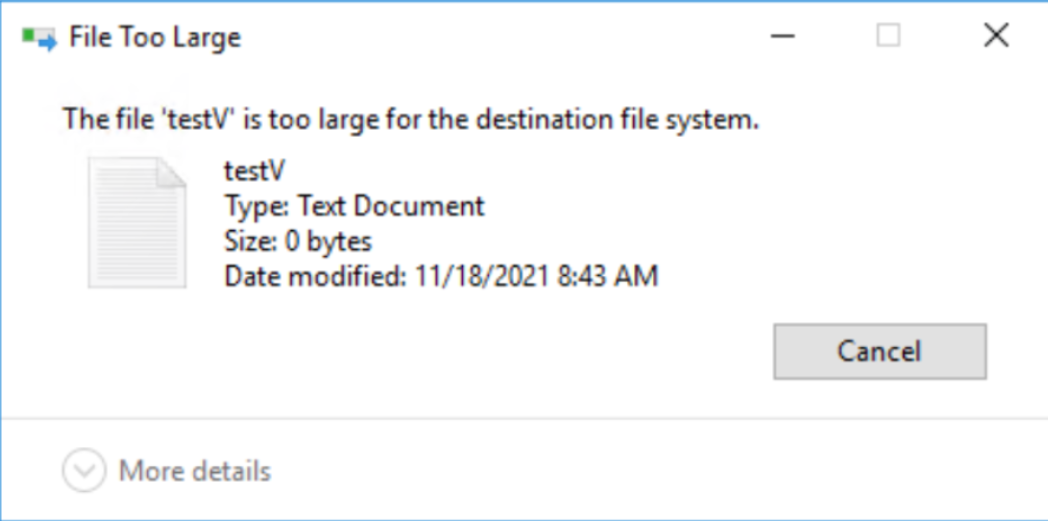
sdnas_active.log:
PS E:\> attrib .\testV.txt
A V E:\testV.txt Skærmbillede af fejl:
Fejlmeddelelse:
sdnas_active.log:
2021/11/25-05:04:13.637761 7f4aa1df1702 SMB: 7:[SDNAS-A18] smb_convertFileAttributes: Ugyldig FileAttribute (0x8020)
2021/11/25-05:04:13.637868 7f4aa1df1702 SMB:10:[sdnas-a18] <<<< SMB2 MSG len=73, Command=0x5(Opret), NTStatus=INVALID_PARAMETER
Cause
Den aktuelle PowerStore-version understøtter ikke V attr.
Resolution
Løsning:
Fjern V attr fra filer, før du kopierer til PowerStore SMB-deling.
I en fremtidig version vil funktionsmåden blive forbedret. Kopiér filer med V attr til PowerStore SMB-share, mist V attr, og kopiér til NTFS- eller Windows SMB-share.
Fjern V attr fra filer, før du kopierer til PowerStore SMB-deling.
I en fremtidig version vil funktionsmåden blive forbedret. Kopiér filer med V attr til PowerStore SMB-share, mist V attr, og kopiér til NTFS- eller Windows SMB-share.
Additional Information
V attr er ReFS-integritetsstrømme - Filintegritet.
Lidt info om ReFS Integration Stream - https://docs.microsoft.com/en-us/windows-server/storage/refs/integrity-streams
Lidt info om ReFS Integration Stream - https://docs.microsoft.com/en-us/windows-server/storage/refs/integrity-streams
Affected Products
PowerStoreArticle Properties
Article Number: 000194244
Article Type: Solution
Last Modified: 10 Dec 2021
Version: 1
Find answers to your questions from other Dell users
Support Services
Check if your device is covered by Support Services.