PowerStore:使用 V attr 將檔案複製到 SMB 共用可能會失敗,並出現錯誤「對目的地檔案系統來說太大」
Summary: 使用 V attr 將檔案複製到 SMB 共用可能會失敗,並出現錯誤「對目的地檔案系統來說太大」。
This article applies to
This article does not apply to
This article is not tied to any specific product.
Not all product versions are identified in this article.
Symptoms
檢查檔案中的 V attr:
失敗訊息: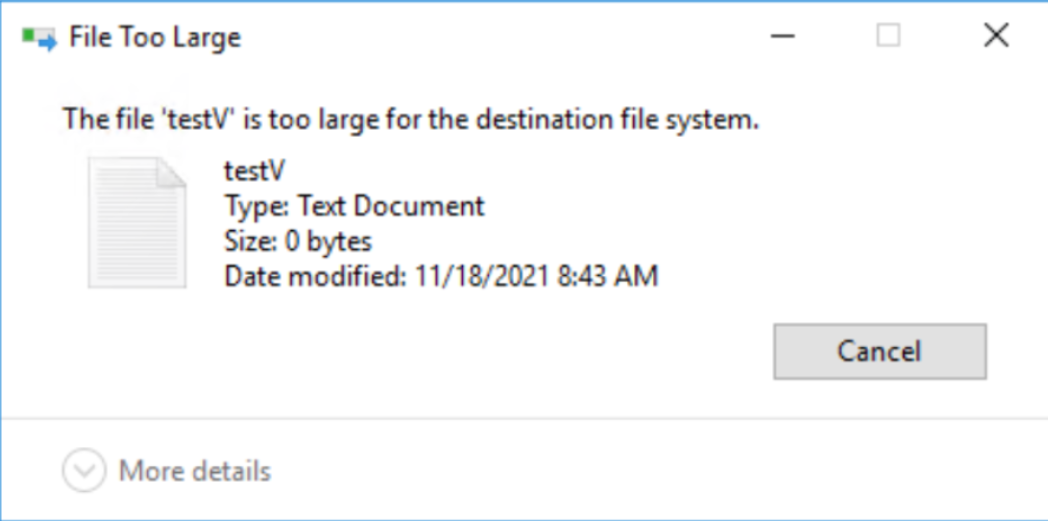
sdnas_active.log:
PS E:\> attrib .\testV.txt
A v E:\testV.txt 失敗螢幕擷取畫面:
失敗訊息:
sdnas_active.log:
2021/11/25-05:04:13.637761 7f4aa1df1702 SMB:7:[SDNAS-A18] smb_convertFileAttributes:無效的 FileAttribute (0x8020)
2021/11/25-05:04:13.637868 7f4aa1df1702 SMB:10:[sdnas-a18] <<<< SMB2 MSG len=73, Command=0x5(建立), NTStatus=INVALID_PARAMETER
Cause
目前的 PowerStore 版本不支援 V attr。
Resolution
因應措施:
複製到 PowerStore SMB 共用之前,請先從檔案移除 V attr。
在將來的版本中,將改進此行為。使用 V attr 將檔案複製到 PowerStore SMB 共用,失去 V Attr,然後複製到 NTFS 或 Windows SMB 共用。
複製到 PowerStore SMB 共用之前,請先從檔案移除 V attr。
在將來的版本中,將改進此行為。使用 V attr 將檔案複製到 PowerStore SMB 共用,失去 V Attr,然後複製到 NTFS 或 Windows SMB 共用。
Additional Information
V attr is ReFS integrity streams - File Integrity。
有關 ReFS 整合流 - https://docs.microsoft.com/en-us/windows-server/storage/refs/integrity-streams 的一些資訊
有關 ReFS 整合流 - https://docs.microsoft.com/en-us/windows-server/storage/refs/integrity-streams 的一些資訊
Affected Products
PowerStoreArticle Properties
Article Number: 000194244
Article Type: Solution
Last Modified: 10 Dec 2021
Version: 1
Find answers to your questions from other Dell users
Support Services
Check if your device is covered by Support Services.