NMM:SQL 備份失敗並顯示錯誤:nsrsqlsv 報告錯誤頁面
Summary: 當執行Microsoft應用程式模組 (NMM) 的 SQL 用戶端,且為頁面驗證啟用資料庫檢查總和時,用於Microsoft (NMM) 備份的 NetWorker 模組會失敗。
This article applies to
This article does not apply to
This article is not tied to any specific product.
Not all product versions are identified in this article.
Symptoms
SQL 資料庫的備份工作階段無法透過 NetWorker,且無法略過。
NMM 會將以下錯誤回報給 nsrsqlsv 登入用戶端 nsr/applogs path:
nsrsqlsv: Microsoft SQL server documentation provides details about the following SQL Server Provider error:
nsrsqlsv: BACKUP 'DB-name' detected an error on page (1:#) in file 'DB-name.mdf'.
nsrsqlsv: (Error: 3043)
Cause
當 SQL 用戶端組態在 NMC 中選取資料庫檢查總和時:
任一用戶端精靈選取「寫入媒體前執行檢查總和」選項,
或是手動用戶端屬性有 -k 參數已新增到備份命令欄位,例如「nsrsqlsv -k“。
Resolution
停用 SQL 資料庫檢查總和屬性:
1。連線至 NetWorker Management Console (NMC)。
2.前往保護標籤,然後按一下用戶端。
3.從 NMC 調整 SQL 用戶端組態。可以使用以下方法之一修改用戶端:
修改用戶端精靈:
一個。在用戶端上按一下滑鼠右鍵,然後按一下修改 用戶端精靈。
b.在 指定備份選項 窗格中,保持清除「 寫入媒體前執行檢查總和 」核取方塊 。
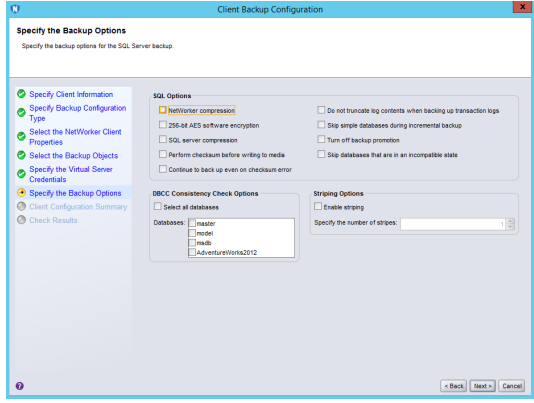
修改用戶端內容:
一個。以滑鼠右鍵按一下,然後選取修改用戶端內容。
b.從應用程式和模組選項卡中,刪除”-k“命令。
4.再次執行備份。
Additional Information
若要確認此 NMM 備份失敗與 NetWorker 問題無關,請讓 SQL 資料庫管理員執行下列步驟:
- 測試執行原生 SQL 工具的相同 SQL 資料庫備份,從 SQL Server Management Studio (SSMS) T-SQL,例如:
- 備份資料庫 [
nameofDB] 到DIsk='somediskpathwithspace'含總和檢查碼 - 注意: TSQL 備份資料庫預設為 NO_CHECKSUM。
- 備份資料庫 [
Affected Products
NetWorker Family, NetWorker, NetWorker Module, NetWorker Module for MicrosoftArticle Properties
Article Number: 000194757
Article Type: Solution
Last Modified: 13 Jan 2026
Version: 2
Find answers to your questions from other Dell users
Support Services
Check if your device is covered by Support Services.