NetWorker 19.5 fails to install on Red Hat Linux 8.x
Summary: NetWorker 19.5 fails to install on Red Hat Linux 8.x. It requires lower version of library "libncursesw.so.5," and Red Hat Linux is having higher version of library "libncursesw.so.6."
This article applies to
This article does not apply to
This article is not tied to any specific product.
Not all product versions are identified in this article.
Symptoms
- NetWorker is being installed on a RHEL-based Linux operating system.
- The installation fails stating that dependencies were not met. The package that is stated is libncrusesw.so.5.
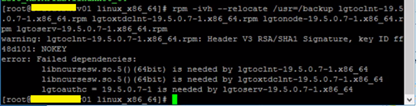
Cause
Prerequisites that are mentioned to install software are not met. These prerequisites are mentioned in NetWorker installation guide.
libncursesw.so.5 is a requirement on RHEL 7 (and later) based operating systems. See the NetWorker installation guide regarding this requirement and any other potential software dependencies. The NetWorker Installation Guide can be found through: https://www.dell.com/support/home/product-support/product/networker/docs
libncursesw.so.5 is a requirement on RHEL 7 (and later) based operating systems. See the NetWorker installation guide regarding this requirement and any other potential software dependencies. The NetWorker Installation Guide can be found through: https://www.dell.com/support/home/product-support/product/networker/docs
Resolution
You can identify which package provides the dependency with the following command: yum provides dependency
e.g:

Verify presence of libncursesw.so.5 in path /usr/lib64: ls /usr/lib/libncursesw*

Initiate the NetWorker package installation again.
e.g:
[root@RedHat8 ~]# yum provides libncursesw.so.5
Last metadata expiration check: 3:25:10 ago on Tue 06 Sep 2022 06:17:33 AM EDT.
ncurses-compat-libs-6.1-7.20180224.el8.i686 : Ncurses compatibility libraries
Repo        : rhel-8-for-x86_64-baseos-rpms
Matched from:
Provide    : libncursesw.so.5

ncurses-compat-libs-6.1-9.20180224.el8.i686 : Ncurses compatibility libraries
Repo        : rhel-8-for-x86_64-baseos-rpms
Matched from:
Provide    : libncursesw.so.5
Install the missing dependency: rpm -ivh package_name
NOTE: Use the latest available package version as outputted by the yum provides command.
Initiate the NetWorker package installation again.
Additional Information
NOTE: For assistance with installing required dependencies, consult with your Linux system administrator. For assistance installing NetWorker software, reach out to your Dell Site Account Manager or Dell Sales Representative to engage our Professional Services (PS) team.
Article Properties
Article Number: 000202911
Article Type: Solution
Last Modified: 14 Mar 2023
Version: 5
Find answers to your questions from other Dell users
Support Services
Check if your device is covered by Support Services.