PowerEdge: How to Perform a System Reseat (virtual reseat) on an MX7000 Compute Sled
Summary: Platform training video that covers how to perform a system reseat (virtual reseat) of a compute sled on an MX7000 chassis in OpenManage Enterprise Modular (OME-M).
This article applies to
This article does not apply to
This article is not tied to any specific product.
Not all product versions are identified in this article.
Instructions
Overview:
You can perform a system reseat remotely using OpenManage Enterprise Modular (OME-M). The system reseat option simulates a physical sled removal and reinsertion.
Steps on how to perform a system reseat:
- Go to Devices > Compute.
- Mark the checkbox next to the sled that you want to perform a system reseat operation on.
- Select Power Control > System Reseat:
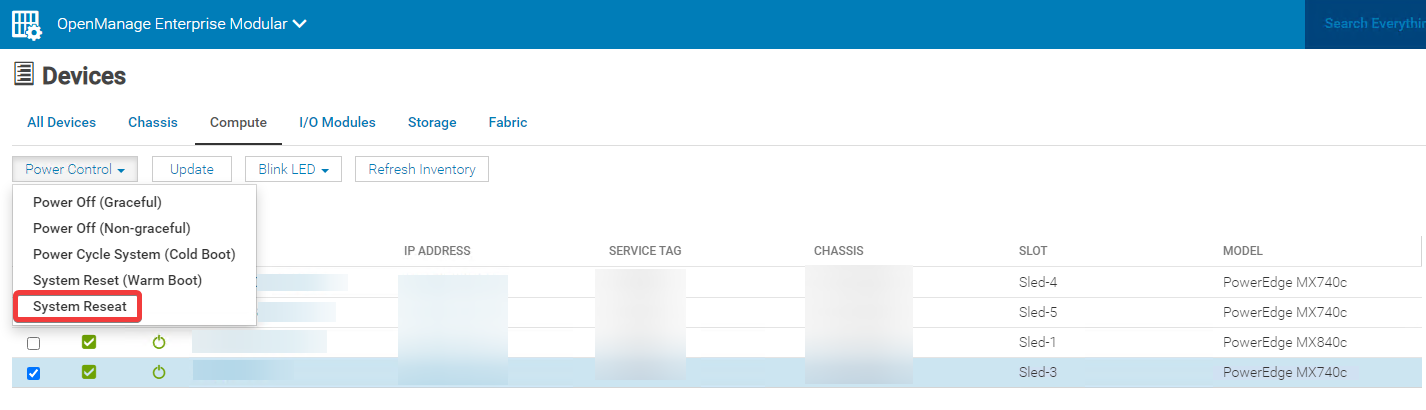
- Once the system reseat is initiated, you may setup a continuous ping to the iDRAC and host IP addresses to validate when both the iDRAC and host OS have come back up.
Additional Information
How to perform a system reseat remotely using OpenManage Enterprise Modular (OME-M)
Duration: 00:01:16 (hh:mm:ss)
When available, closed caption (subtitles) language settings can be chosen using the CC icon on this video player.
Affected Products
Dell OpenManage Enterprise-Modular, PowerEdge MX7000, PowerEdge MX740C, PowerEdge MX750c, PowerEdge MX760c, PowerEdge MX840C, Dell EMC vSAN MX740c Ready Node, Dell EMC vSAN MX750c Ready Node, Dell vSAN Ready Node MX760cArticle Properties
Article Number: 000206110
Article Type: How To
Last Modified: 29 May 2025
Version: 5
Find answers to your questions from other Dell users
Support Services
Check if your device is covered by Support Services.