工場出荷時のインストール後、MyDellアプリケーション タイルがWindows 10のスタート メニューに表示されない
Summary: この記事では、Windows 10で、工場出荷時のインストール後にMyDellアプリケーションが空白で表示されることについて説明します。
This article applies to
This article does not apply to
This article is not tied to any specific product.
Not all product versions are identified in this article.
Symptoms
Windows 10のスタート メニューにアプリケーション タイルが表示されない
Windows 10では、MyDellアプリケーションは工場出荷時のインストール後に空白で表示されますが、ユーザーはアプリケーションをクリックして起動できます。
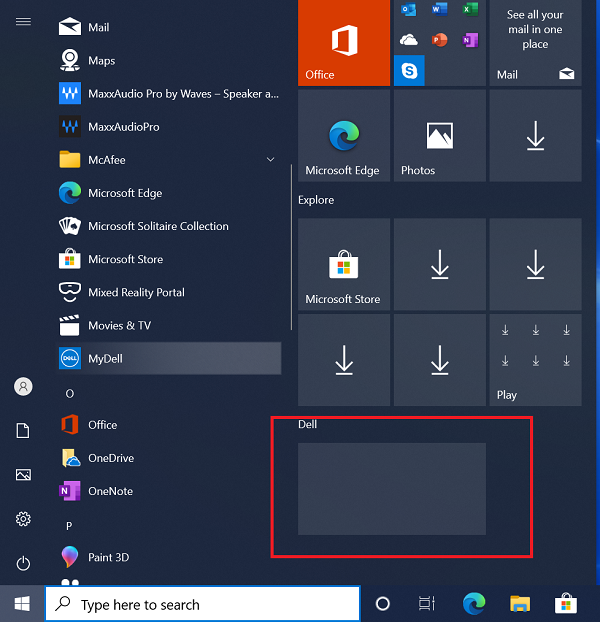
(図1 - MyDellアプリケーション)
影響を受けるシステム
- MyDell
Cause
Resolution
Affected Products
MyDellArticle Properties
Article Number: 000207813
Article Type: Solution
Last Modified: 14 Mar 2025
Version: 3
Find answers to your questions from other Dell users
Support Services
Check if your device is covered by Support Services.