「IDPA:DD Virtual Editionにメモリーのサポートされていない仮想ハードウェア構成が表示される
Summary: DP4400の導入後、Data Domain Virtual Edition (DDVE)に、メモリーに対してサポートされていない仮想ハードウェア構成が表示されます。「メモリー予約は81,920 MB以上である必要があります!」
This article applies to
This article does not apply to
This article is not tied to any specific product.
Not all product versions are identified in this article.
Symptoms
Data Domain CLIで、 サポートされていない仮想ハードウェア構成のアクティブなアラートが表示されます。
sysadmin@dd-4400# alerts show current-detailed

Alert Id                 p0-12
Post Time                Thu Jan 26 18:48:27 2023
Severity                 CRITICAL
Class                    Environment
Object                   Component=Memory
Message                  Unsupported virtual hardware configuration.
Additional Information   Cause=Memory reservation must be 81920 MB at least!
Event Id                 EVT-ENVIRONMENT-00040
Event Name               UnsupportedHardwareConfig
Description              Unsupported virtual machine hardware configuration was detected.
                         This configuration may cause unexpected behavior.
Action                   Fix the hardware configuration to resolve the problem.
                         If problem persists, restart the system.
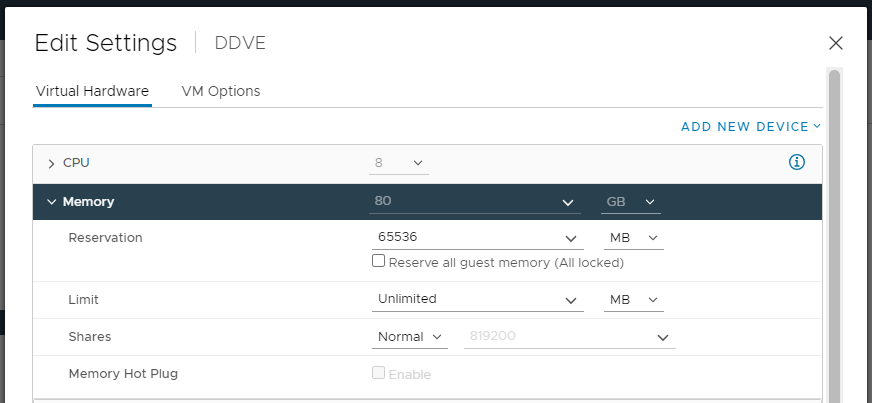
Integrated Data Protection Appliance vCenterから、DDVEに構成された適切なメモリー容量(80 GB)が表示されます。
Cause
この問題は、DDVEの導入中に発生します。[ Reserve all guest memory (All locked)]が選択されていません。
Resolution
この問題に対処するには、次の手順を実行します。
![[Reserve all guest memory All locked]オプションを選択します](https://supportkb.dell.com/img/ka0Do0000001wszIAA/ka0Do0000001wszIAA_ja_1.png)
- Integrated Data Protection Appliance vCenter UIを開き、DDVEを右クリックして Edit Settingsを選択します。
- [Memory]で、[Reserve all guest memory (All locked)]オプションを選択し、設定を保存します。
- 次のコマンドを使用して、Data Domain CLIからイベントをクリアします。
alerts clear alert-id p0-<id>.
Affected Products
Integrated Data Protection Appliance FamilyProducts
PowerProtect DP4400, Integrated Data Protection Appliance SoftwareArticle Properties
Article Number: 000207980
Article Type: Solution
Last Modified: 08 Aug 2025
Version: 6
Find answers to your questions from other Dell users
Support Services
Check if your device is covered by Support Services.