IDPA: DD Virtual Edition에 메모리에 대해 지원되지 않는 가상 하드웨어 구성이 표시됨
Summary: DP4400을 배포한 후 DDVE(Data Domain Virtual Edition)에 메모리에 대해 지원되지 않는 가상 하드웨어 구성이 표시됨 "메모리 예약은 최소 81,920MB여야 합니다!"
This article applies to
This article does not apply to
This article is not tied to any specific product.
Not all product versions are identified in this article.
Symptoms
지원되지 않는 가상 하드웨어 구성에 대한 활성 알림이 Data Domain CLI에 관찰됩니다.
sysadmin@dd-4400# alerts show current-detailed

Alert Id                 p0-12
Post Time                Thu Jan 26 18:48:27 2023
Severity                 CRITICAL
Class                    Environment
Object                   Component=Memory
Message                  Unsupported virtual hardware configuration.
Additional Information   Cause=Memory reservation must be 81920 MB at least!
Event Id                 EVT-ENVIRONMENT-00040
Event Name               UnsupportedHardwareConfig
Description              Unsupported virtual machine hardware configuration was detected.
                         This configuration may cause unexpected behavior.
Action                   Fix the hardware configuration to resolve the problem.
                         If problem persists, restart the system.
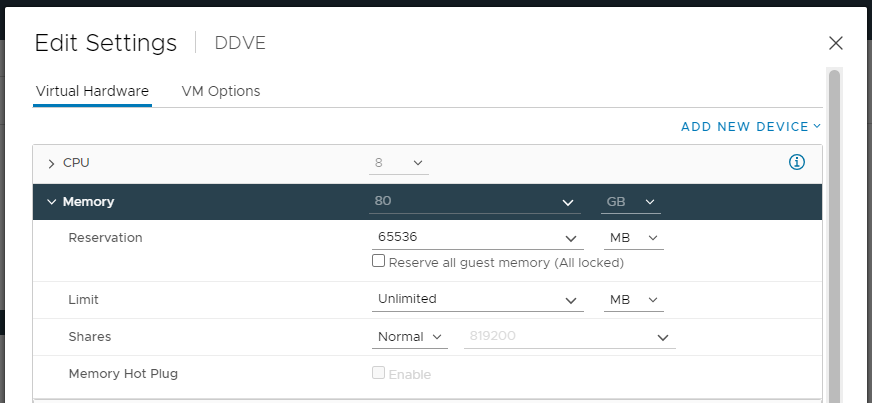
Integrated Data Protection Appliance vCenter에서 DDVE에 구성된 메모리 양(80GB)이 표시됩니다.
Cause
이 문제는 DDVE를 배포하는 동안 Reserve all guest memory (All locked)가 선택되지 않은 상태에서 발생합니다.
Resolution
문제를 해결하려면 다음을 수행합니다.
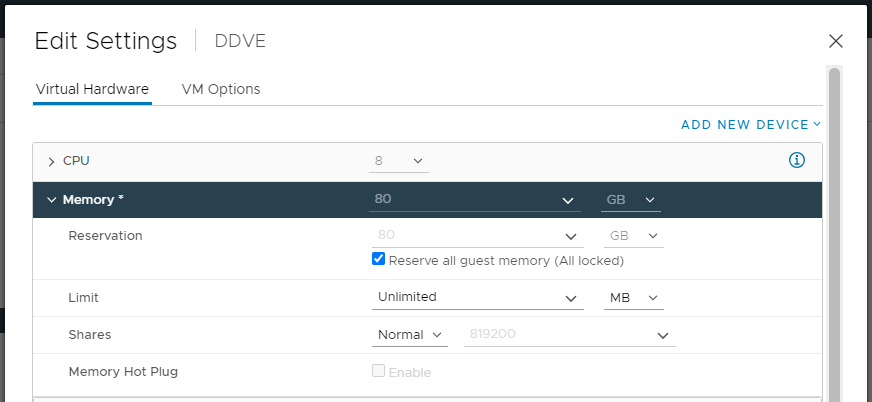
- Integrated Data Protection Appliance vCenter UI를 열고 DDVE 를 마우스 오른쪽 버튼으로 클릭한 다음 Edit Settings를 선택합니다.
- 메모리에서 Reserve all guest memory (All locked) 옵션을 선택하고 설정을 저장합니다.
- 다음 명령을 사용하여 Data Domain CLI에서 이벤트를 지웁니다.
alerts clear alert-id p0-<id>.
Affected Products
Integrated Data Protection Appliance FamilyProducts
PowerProtect DP4400, Integrated Data Protection Appliance SoftwareArticle Properties
Article Number: 000207980
Article Type: Solution
Last Modified: 08 Aug 2025
Version: 6
Find answers to your questions from other Dell users
Support Services
Check if your device is covered by Support Services.