NetWorker:AzureクライアントのWindowsファイル システム バックアップでファイルが見つからない
Summary: Azure上のWindowsファイル システムは、NetWorkerディレクティブがない場合でもファイルをスキップします。
This article applies to
This article does not apply to
This article is not tied to any specific product.
Not all product versions are identified in this article.
Symptoms
Azure上のWindowsファイル システムは、ファイルをスキップするNetWorkerディレクティブはありませんが、ファイルをスキップします
デバッグの保存出力に次のように表示されます
デバッグの保存出力に次のように表示されます
87713:save: Found prototype specification for '\\?\GLOBALROOT\Device\HarddiskVolumeShadowCopy1288\': skip : hiberfil.sys
87713:save: Found prototype specification for '\\?\GLOBALROOT\Device\HarddiskVolumeShadowCopy1288\Areas Compartidas\':+ skip : *.*
Cause
バックアップ ファイル システムはAzureストレージ ボリューム上にあります。システムは、ボリューム シャドウ コピー サービス(VSS)ライター「同期共有サービス ライター」を使用します。設計上、ファイルをスキップします。
これが原因であることを確認するには、
- 管理者としてコマンド プロンプトを開き、次のコマンドを実行します。
C:\>  DISKSHADOW /l writers.txt
DISKSHADOW> LIST WRITERS DETAILED
DISKSHADOW> exit
- 出力ファイルでwriters.txtを確認します。以下のメッセージが表示された場合は、問題が確認されています。
* WRITER "Sync Share Service Writer"
.////
and that writer contains Components with affected drive
            - Components:
            - File List: Path = J:\DataFiles, Filespec = *.*
            - Paths affected by this component:
                - J:\DataFiles
            - Volumes affected by this component:
                               - \\?\Volume{c34a534a-63a2-4aee-b47a-e2092dc7a901}\ [J:\]
Resolution
次のコマンドを使用して、Azureストレージ ボリュームをバックアップするためにVSSをオフにします。
VSS:*=off
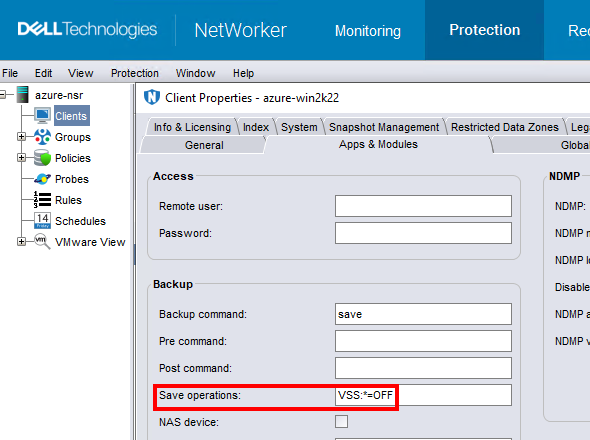
メモ: これは、ファイル システム データをバックアップするクライアントに対してのみ行ってください。VSSを使用せずにバックアップを実行すると、Windowsをバックアップできなくなる
DISASTER_RECOVERY:\ セーブセット;つまり、Windows VMのベア メタル リカバリー(BMR)は実行できません。
Affected Products
NetWorkerProducts
NetWorker FamilyArticle Properties
Article Number: 000210906
Article Type: Solution
Last Modified: 04 Mar 2026
Version: 3
Find answers to your questions from other Dell users
Support Services
Check if your device is covered by Support Services.