NetWorker: O backup do sistema de arquivos do Windows para client do Azure está faltando arquivos
Summary: O file system do Windows no Azure ignora arquivos, embora não haja nenhuma diretiva do NetWorker para fazer isso.
This article applies to
This article does not apply to
This article is not tied to any specific product.
Not all product versions are identified in this article.
Symptoms
O file system do Windows no Azure ignora arquivos, embora não haja nenhuma diretiva do NetWorker para fazer isso.
A saída do salvamento de depuração mostra
A saída do salvamento de depuração mostra
87713:save: Found prototype specification for '\\?\GLOBALROOT\Device\HarddiskVolumeShadowCopy1288\': skip : hiberfil.sys
87713:save: Found prototype specification for '\\?\GLOBALROOT\Device\HarddiskVolumeShadowCopy1288\Areas Compartidas\':+ skip : *.*
Cause
O file system de backup está no volume de armazenamento do Azure. O sistema usa o gravador "Sync Share Service Writer" do VSS (Volume Shadowcopy Service, serviço de cópias de sombra de volume). Ele ignora arquivos por design.
Para verificar se essa é a causa,
- Abra um prompt de comando como Administrador e execute:
C:\>  DISKSHADOW /l writers.txt
DISKSHADOW> LIST WRITERS DETAILED
DISKSHADOW> exit
- Observe o arquivo de saída para obter writers.txt. Se a mensagem abaixo for exibida, isso confirma o problema.
* WRITER "Sync Share Service Writer"
.////
and that writer contains Components with affected drive
            - Components:
            - File List: Path = J:\DataFiles, Filespec = *.*
            - Paths affected by this component:
                - J:\DataFiles
            - Volumes affected by this component:
                               - \\?\Volume{c34a534a-63a2-4aee-b47a-e2092dc7a901}\ [J:\]
Resolution
Desative o VSS para fazer backup de volumes de armazenamento do Azure com o comando:
VSS:*=off
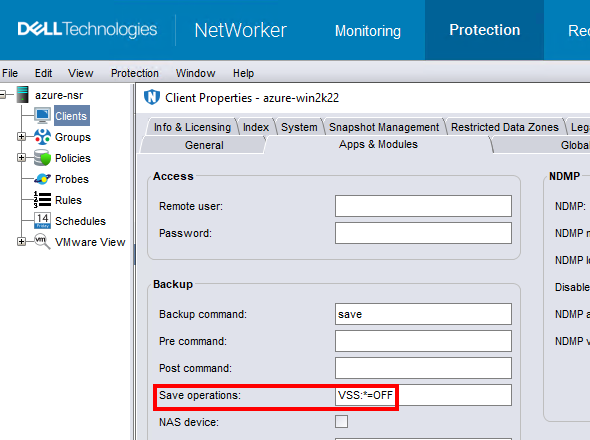
Nota: Faça isso somente para clients que fizerem backup de dados do file system. Executar um backup sem VSS torna impossível fazer backup do Windows
DISASTER_RECOVERY:\ salvar conjunto; ou seja, a recuperação bare metal (BMR) da VM do Windows não seria possível.
Affected Products
NetWorkerProducts
NetWorker FamilyArticle Properties
Article Number: 000210906
Article Type: Solution
Last Modified: 04 Mar 2026
Version: 3
Find answers to your questions from other Dell users
Support Services
Check if your device is covered by Support Services.