Avamar: /tmp/vmdk_가 프록시 /tmp 파일 시스템에 남아 있을 수 있습니다.
Summary: /tmp/vmdk* 파일이 남아 있기 때문에 Avamar 프록시에 공간이 부족합니다.
This article applies to
This article does not apply to
This article is not tied to any specific product.
Not all product versions are identified in this article.
Symptoms
명령을 실행할 때 df -h 프록시의 루트 파티션에 공간이 부족한 것을 볼 수 있습니다.프록시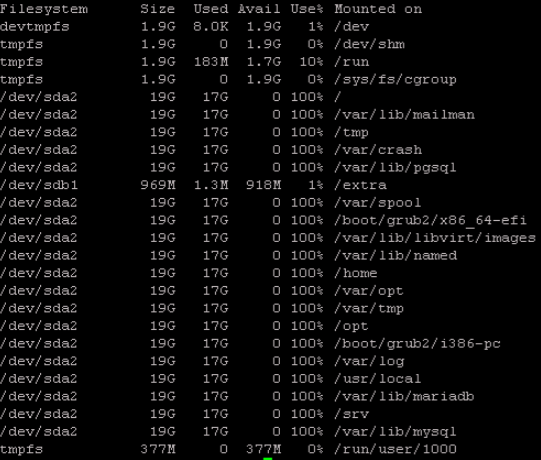 에서 /tmp를 볼 때 여러 vmdk* 파일이 있습니다.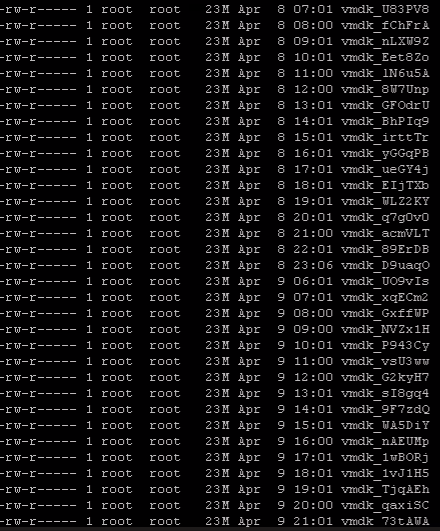
Cause
인덱스 또는 제외 기능이 활성화된 상태에서 백업을 수행하면 프록시가 vixMntAPI를 사용하여 VM에 연결하고 Windows 레지스트리 파일을 /tmp/vmdk_####,
[VcbImageBackupAssistThread] HLPR_IsfileExist::sLine = 83623936 Apr 4 00:26 2017 SYSTEM2022/11/23-19:03:27.52207 [VcbImageBackupAssistThread] HLPR_SaveFileInVMDKToTmp::command line : /usr/local/bin/ntfscat /dev/loop1 Windows/System32/config/SYSTEM > /tmp/vmdk_jQHnvy
열거나 읽는 데 문제가 있는 경우 /tmp/vmdk_jQHnvy, 프록시는 다음과 같은 경고 메시지를 인쇄합니다. 임시 파일은 삭제되지 않습니다.
avvcbimage Warning <44016>: ReadRegistryEntriesFromRegFile::failed to read system child nodes values of MountedDevices 2022-11-23 19:03:31 avvcbimage Warning <43586>: GetExcludeFileSectors::Get partition driver letter failed.
Resolution
해결 방법:
데이터 세트에서 인덱스 및 제외 기능을 비활성화합니다.
Avamar의 웹 인터페이스를 열고 Settings -->Dataset --> Select the appropriate dataset -->Edit로 이동합니다.
아래와 같이 상자 인덱스 VMware 이미지 백업 기능의 선택을 취소합니다.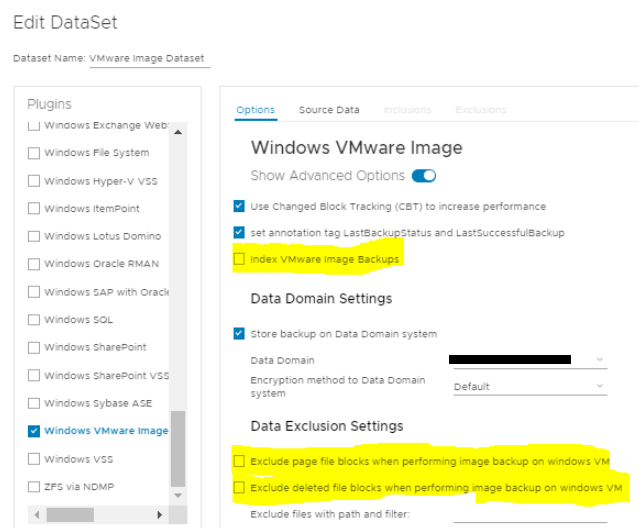
영구 솔루션은 다음 프록시 핫픽스를 통해 해결됩니다.
- Avamar 19.4: 이 문제는 프록시 HF 338728에서 해결되었습니다. 최신 누적 프록시 핫픽스를 설치합니다.
- Avamar 19.7: 이 문제는 프록시 HF 337617에서 해결되었습니다. 최신 누적 프록시 핫픽스를 설치합니다.
- Avamar 19.8: 이 문제는 프록시 HF 338258에서 해결되었습니다. 최신 누적 프록시 핫픽스를 설치합니다.
Affected Products
AvamarArticle Properties
Article Number: 000212615
Article Type: Solution
Last Modified: 27 Aug 2025
Version: 4
Find answers to your questions from other Dell users
Support Services
Check if your device is covered by Support Services.