Avamar:/tmp/vmdk_ 可能保留在代理 /tmp 檔案系統上
Summary: Avamar 代理空間不足,因為留下 /tmp/vmdk* 檔案。
This article applies to
This article does not apply to
This article is not tied to any specific product.
Not all product versions are identified in this article.
Symptoms
執行命令時 df -h 您可以看到代理的根分割區空間不足: 在代理上檢視 /tmp 時,有多個 vmdk* 檔案: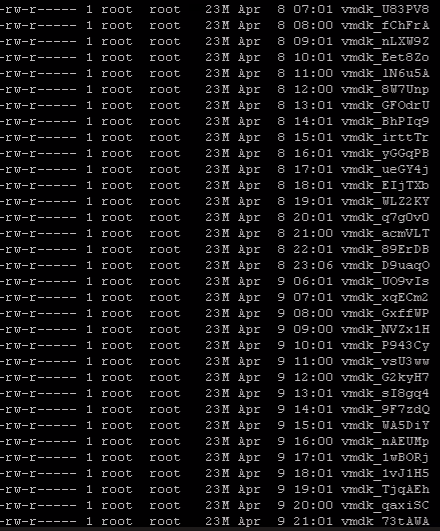
Cause
在啟用索引或排除功能的情況下執行備份時,代理會使用 vixMntAPI 連線至 VM,並將 Windows 登錄檔複製到 /tmp/vmdk_####,
[VcbImageBackupAssistThread] HLPR_IsfileExist::sLine = 83623936 Apr 4 00:26 2017 SYSTEM2022/11/23-19:03:27.52207 [VcbImageBackupAssistThread] HLPR_SaveFileInVMDKToTmp::command line : /usr/local/bin/ntfscat /dev/loop1 Windows/System32/config/SYSTEM > /tmp/vmdk_jQHnvy
如果開啟或閱讀時發生問題 /tmp/vmdk_jQHnvy,代理會列印如下警告消息。它不會刪除臨時檔。
avvcbimage Warning <44016>: ReadRegistryEntriesFromRegFile::failed to read system child nodes values of MountedDevices 2022-11-23 19:03:31 avvcbimage Warning <43586>: GetExcludeFileSectors::Get partition driver letter failed.
Resolution
因應措施:
禁用數據集中的索引和排除功能。
開啟 Avamar 的 Web 介面,然後導覽至設定 -->資料集 --> 選取適當的資料集 -->編輯。
清除方塊索引 VMware 映像備份功能,如下所示:
下列代理修補程式可解決永久解決方案。
- Avamar 19.4:此問題已在代理 HF 338728中解決。安裝最新的累積代理 hotfix。
- Avamar 19.7:此問題已在代理 HF 337617中解決。安裝最新的累積代理 hotfix。
- Avamar 19.8:此問題已在代理 HF 338258中解決。安裝最新的累積代理 hotfix。
Affected Products
AvamarArticle Properties
Article Number: 000212615
Article Type: Solution
Last Modified: 27 Aug 2025
Version: 4
Find answers to your questions from other Dell users
Support Services
Check if your device is covered by Support Services.