Microphone Does Not Work on Dell Pro Webcam - WB5023 or Dell Webcam - WB3023
Summary: Learn about how the Dell Pro Webcam - WB5023 and Dell Webcam - WB3023 must have the microphone enabled to use it.
This article applies to
This article does not apply to
This article is not tied to any specific product.
Not all product versions are identified in this article.
Symptoms
The Dell webcam’s microphone does not appear in unified communication apps (Zoom, Teams, and so on).
Affected Products:
- Dell Pro Webcam - WB5023
- Dell Webcam - WB3023
Cause
The default setting of the webcam’s microphone is set to off.
Resolution
The method to enable the microphone differs depending on whether you are using Windows or macOS. Click the appropriate operating system for more information.
Windows
- Download and install Dell Peripheral Manager (DPeM).
- From the Dell Peripheral Manager setup panel, under Audio, slide the Camera Microphone slider to enable the microphone.
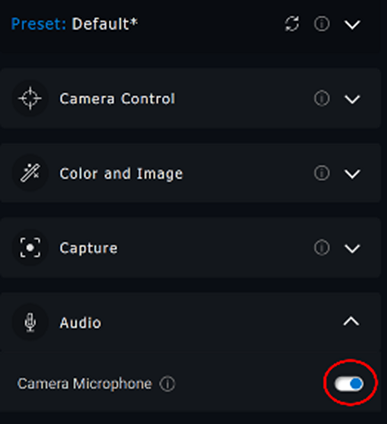
- If the microphone is enabled in Dell Peripheral Manager, and the microphone is still not working, enable the microphone from Windows Settings. To do this, click the Start menu, search for Sound Settings, and then open Sound Settings.
- Under Input, select Microphone (Dell Webcam WBxxxx) as the input device. The Dell Pro Webcam - WB5023 or Dell Webcam - WB3023 microphone should now detect audio.
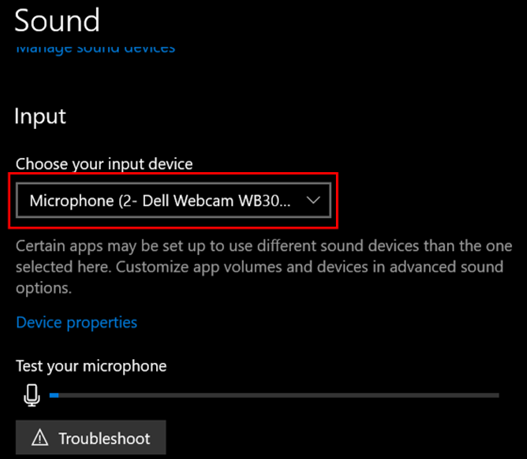
Note: If connecting the camera to a Dell computer, update the computer audio driver to the latest version to improve the compatibility for the camera microphone.
macOS
- Go to Dell Display and Peripheral Manager (DDPM).
- Click the Drivers & Downloads tab.
- Select Apple macOS under Operating System.
- Click the Download button to download the Dell Display and Peripheral Manager Application.
- Connect the Dell Pro Webcam - WB5023 or Dell Webcam - WB3023 to the Mac.
- Click the Webcam tab on the left panel.
- Click Webcam Control on the right panel.
- On the right panel, slide the Camera Microphone to enable the microphone.
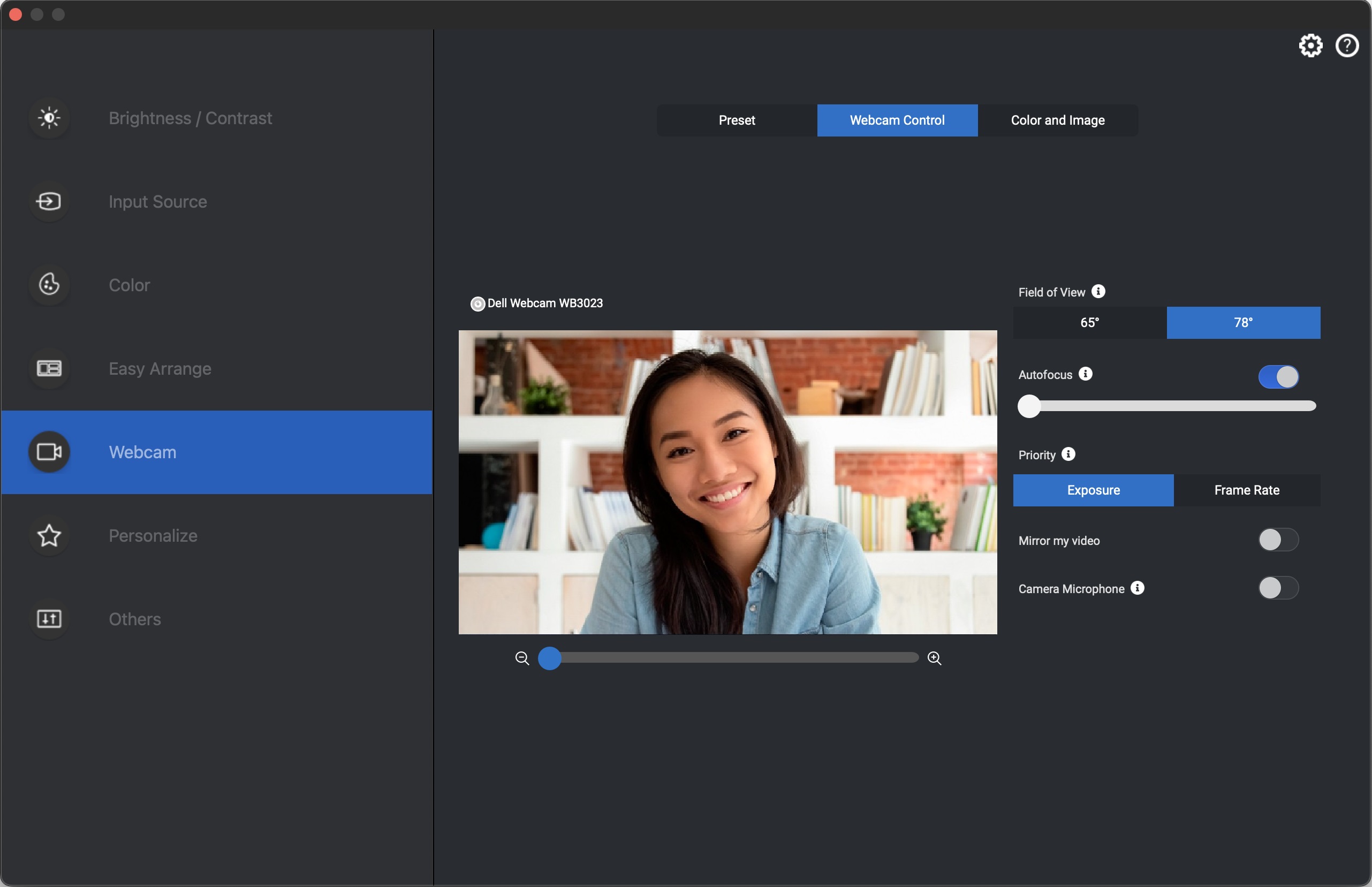
- The webcam cycles power after changing the setting.
Affected Products
Alienware 16 Area-51 AA16250, Alienware m16 R2, Alienware m18 R2, Alienware x16 R2, Chromebook 3120, Dell 14 Premium DA14250, Dell 16 Premium DA16250, Dell 14 Plus 2-in-1 DB04250, Dell 14 Plus 2-in-1 DB04255, Dell 16 Plus 2-in-1 DB06250
, Dell 14 Plus DB14250, Dell 14 Plus DB14255, Dell 16 Plus DB16250, Dell 16 Plus DB16255, Dell 14 DC14250, Dell 14 DC14255, Dell 16 DC16251, Dell 16 DC16256, Dell Tower Plus EBT2250, Dell 24 All-in-One EC24250, Dell 27 All-in-One EC27250, Dell Slim ECS1250, Dell Tower ECT1250, Dell Pro Max Micro FCM2250, Dell Pro Max Slim FCS1250, Dell Pro Max Tower T2 FCT2250, Dell Pro Max 14 Premium MA14250, Dell Pro Max 16 Premium MA16250, Dell Pro Max 16 Plus MB16250, Dell Pro Max 18 Plus MB18250, Dell Pro Max 14 MC14250, Dell Pro Max 14 MC14255, Dell Pro Max 16 MC16250, Dell Pro Max 16 MC16255, Dell Pro 13 Premium PA13250, Dell Pro 14 Premium PA14250, Dell Pro 13 Plus PB13250, Dell Pro 13 Plus PB13255, Dell Pro 14 Plus PB14250, Dell Pro 14 Plus PB14255, Dell Pro 16 Plus PB16250, Dell Pro 16 Plus PB16255, Dell Pro 14 PC14250, Dell Pro 14 PC14255, Dell Pro 16 PC16250, Dell Pro 16 PC16255, Dell Pro 14 Essential PV14250, Dell Pro 14 Essential PV14255, Dell Pro 24 All-in-One Plus QB24250, Dell Pro Micro Plus QBM1250, Dell Pro Slim Plus QBS1250, Dell Pro Tower Plus QBT1250, Dell Pro 24 All-in-One QC24250, Dell Pro 24 All-in-One QC24251, Dell Pro Micro QCM1250, Dell Pro Micro QCM1255, Dell Pro Slim QCS1250, Dell Pro Slim QCS1255, Dell Pro Tower QCT1250, Dell Pro Tower QCT1255, Dell Pro Webcam WB5023, Dell Webcam WB3023, Inspiron 13 5330, Inspiron 14 5440, Inspiron 14 5441, Inspiron 14 5445, Inspiron 14 Plus 7440, Inspiron 14 Plus 7441, Inspiron 14 7445 2-in-1, Inspiron 16 5640, Inspiron 16 5645, Inspiron 16 Plus 7640, Inspiron 3030 Small Desktop, Latitude 7350, Latitude 5455, Latitude 7455, Latitude 9450 2-in-1, OptiPlex 3000 Thin Client, OptiPlex 7000 Tower, OptiPlex 7000 Micro, OptiPlex 7000 Small Form Factor, Precision 3490, Precision 5490, Precision 3590, Mobile Precision 3591, Mobile Precision 5690, Precision 7680, Precision 7780, Precision 3280 Compact, Precision 3460 Small Form Factor, Precision 5860 Tower, Precision 3680 Tower, Precision 7875 Tower, Precision 7960 Tower, XPS 13 9345, XPS 13 9350, XPS 14 9440, XPS 16 9640, XPS 8960
...
Article Properties
Article Number: 000213452
Article Type: Solution
Last Modified: 17 Oct 2025
Version: 5
Find answers to your questions from other Dell users
Support Services
Check if your device is covered by Support Services.