Chyba odinstalace softwaru PowerPath pro systém Windows: 0x80070091 – Chyba při odstraňování adresáře / chyby instalace softwaru PowerPath 0xe0000247: Při pokusu o přidání ovladače do úložiště došlo k problému.
Summary: Chyba odinstalace softwaru PowerPath pro systém Windows: 0x80070091 – Chyba při odstraňování adresáře. 0xe0000247 chyby instalace softwaru PowerPath: Při pokusu o přidání ovladače do úložiště došlo k problému. ...
This article applies to
This article does not apply to
This article is not tied to any specific product.
Not all product versions are identified in this article.
Symptoms
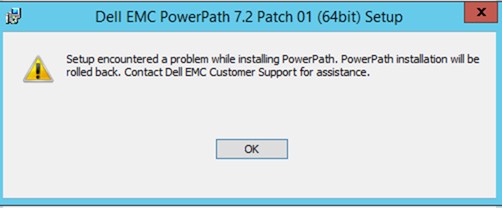
1. Po úspěšném odebrání softwaru PowerPath z nabídky Ovládací prvky/Programy a funkce se při instalaci softwaru PowerPath zobrazí níže uvedená chyba a nebude možné v instalaci pokračovat.
PowerPath 7.2 P02 installation Boot 2023-06-30 14:42:51.452 [UNK]:   LIB: Event=0, Error=e0000247 (A problem was encountered while attempting to add the driver to the store.) Failed to copy OEM INF for driver package "C:\Program Files\EMC\PowerPath\Drivers\emcpclass.inf"
2023-06-30 14:42:51.452 [VER]:   LIB: Event=3, In Limited retStatus= -1 reboot : 0
2023-06-30 14:42:51.453 [ERR]:   EmcpWinInstallSetupDriver failed (0xe0000247).
2023-06-30 14:42:51.453 [ERR]: Command failed: error 2 (Generic failure).
### ppinstall_2023-06-30_XX-XX-XX_XXXXXX.log
PowerPath 7.2 P02 installation Boot 2023-06-30 14:42:51.452 [UNK]:   LIB: Event=0, Error=e0000247 (A problem was encountered while attempting to add the driver to the store.) Failed to copy OEM INF for driver package "C:\Program Files\EMC\PowerPath\Drivers\emcpclass.inf"
2023-06-30 14:42:51.452 [VER]:   LIB: Event=3, In Limited retStatus= -1 reboot : 0
2023-06-30 14:42:51.453 [ERR]:   EmcpWinInstallSetupDriver failed (0xe0000247).
2023-06-30 14:42:51.453 [ERR]: Command failed: error 2 (Generic failure).
### SetupApi.Dev.log
>>>  [SetupCopyOEMInf - C:\Program Files\EMC\PowerPath\Drivers\emcpclass.inf]
>>>  Section start 2023/06/30 14:31:23.362
      cmd: "C:\Program Files\EMC\PowerPath\ppinstall.exe" install -inf "C:\Program Files\EMC\PowerPath\Drivers\emcpclass.inf" -rootdevice default -force -limited -verbose -logfile "C:\ProgramData\EMC\PowerPath\logs\ppinstall_2023-06-30_14-30-59_29151.log"
     sto: {Setup Import Driver Package: C:\Program Files\EMC\PowerPath\Drivers\emcpclass.inf} 14:31:23.362
     inf:      Provider: Dell Inc. or its subsidiaries.
     inf:      Class GUID: {4D36E967-E325-11CE-BFC1-08002BE10318}
     inf:      Driver Version: 08/11/2021,7.1.0.234
     inf:      Catalog File: EmcpClass.cat
     pol:      {Driver package policy check} 14:31:23.643
     pol:      {Driver package policy check - exit(0x00000000)} 14:31:23.643
     sto:      {Stage Driver Package: C:\Program Files\EMC\PowerPath\Drivers\emcpclass.inf} 14:31:23.643
     inf:           {Query Configurability: C:\Program Files\EMC\PowerPath\Drivers\emcpclass.inf} 14:31:23.659
     inf:                Driver package 'emcpclass.inf' is configurable.
     inf:           {Query Configurability: exit(0x00000000)} 14:31:23.659
     flq:           Copying 'C:\Program Files\EMC\PowerPath\Drivers\EmcpClass.cat' to 'C:\Windows\System32\DriverStore\Temp\{197cd00c-edd4-2c44-a211-61ae2c995147}\EmcpClass.cat'.
     flq:           Copying 'C:\Program Files\EMC\PowerPath\Drivers\emcpclass.inf' to 'C:\Windows\System32\DriverStore\Temp\{197cd00c-edd4-2c44-a211-61ae2c995147}\emcpclass.inf'.
     flq:           Copying 'C:\Program Files\EMC\PowerPath\Drivers\EmcpClass.sys' to 'C:\Windows\System32\DriverStore\Temp\{197cd00c-edd4-2c44-a211-61ae2c995147}\EmcpClass.sys'.
     sto:           {DRIVERSTORE IMPORT VALIDATE} 14:31:23.706
     sig:                {_VERIFY_FILE_SIGNATURE} 14:31:23.737
     sig:                     Key      = emcpclass.inf
     sig:                     FilePath = C:\Windows\System32\DriverStore\Temp\{197cd00c-edd4-2c44-a211-61ae2c995147}\emcpclass.inf
     sig:                     Catalog  = C:\Windows\System32\DriverStore\Temp\{197cd00c-edd4-2c44-a211-61ae2c995147}\EmcpClass.cat
!    sig:                     Verifying file against specific (valid) catalog failed! (0x800b0109)
!    sig:                     Error 0x800b0109: A certificate chain processed, but terminated in a root certificate which is not trusted by the trust provider.
     sig:                {_VERIFY_FILE_SIGNATURE exit(0x800b0109)} 14:31:23.878
     sig:                {_VERIFY_FILE_SIGNATURE} 14:31:23.878
     sig:                     Key      = emcpclass.inf
     sig:                     FilePath = C:\Windows\System32\DriverStore\Temp\{197cd00c-edd4-2c44-a211-61ae2c995147}\emcpclass.inf
     sig:                     Catalog  = C:\Windows\System32\DriverStore\Temp\{197cd00c-edd4-2c44-a211-61ae2c995147}\EmcpClass.cat
!    sig:                     Verifying file against specific Authenticode(tm) catalog failed! (0x800b0109)
!    sig:                     Error 0x800b0109: A certificate chain processed, but terminated in a root certificate which is not trusted by the trust provider.
     sig:                {_VERIFY_FILE_SIGNATURE exit(0x800b0109)} 14:31:23.956
!!!  sig:                Driver package catalog file certificate does not belong to Trusted Root Certificates, and Code Integrity is enforced.
!!!  sig:                Driver package failed signature validation. Error = 0xE0000247
     sto:           {DRIVERSTORE IMPORT VALIDATE: exit(0xe0000247)} 14:31:23.956
!!!  sig:           Driver package failed signature verification. Error = 0xE0000247
!!!  sto:           Failed to import driver package into Driver Store. Error = 0xE0000247
     sto:      {Stage Driver Package: exit(0xe0000247)} 14:31:23.972
     sto: {Setup Import Driver Package - exit (0xe0000247)} 14:31:23.972
!!!  inf: Failed to import driver package into driver store
!!!  inf: Error 0xe0000247: A problem was encountered while attempting to add the driver to the store.
2. Při spuštění příkazu PowerPath RemoveAll "DellEMCPower.X64.Signed.7.1.b267.exe /r" chyba: 0x80070091 – Zobrazí se chyba při odstraňování adresáře.
### bootstrapper_2023-06-30_14-05-21_24128.log
2023-06-30 14:05:21    Extracting embedded files for component 'ppremoveall': 1 CAB(s)
2023-06-30 14:05:21    Resolved CAB path 'C:\administrator\AppData\Local\Temp\2\{3A4C2982-F5D1-4F5F-A0A6-69F376E72612}\current' for component 'PPREMOVEALL'
2023-06-30 14:05:21    Extracting 'SETUP_PPREMOVEALL_1.CAB' for component 'PPREMOVEALL'
2023-06-30 14:05:21    Extracting: C:\Users\administrator\AppData\Local\Temp\2\{3A4C2982-F5D1-4F5F-A0A6-69F376E72612}\current\ppRemoveAll.exe
2023-06-30 14:05:21    Done: C:\Users\administratorAppData\Local\Temp\2\{3A4C2982-F5D1-4F5F-A0A6-69F376E72612}\current\ppRemoveAll.exe
2023-06-30 14:05:21    -- Executable: C:\Users\administrator\AppData\Local\Temp\2\{3A4C2982-F5D1-4F5F-A0A6-69F376E72612}\current\PPRemoveAll.exe -no
2023-06-30 14:05:21    PPRemoveall started (C:\Users\administrator\AppData\Local\Temp\2\{3A4C2982-F5D1-4F5F-A0A6-69F376E72612}\current\PPRemoveAll.exe -no)
2023-06-30 14:05:27    PPRemoveall finished (0)
2023-06-30 14:05:27    Deleting temporary directory
2023-06-30 14:07:31    Error: 0x80070091 - Error deleting directory: C:\Users\administrator\AppData\Local\Temp\2\{3A4C2982-F5D1-4F5F-A0A6-69F376E72612}\current: The directory is not empty.
2023-06-30 14:07:31    EMC PowerPath installer finished, return code=-1
Cause
Problém byl způsoben možností "vynucení podpisu ovladače" v systému Windows, která je ve výchozím nastavení povolena a je přísnější při sledování a ověřování ovladačů zařízení, které se pokusily nainstalovat do daného systému Windows.
Resolution
Problém lze vyřešit dočasnou deaktivací ověření podpisu ovladače.
1. Deaktivujte ověřování podpisu na hostiteli pomocí příkazu "bcdedit /set testsigning on".
2. Restartujte hostitele.
3. Nainstalujte software PowerPath
4. Znovu povolte funkci ověření podpisu na hostiteli pomocí příkazu "bcdedit /set testsigning off".
5. Restartujte hostitele.
Article Properties
Article Number: 000215545
Article Type: Solution
Last Modified: 14 Jul 2023
Version: 2
Find answers to your questions from other Dell users
Support Services
Check if your device is covered by Support Services.