PowerProtect Data Manager: Kan inte skapa lagringsenhet med felkod CFG0001
Summary: Det går inte att skapa lagringsenhet med felkod CFG0001
This article applies to
This article does not apply to
This article is not tied to any specific product.
Not all product versions are identified in this article.
Symptoms
När du skapar en ny policy går det inte att skapa lagringsenheten.
Från användargränssnittet:
Från användargränssnittet:
CFG0001: xxx: Unable to configure the protection policy because of the following error: Failed to connect to PowerProtect DD System. errorNum: 5007 errorMessage: operation is not implementedFrån jobbloggen:
ddboost.log: 2023-08-11T23:15:17.931Z ERROR [] [pool-26-thread-1] [00000000-0000-4000-b000-000000000000][][][TRACE_ID:81a3388041e49793;JOB_ID:9ea4884359c07119][plc.id:2eab4e3d,asset.id:,pcs.id:] ddboost.log(52) - severity:1 msg:[D688:7FF690077BA0] ddp_connect_with_config() failed, Hostname: xxx, Err: 5007-nfs ddp getinfo failed (nfs: Operation not supported)Bekräftat att det inte finns något nätverksproblem, inget certifikatproblem, använder redan sysadmin för att lägga till Data Domain (identifieringen fungerar bra).
Cause
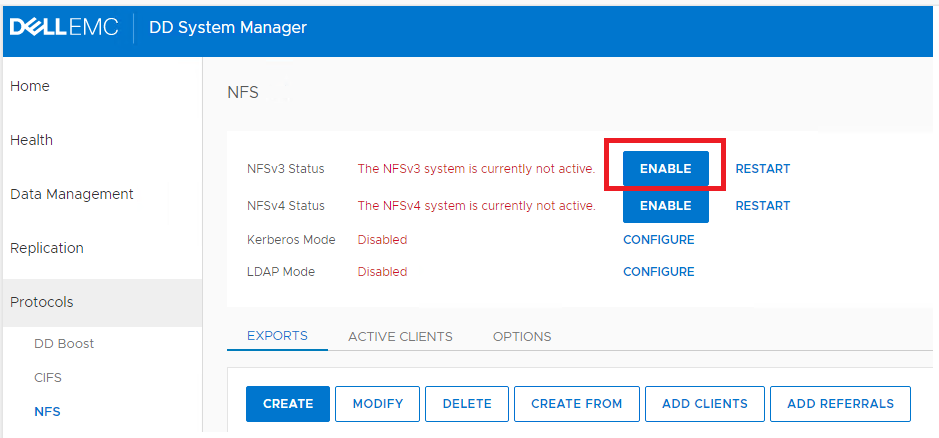
Data Domain NFS-tjänsten är inaktiverad.
Resolution
I Data Domain-gränssnittet klickar du på "ENABLE" för att aktivera NFSv3.
Affected Products
PowerProtect Data Manager, PowerProtect SoftwareArticle Properties
Article Number: 000216695
Article Type: Solution
Last Modified: 18 May 2026
Version: 6
Find answers to your questions from other Dell users
Support Services
Check if your device is covered by Support Services.