CloudLink:如何修复CloudLink中的ERR_SSL_KEY_USAGE_INCOMPATIBLE
Summary: 使用 Chrome 或 Edge 打开CloudLink Web UI 收到错误“ERR_SSL_KEY_USAGE_INCOMPATIBLE,”。Mozilla 和 Firefox 打开 CloudLink Web UI 时没有任何问题。
This article applies to
This article does not apply to
This article is not tied to any specific product.
Not all product versions are identified in this article.
Symptoms
使用 Chrome 或 Edge 打开 CloudLink Web UI 收到以下错误:
Error ERR_SSL_KEY_USAGE_INCOMPATIBLE
Cause
该问题是由 Chrome 或 Edge 浏览器安全设置引起的。
此问题出现在 Chrome 版本 119.0.6045.160(正式版本)中。
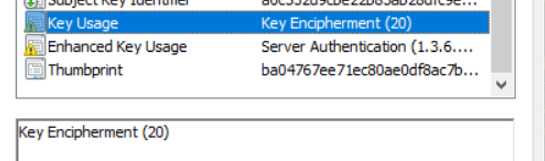
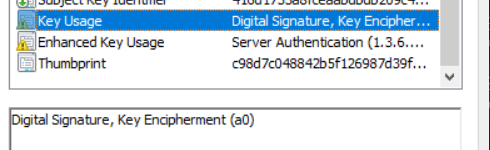
原因是 CloudLink 7.1.x 自签名证书在密钥使用中没有数字签名。
CloudLink 7.x 证书:
CloudLink 8 证书:
此问题出现在 Chrome 版本 119.0.6045.160(正式版本)中。
原因是 CloudLink 7.1.x 自签名证书在密钥使用中没有数字签名。
CloudLink 7.x 证书:
CloudLink 8 证书:
Resolution
在 Chrome 中,您可以通过在 regedit 中添加以下内容来应用解决方法。
[HKEY_LOCAL_MACHINE\SOFTWARE\Policies\Google\Chrome]
"RSAKeyUsageForLocalAnchorsEnabled"=dword:00000000
您必须重新启动浏览器才能使更改生效。但是,这会降低 Chrome 的安全性,因此不推荐解决方案。
首选的解决方法:
- 使用其他浏览器访问 CloudLink 7.1.x UI。Firefox 和 Internet Explorer 似乎仍在使用 CloudLink 7.1.x,但不支持 Internet Explorer 并且可能缺少某些功能。 即使 Internet Explorer 似乎未安装在 Windows 计算机上,您仍然可以通过转到 Internet 选项>程序管理>加载项了解有关工具栏和扩展程序的更多信息来>打开选项卡。
- 生成自定义 CA 签名的 Web SSL 证书,其中包括“密钥使用”中的数字签名。
- 升级到 CloudLink 8.1 或更高版本
以下是使用 OpenSSL 生成自签名证书的说明,该证书旨在替换适用于 Chrome 和 Edge 的 CloudLink 7.x webSSL 证书。
- 在安装了 OpenSSL 的 Linux 服务器上, 通过运行命令 vi template.cfg 创建名为 template.cfg 的文件,并将信息粘贴到下面的框中。
- 修改 蓝色 条目并替换相关信息。
[req]
default_bits           = 2048
distinguished_name     = req_distinguished_name
req_extensions         = v3_req

[req_distinguished_name]
C =Country(2 letter code)
ST =State
L =Locality(city)
O =Organization
OU =OrgUnit
CN =CommonName

C_default =US
ST_default =utah
L_default =salt lake city
O_default =dell
OU_default =dell
CN_default =cloudlinknode1

[ v3_req ]
subjectAltName   = @alt_names
keyUsage         = keyEncipherment, digitalSignature
extendedKeyUsage = serverAuth, clientAuth

[alt_names]
IP      = 192.XXX.XX.XXX
DNS.1   = cloudlinknode1
- 运行命令:
openssl req -newkey 2048 -keyout cloudlinknode1.key -config template.cfg -x509 -days 730 -out cloudlinknode1.crt -extensions v3_req -nodes
这将输出两个文件: cloudlinknode1.crt 和 cloudlinknode1.key。您将这些文件上传到 服务器 > TLS 中的 CloudLink UI。此外,保存这些文件并将它们保存在安全的地方。我设置了 -days to 730 指 2 年,但您可以根据需要进行调整。
- 必须为每个 CloudLink 节点单独执行此操作。
Affected Products
CloudLink SecureVM, PowerFlex rack, ScaleIOArticle Properties
Article Number: 000219861
Article Type: Solution
Last Modified: 14 Oct 2026
Version: 8
Find answers to your questions from other Dell users
Support Services
Check if your device is covered by Support Services.