Unable to Install CyberLink Products
Summary: Customers who purchased CyberLink products are unable to download and install the software using either Dell Digital Delivery or Dell Digital Locker.
This article applies to
This article does not apply to
This article is not tied to any specific product.
Not all product versions are identified in this article.
Symptoms
Affected Products:
- CyberLink PowerDirector and PhotoDirector
- CyberLink Director Suite 365 with Promeo
- CyberLink Media Player with PowerDVD
If you have already redeemed or downloaded and installed prior to November 22, 2023, then you should not be affected. If you have not, you must do so using a new CyberLink provided redemption link and process, where you are prompted throughout.
To get your CyberLink Product, you need your Dell entitlement associated License Key that can be retrieved and copied (in its decrypted state) from your My Account or alternatively from your Dell Optimizer Application or from the Dell or Alienware Preferred App. Once you have the key copied, go to the new CyberLink Redemption URL provided below by product and follow the prompts to redeem or activate the associated license and get your entitled CyberLink software downloaded and installed. If you had installed prior to November 22, 2023, or have already contacted Dell Service and Support and your installation issue has been resolved, you may ignore this message.
At Dell, we appreciate your business and continue to work closely with our partners to minimize customer experience impact. We apologize for any inconvenience this may have caused you.
Reach out to us at Dell Support or to CyberLink Support 
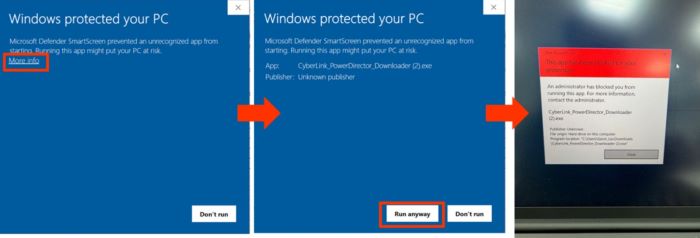
Beginning on November 22, 2023 if end users receive an error message blocking the installation process, follow the instruction below for an alternative installation process.
Cause
Not Applicable
Resolution
If affected, go to copy CyberLink Entitlement License Key or Redemption code from Dell Optimizer Application or customers My Account.
To get a license from My Account:
Reference Dell Digital Locker has moved to My Account
To get a license from Dell Optimizer:
- Reference Dell Optimizer Version 6.x Purchased Apps Information
- Locate Your Software: Once in the Dell Optimizer application, find the software for which you need the license key.
- View License Key: For other software, after selecting the software, you might see an option to Redeem software, Copy License Key, or more details.
- Copy the Key: Once the key is displayed, you can copy it for your use.
- Reference How to Download and Install CyberLink Products Sold at Dell and select appropriate product for further assistance.
Note: Reference How to Download and Install CyberLink Products Sold at Dell and select the appropriate product for assistance with coping license key.
- Go to CyberLink provided Redemption URL (as applicable by Product).
- Redemption Link for Power Director, Photo Director, and PowerDVD https://www.CyberLink.com/prog/dell-redeem/redeem-step1.jsp
- Redemption Link for Director Suite 365 + Promeo https://www.CyberLink.com/prog/dell-redeem/step1.jsp Note: CyberLink software redeemed or downloaded using the redemption link is automatically upgraded to version 2024.
- Redemption Link for Power Director, Photo Director, and PowerDVD https://www.CyberLink.com/prog/dell-redeem/redeem-step1.jsp
CyberLink Power Director, Photo Director, and PowerDVD
For assistance activating Power Director, Photo Director, and PowerDVD using the link https://www.CyberLink.com/prog/dell-redeem/redeem-step1.jsp
- Enter the License Key obtained in step 1 and copy to a clipboard for later use during the installation process.
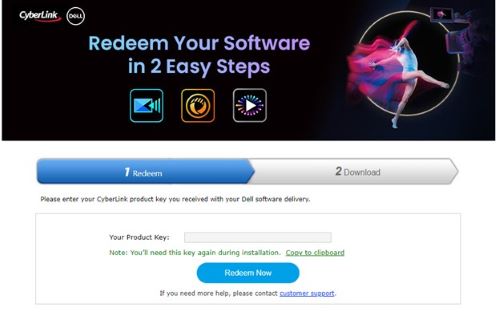
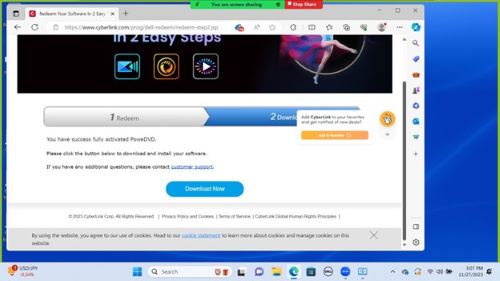
- After successfully activating the product, go to the download tab and Click Download Now.
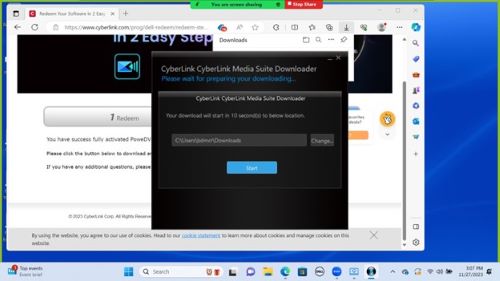
- The download appears in the browser download tab. Go to open file and Click Start.
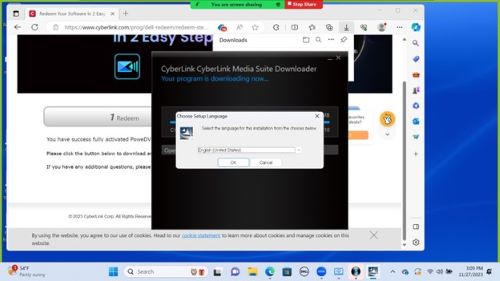
- Select the appropriate language and Click Ok.
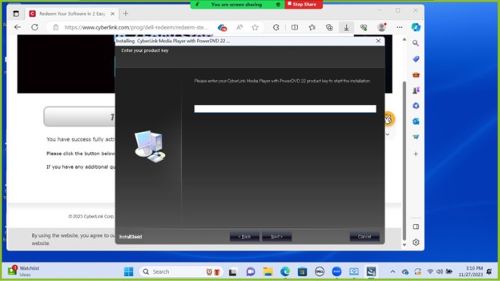
- Follow the directions for User Agreement and paste the Product Key that was copied to the clipboard in step 3 when prompted.
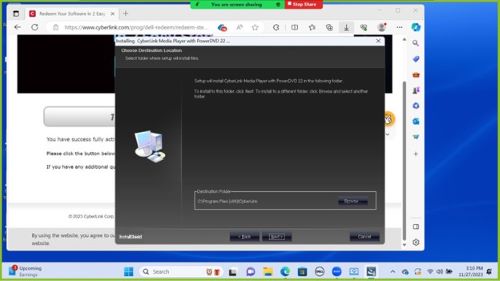
- Select Installation Path for CyberLink product Installation.
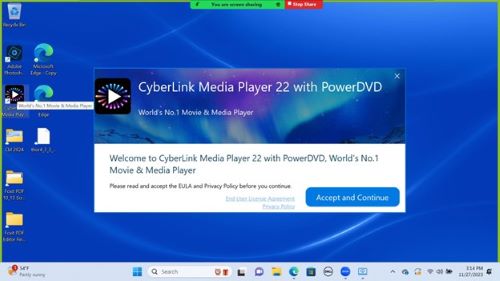
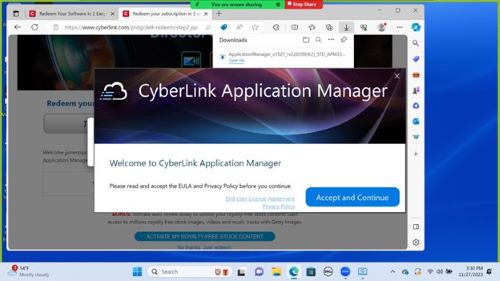
- Follow the instructions for the installation wizard. The computer displays a CyberLink End User License Agreement (EULA), once completed. Click Accept and Continue.
CyberLink Director Suite 365 + Promeo
For assistance activating Redemption Link for Director Suite 365 + Promeo, click to the link https://www.CyberLink.com/prog/dell-redeem/step1.jsp
- Sign in using email and password associated with your CyberLink account.
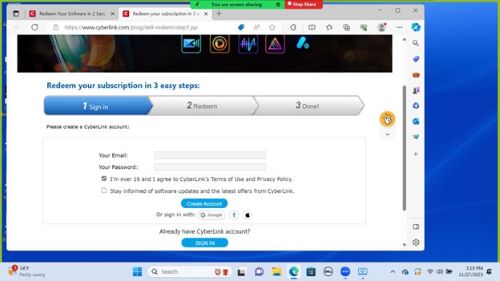
- Enter the product key that was obtained in step 1 from the instructions noted above.
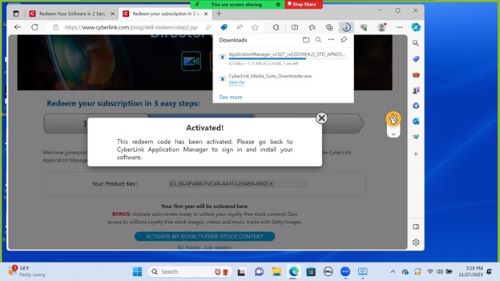
- Open the downloaded file from the browser. Click Accept and Continue.
 Note:
Note:- If unable to assist with installation issues, guide the customer to contact CyberLink:
- Email: CL_Customer-Service@cyberlink.com
- CyberLink support website: https://www.cyberlink.com/support-center/contact-support?type=download
- Phone: https://www.cyberlink.com/support-center/phone-support
- Once the customer reaches the CyberLink support team, they will ensure that they receive their software ASAP, as the new download became available on November 26, 2023.
- If unable to assist with installation issues, guide the customer to contact CyberLink:
Article Properties
Article Number: 000220013
Article Type: Solution
Last Modified: 19 May 2026
Version: 6
Find answers to your questions from other Dell users
Support Services
Check if your device is covered by Support Services.