Alienware Pro 遊戲專用無線滑鼠在省電模式中延遲
Summary: 本文提供 Alienware Pro 遊戲專用無線滑鼠在省電模式中延遲的相關資訊。
This article applies to
This article does not apply to
This article is not tied to any specific product.
Not all product versions are identified in this article.
Symptoms
受影響的產品:
- Alienware Pro 遊戲專用無線滑鼠
在 Alienware Command Center (AWCC) 中將滑鼠切換至開啟 Pro-滑鼠省電模式後,當達到指定的電池電量時,滑鼠會出現延遲或回應緩慢的情況。
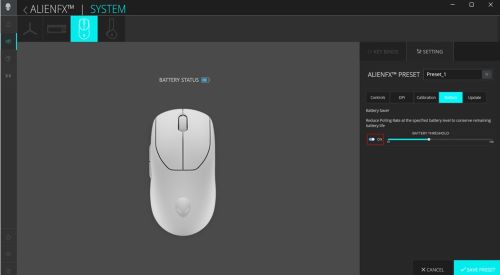
注意:省電模式預設為關閉。當省電模式開啟時,當 Pro-mouse 達到指定的電池電量時,輪詢率會重設。使用者可在 AWCC 中設定指定的電池電量。
Cause
這是因為在啟用省電模式時,輪詢速率設定為最大 125Hz (而非 1kHz)。
Resolution
此修正可在 AWCC v6.3 或更新版本中取得。
當省電模式切換為開啟時,當 Pro-Mouse 達到指定的電池電量時,永久修正會將輪詢速率設為預設的 1kHz (無論原始輪詢速率如何)。
Affected Products
Alienware Pro Wireless Gaming MouseArticle Properties
Article Number: 000220861
Article Type: Solution
Last Modified: 12 Aug 2025
Version: 7
Find answers to your questions from other Dell users
Support Services
Check if your device is covered by Support Services.