Dell Networking SONiC: como configurar o gateway estático Anycast (endereço anycast)
Summary: Este artigo explica como configurar o gateway estático Anycast (endereço anycast) no Dell Networking Enterprise SONiC.
This article applies to
This article does not apply to
This article is not tied to any specific product.
Not all product versions are identified in this article.
Instructions
Pré-requisitosEstamos usando a nomenclatura de interface padrão para demonstrar os conceitos. Consulte o artigo Dell Networking série S: Configuração básica da interface — SONiC 4.0 para obter mais informações sobre nomenclatura de interface |
Índice
Gateway
estático AnycastSAG no MCLAG
Sintaxe de
configuraçãoExemplo de configuração
Gateway estático Anycast
O Static Anycast Gateway (SAG) permite que vários switches roteiem pacotes simultaneamente usando um endereço de gateway compartilhado em uma configuração de roteador ativo/ativo. Cada switch é configurado com um endereço IP virtual anycast e um endereço MAC virtual anycast. O MAC virtual anycast é compartilhado entre todos os endereços IP anycast configurados.
Em uma configuração de EVPN spine-leaf, todos os switches leaf roteados por gateway têm configurações anycast consistentes. Especificamente, cada switch é configurado com o mesmo endereço IP virtual anycast e endereço MAC virtual anycast.
SAG no MCLAG
Em vez disso, use o gateway estático Anycast no VRRP quando a agregação de links de vários chassis (MCLAG) for usada no Dell SONiC. Configure o mesmo endereço IP anycast e o mesmo endereço MAC anycast em ambos os pares MCLAG na mesma interface vlan.
No Dell Enterprise SONiC, o MCLAG atualmente não é compatível com VRRP. A partir da versão mais recente (Dell SONiC 4.2), esta afirmação permanece precisa. Para obter compatibilidade futura, consulte o guia do usuário da sua versão.
Como exemplo, na topologia abaixo, estamos usando o mesmo endereço IP anycast 10.0.0.254/24 para vlan 100 em ambos os pares MCLAG.
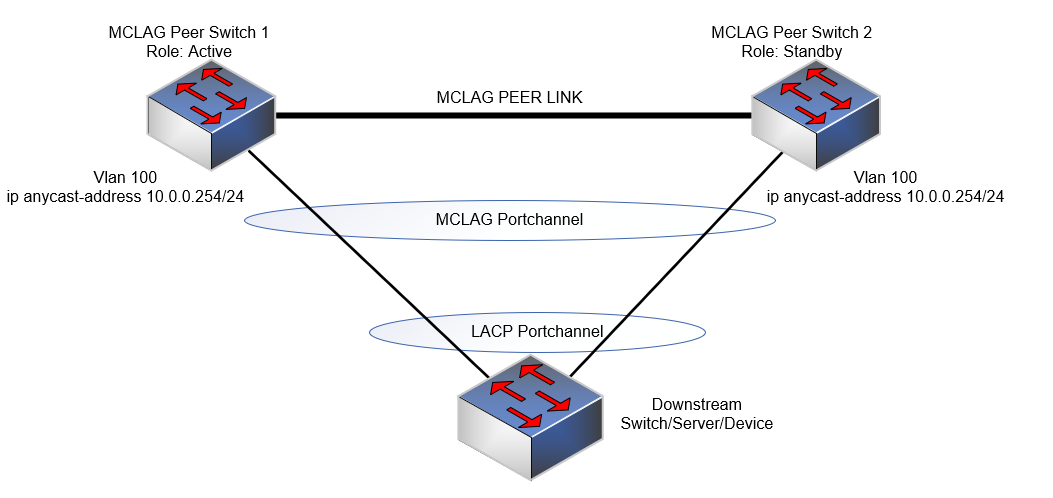
Nota:
- O endereço IP de Anycast não pode ser usado para fins de gerenciamento.
- O endereço MAC virtual Anycast não pode ser um endereço MAC multicast.
Sintaxe de configuração
| Configuração | Explicação |
|---|---|
admin@DELLSONiC:~$ sonic-cli |
Insira a CLI do Dell SONiC |
DELLSONiC# configure terminal |
Entre no modo de configuração. |
DELLSONiC(config)# ip anycast-address enable |
Habilitar endereço de gateway anycast |
DELLSONiC(config)# ip anycast-mac-address xx:xx:xx:xx:xx:xx |
Configurar o endereço MAC anycast |
DELLSONiC(config)# interface Vlan <vlan ID> |
Configurar a VLAN |
DELLSONiC(config-if-Vlan-<ID>)# ip anycast-address <A.B.C.D/mask> |
Configurar endereço de gateway anycast |
Para desativar o gateway anycast:
| Configuração | Explicação |
|---|---|
DELLSONiC(config)# ip anycast-address disable |
Desativar endereço de gateway Anycast |
Para verificar, use o comando abaixo:
| Configuração | Explicação |
|---|---|
DELLSONiC# show ip static-anycast-gateway |
Visualizar detalhes em static-anycast-gateway |
Exemplo de configuração
Configurando o endereço IP anycast na VLAN 100: admin@DELLSONiC:~$ sonic-cli DELLSONiC# configure terminal DELLSONiC(config)# ip anycast-mac-address 00:11:22:33:44:55 DELLSONiC(config)# ip anycast-address enable Lets configure anycast IP in interface vlan 100 DELLSONiC(config)# interface Vlan 100 DELLSONiC(config-if-Vlan100)# ip anycast-address 10.0.0.254/24 DELLSONiC(config-if-Vlan100)# end DELLSONiC# |
Para verificar o endereço IP da VLAN 100:
DELLSONiC# show ip interfaces Flags: U-Unnumbered interface, A-Anycast IP ----------------------------------------------------------------------------------------------------------------- Interface IP address/mask VRF Admin/Oper Flags ----------------------------------------------------------------------------------------------------------------- Vlan100 10.0.0.254/24 up/up A |
Para verificar gateways estáticos anycast:
DELLSONiC# show ip static-anycast-gateway Configured Anycast Gateway MAC address: 00:11:22:33:44:55 IPv4 Anycast Gateway MAC address: enable Total number of gateway: 1 Total number of gateway admin UP: 1 Total number of gateway oper UP: 1 Interfaces Gateway Address Vrf Admin/Oper ------------------- --------------- --------------- ---------- Vlan10 10.0.0.254/24 up/up |
Affected Products
Enterprise SONiC Distribution, PowerSwitch E3200-ON Series, Dell EMC Networking N3200-ON, PowerSwitch S5212F-ON, PowerSwitch S5224F-ON, PowerSwitch S5232F-ON, PowerSwitch S5248F-ON, PowerSwitch S5296F-ON, PowerSwitch Z9100-ON, PowerSwitch Z9264F-ON
, PowerSwitch Z9332F-ON, PowerSwitch Z9432F-ON
...
Article Properties
Article Number: 000223335
Article Type: How To
Last Modified: 20 Mar 2024
Version: 3
Find answers to your questions from other Dell users
Support Services
Check if your device is covered by Support Services.