Dell Networking SONiC Konfigurera statisk Anycast-gateway (anycast-adress)
Summary: I den här artikeln beskrivs hur du konfigurerar statisk Anycast-gateway (anycast-adress) i Dell Networking Enterprise SONiC.
This article applies to
This article does not apply to
This article is not tied to any specific product.
Not all product versions are identified in this article.
Instructions
FörutsättningarVi använder standardgränssnittsnamn för att demonstrera begreppen. Se artikeln Dell Networking S-serien: Grundläggande gränssnittskonfiguration – SONiC 4.0 för mer information om gränssnittsnamngivning |
Index
Statisk Anycast-gateway
SAG i MCLAG
Konfigurationssyntax
Exempel på konfiguration
Statisk Anycast-gateway
Statisk Anycast Gateway (SAG) gör det möjligt för flera switchar att dirigera paket samtidigt med hjälp av en delad gatewayadress i en aktiv/aktiv routerkonfiguration. Varje switch konfigureras med en virtuell anycast-IP-adress och en virtuell anycast-MAC-adress. Den virtuella anycast-MAC-MAC:en delas mellan alla konfigurerade anycast-IP-adresser.
I en spine-leaf EVPN-konfiguration har alla gateway-dirigerade leaf-switchar konsekventa anycast-konfigurationer. Varje switch konfigureras med samma virtuella Anycast-IP-adress och virtuella AnyCast-MAC-adress.
SAG i MCLAG
Använd istället statisk Anycast-gateway på VRRP när MCLAG (Multi-chassis Link Aggregation) används i Dell SONiC. Konfigurera samma anycast IP-adress och anycast MAC-adress på båda MCLAG Peers på samma VLAN-gränssnitt.
I Dell Enterprise SONiC har MCLAG för närvarande inte stöd för VRRP. Från och med den senaste versionen (Dell SONiC 4.2) är detta uttalande fortfarande korrekt. Mer information om framtida kompatibilitet finns i användarhandboken för din version.
I topologin nedan använder vi till exempel samma anycast IP-adress 10.0.0.254/24 för vlan 100 i båda MCLAG-peer-enheterna.
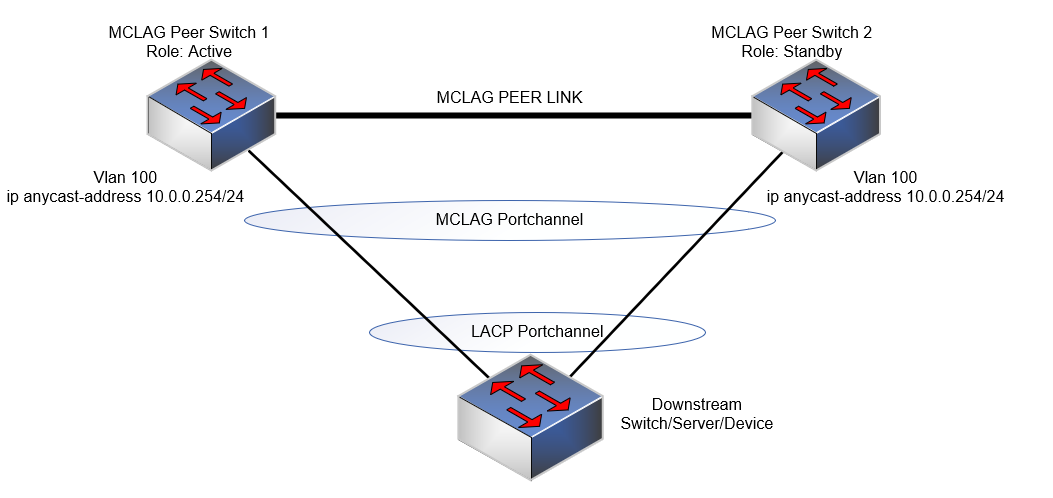
Obs!
- Anycasts IP-adress kan inte användas i hanteringssyfte.
- En virtuell Anycast-MAC-adress får inte vara en multicast-MAC-adress.
Konfigurationssyntax
| Konfiguration | Förklaring |
|---|---|
admin@DELLSONiC:~$ sonic-cli |
Här kommer Dell SONiC CLI in i bilden |
DELLSONiC# configure terminal |
Gå till konfigurationsläget. |
DELLSONiC(config)# ip anycast-address enable |
Aktivera anycast-gatewayadress |
DELLSONiC(config)# ip anycast-mac-address xx:xx:xx:xx:xx:xx |
Konfigurera Anycast MAC-adress |
DELLSONiC(config)# interface Vlan <vlan ID> |
Konfigurera vlan |
DELLSONiC(config-if-Vlan-<ID>)# ip anycast-address <A.B.C.D/mask> |
Konfigurera anycast-gatewayadress |
Så här inaktiverar du anycast-gateway:
| Konfiguration | Förklaring |
|---|---|
DELLSONiC(config)# ip anycast-address disable |
Inaktivera Anycast-gatewayadress |
Använd kommandot nedan för att verifiera:
| Konfiguration | Förklaring |
|---|---|
DELLSONiC# show ip static-anycast-gateway |
Visa information om static-anycast-gateway |
Exempelkonfiguration
Konfigurera IP anycast-adress i Vlan 100: admin@DELLSONiC:~$ sonic-cli DELLSONiC# configure terminal DELLSONiC(config)# ip anycast-mac-address 00:11:22:33:44:55 DELLSONiC(config)# ip anycast-address enable Lets configure anycast IP in interface vlan 100 DELLSONiC(config)# interface Vlan 100 DELLSONiC(config-if-Vlan100)# ip anycast-address 10.0.0.254/24 DELLSONiC(config-if-Vlan100)# end DELLSONiC# |
Så här verifierar du IP-adressen för Vlan 100:
DELLSONiC# show ip interfaces Flags: U-Unnumbered interface, A-Anycast IP ----------------------------------------------------------------------------------------------------------------- Interface IP address/mask VRF Admin/Oper Flags ----------------------------------------------------------------------------------------------------------------- Vlan100 10.0.0.254/24 up/up A |
Så här verifierar du statiska Anycast-gatewayer:
DELLSONiC# show ip static-anycast-gateway Configured Anycast Gateway MAC address: 00:11:22:33:44:55 IPv4 Anycast Gateway MAC address: enable Total number of gateway: 1 Total number of gateway admin UP: 1 Total number of gateway oper UP: 1 Interfaces Gateway Address Vrf Admin/Oper ------------------- --------------- --------------- ---------- Vlan10 10.0.0.254/24 up/up |
Affected Products
Enterprise SONiC Distribution, PowerSwitch E3200-ON Series, Dell EMC Networking N3200-ON, PowerSwitch S5212F-ON, PowerSwitch S5224F-ON, PowerSwitch S5232F-ON, PowerSwitch S5248F-ON, PowerSwitch S5296F-ON, PowerSwitch Z9100-ON, PowerSwitch Z9264F-ON
, PowerSwitch Z9332F-ON, PowerSwitch Z9432F-ON
...
Article Properties
Article Number: 000223335
Article Type: How To
Last Modified: 20 Mar 2024
Version: 3
Find answers to your questions from other Dell users
Support Services
Check if your device is covered by Support Services.