Dell Pair geeft geen melding om verbinding te maken na het uitschakelen van Windows Swift Pair
Summary: Meer informatie over het notificatiebericht van Dell Pair Connection.
This article applies to
This article does not apply to
This article is not tied to any specific product.
Not all product versions are identified in this article.
Symptoms
Dell Pair geeft in het volgende scenario mogelijk geen verbindingsherinneringsbericht weer:
- Windows Swift Pair is uitgeschakeld of uitgeschakeld.
- Het door Dell Pair ondersteunde randapparaat is ingeschakeld en in de Bluetooth-koppelingsmodus gezet.
- Een melding om verbinding te maken van Dell Pair wordt niet weergegeven.
Softwareproblemen waarin dit probleem optreedt:
- Dell Pair
Opmerking: Voor producten die Dell Pair ondersteunen, raadpleegt u het gedeelte Ondersteunde platforms en randapparatuur in Wat is Dell Pair?.
Cause
De functieaanroep van DeviceIOControl (Windows API) retourneert geen data naar Dell Pair. Bluetooth-advertentiepakketten worden niet ontvangen op app-niveau. Dell paar wordt niet blootgesteld aan de wijzigingen in de Windows Bluetooth-driver die vanaf Win 11 22H2 worden uitgevoerd.
Resolution
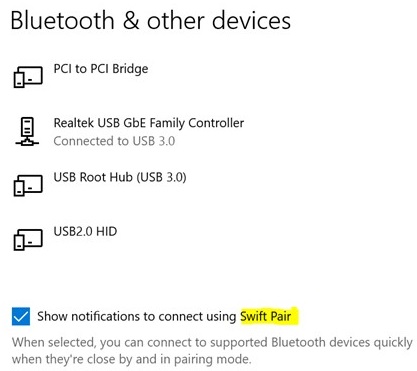
Om Dell Pair in te schakelen, voert u de volgende stappen uit om Windows Swift Pair in te schakelen.
- Ga naar Instellingen.
- Ga naar Bluetooth en andere apparaten.
- Vink het vakje aan naast Meldingen weergeven om verbinding te maken via Swift Pair.
Affected Products
Dell 16 Plus DB16250, Dell 16 Plus DB16255, Dell 14 DC14250, Dell 14 DC14255, Dell Pro Premium Collaboration Keyboard KB900, Dell Pro Compact Silent Keyboard and Mouse - KM555, Dell Pro Premium Collaboration Keyboard and Mouse KM900
, Dell Pro Premium Mouse MS900, Dell Pair, Dell Pro 13 Premium PA13250, Dell Pro 14 Premium PA14250, Dell Pro 13 Plus PB13250, Dell Pro 13 Plus PB13255, Dell Pro 14 Plus PB14250, Dell Pro 14 Plus PB14255, Dell Pro 16 Plus PB16250, Dell Pro 16 Plus PB16255, Dell Pro 14 PC14255, Dell Pro 16 PC16255, Dell Pro 14 Essential PV14250, Dell Pro 14 Essential PV14255, Dell Pro Rugged 13 RA13250, Dell Pro Rugged 14 RB14250, Dell Pro Plus Wireless Speakerphone SL525, Dell Pro Wired Speakerphone SP325, Dell Pro Wireless Headset WL3024, Dell Pro Plus Wireless ANC Headset WL5024, Dell Pro Premium Wireless ANC Headset WL7024, Inspiron 13 5320, Inspiron 13 5330, Inspiron 14 5420, Inspiron 14 5425, Inspiron 14 5430, Inspiron 14 5435, Inspiron 14 5440, Inspiron 14 5445, Inspiron 14 Plus 7420, Inspiron 14 7430 2-in-1, Inspiron 14 Plus 7430, Inspiron 14 7440 2-in-1, Inspiron 14 Plus 7440, Inspiron 14 7445 2-in-1, Inspiron 16 5620, Inspiron 16 5625, Inspiron 16 5630, Inspiron 16 5635, Inspiron 16 5640, Inspiron 16 5645, Inspiron 16 Plus 7620, Inspiron 16 7630 2-in-1, Inspiron 16 Plus 7630, Inspiron 16 7635 2-in-1, Inspiron 16 7640 2-in-1, Inspiron 16 Plus 7640, Latitude 3330, Latitude 3340, Latitude 5320, Latitude 5330, Latitude 5340, Latitude 5350, Latitude 7320, Latitude 7330, Latitude 7340, Latitude 7350, Latitude 7350 Detachable, Latitude 9330, Latitude 3440, Latitude 3450, Latitude 5431, Latitude 5440, Latitude 5450, Latitude 5455, Latitude 7420, Latitude 7430, Latitude 7450, Latitude 7455, Latitude 9430, Latitude 9440 2-in-1, Latitude 9450 2-in-1, Latitude 3540, Latitude 5530, Latitude 5531, Latitude 5540, Latitude 5550, Latitude 7530, Latitude 7650, Latitude 5430, Precision 3480, Precision 3490, Precision 5470, Precision 5480, Precision 5490, Precision 3570, Precision 3571, Precision 3580, Precision 3581, Precision 3590, Mobile Precision 3591, Mobile Precision 5690, Precision 7680, Precision 5770, Precision 7770, Precision 7780, Vostro 5320, Vostro 14 3440, Vostro 5620, Vostro 5625, Vostro 16 5630, Vostro 16 5635, Vostro 16 5640, Vostro 7620, XPS 13 9315 2-in-1, XPS 13 9315, XPS 13 9340, XPS 13 9350, XPS 15 9520, XPS 15 9530, XPS 16 9640, XPS 17 9720, XPS 17 9730
...
Article Properties
Article Number: 000223586
Article Type: Solution
Last Modified: 20 Oct 2025
Version: 4
Find answers to your questions from other Dell users
Support Services
Check if your device is covered by Support Services.