Precision 筆記型電腦上的高傳真音效控制器錯誤
Summary: 本文探討在 Precision 工作站和 Dell Pro Max 筆記型電腦上使用外接式喇叭時,High Definition Audio 控制器顯示錯誤代碼 55 且沒有音訊。
This article applies to
This article does not apply to
This article is not tied to any specific product.
Not all product versions are identified in this article.
Symptoms
受影響的平台:
- Dell Pro Max 14 Premium MA14250
- Dell Pro Max 16 Premium MA16250
- Precision 5690
- Precision 7680
- Precision 7780
症狀:
- 高傳真音效控制器在裝置管理員中顯示錯誤代碼 55。
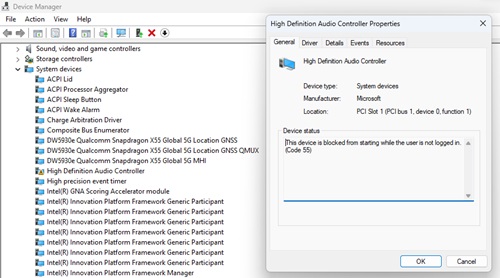
- 由於驅動程式處於錯誤狀態,因此使用連接至電腦的外接顯示器時沒有音訊。
Cause
組合設定會導致此問題:
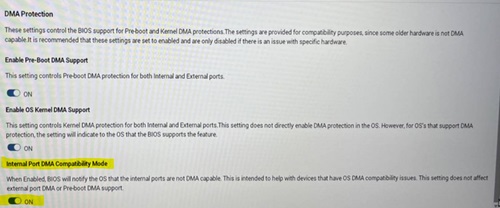
- 在 BIOS 中啟用開機前 DMA 支援和啟用作業系統核心 DMA 支援。
- 群組原則物件:已啟用與核心 DMA 保護不相容的外部裝置列舉原則 。
- 列舉原則 設定為 「僅在登入時 (預設) 」或 「全部封鎖」。
如果這些設定是以這種方式設定的,則會導致高傳真音訊控制器顯示錯誤代碼 55,因為其中不包含 DMA 重新對應。
Resolution
將電腦上的 BIOS 更新為 1.17.0 版或更新版本可解決問題。若要下載和安裝 BIOS,請參閱 BIOS 更新指南。
注意:Dell Pro Max 16 Premium MA16250 和 Dell Pro Max 14 Premium MA14250 (功能已在出貨 BIOS 中實作,使用者必須啟用下列設定)。
更新 BIOS 後,您必須在 BIOS 的「虛擬化」區段下啟用「內部連接埠 DMA 相容模式」。
Affected Products
Dell Pro Max 14 Premium MA14250, Dell Pro Max 16 Premium MA16250, Precision 7680, Precision 7780Products
Mobile Precision 5690Article Properties
Article Number: 000224493
Article Type: Solution
Last Modified: 09 Jun 2026
Version: 12
Find answers to your questions from other Dell users
Support Services
Check if your device is covered by Support Services.