Windows Defender 0x80070003:系统找不到指定的路径。
Summary: Windows Server 计算机可能会显示警告,指示 Windows Defender 保护未运行。 提供以下错误代码作为原因: 0x80070003:系统找不到指定的路径。
This article applies to
This article does not apply to
This article is not tied to any specific product.
Not all product versions are identified in this article.
Symptoms
-
事件查看器可能包含以下条目:
Windows could not start the Windows Defender Antivirus Service service on the local computer. Error 2: the system cannot find the file specified.
-
Defender 服务本身可能在服务控制台中显示为已停止。尝试启动它会导致以下错误:错误 126:The specified module could not be found.
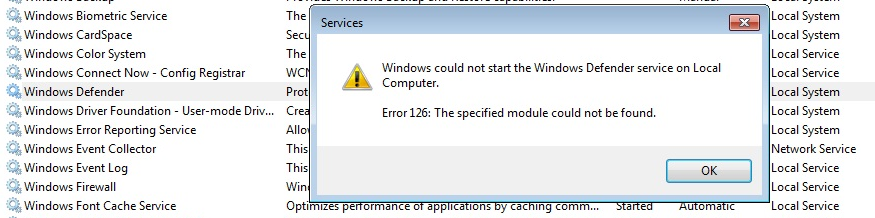
-
此外,以下错误代码可能会显示在服务器管理器中,或者显示在事件查看器系统或应用程序日志中:
0x8007007e: Antimalware protection has stopped functioning for an unknown reason.
0x80070003: The system cannot find the path specified.
-
标准修复命令(例如下面列出的命令)无法解决该情况:
SFC /ScanNow
DISM.exe /Online /Cleanup-image /Restorehealth
Cause
此行为的可能原因是意外删除了受影响系统
上的以下文件夹(或其内容):C:\ProgramData\Microsoft\Windows Defender\Platform\<Platform Version>
这可能是由于系统上安装了额外的第三方防病毒软件的激进设置所致。
Resolution
如果 C:\ProgramData\Microsoft\Windows Defender\Platform\<Platform Version> 目录缺失或为空,则可以将其(及其内容)从具有类似操作系统和 Windows Defender 平台版本的系统复制到受影响的系统。
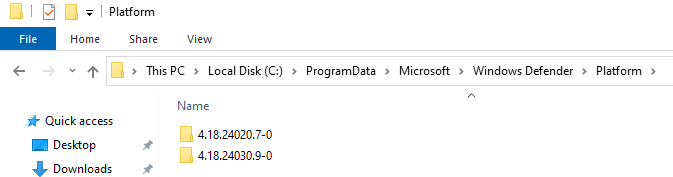
在此并重新启动后,Windows Defender 服务将启动。
Additional Information
如果存在第二个非 Microsoft 防病毒软件,请遵循 此处
Affected Products
Microsoft Windows Server 2016, Microsoft Windows Server 2019, Microsoft Windows Server 2022Article Properties
Article Number: 000224862
Article Type: Solution
Last Modified: 01 Jan 2025
Version: 2
Find answers to your questions from other Dell users
Support Services
Check if your device is covered by Support Services.