Dell Precisionワークステーションに接続されている場合、Dell Dockが正しく機能しない
Summary: Dellデュアル コネクター ドッキング ステーションを使用している場合に、外部モニターに何も表示されず、LANが機能しないという断続的な問題が発生すると、お客様が報告してくることがあります。
This article applies to
This article does not apply to
This article is not tied to any specific product.
Not all product versions are identified in this article.
Symptoms
影響を受けるプラットフォーム:
- Precision 7670
- Precision 7770
- Precision 7680
- Precision 7780
対象製品:
- Dell Performance Dock - WD19DCS
- Dell Performance Dock - WD19DC
再作成する手順:
- ホスト コンピューターのBIOS設定の[電源]-[USBウェイク サポート]-[Wake on Dell USB-Cドッキング ステーション]が[オン]に設定されている。
- 外部電源(ACアダプター バレルまたはType-C)が2時間以上ホスト コンピューターに接続されていない。
- 外部モニターをドッキング ステーション WD19DCSまたはWD19DCに接続します(HDMI、DP、またはType-C DPポートを介してドッキング ステーションに接続された1台または複数のモニター)。
- ドッキング ステーションが左側に接続されているPCの電源を入れます(2 x USB Type-Cポート対応Thunderbolt4)。
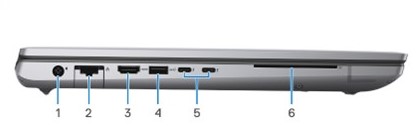
図1: (英語のみ)Dell Precision 7780の左面図
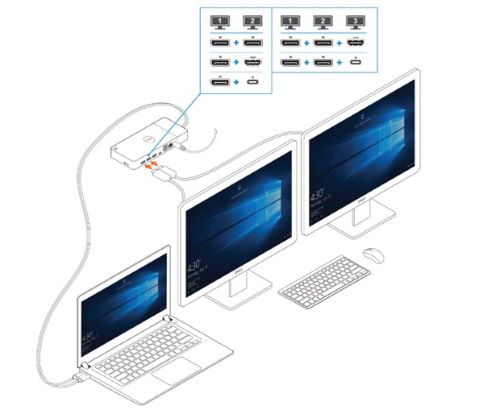
図2:(英語のみ)外部モニターの接続
Cause
-
Resolution
BIOSを次のバージョンにアップデートすると、この問題は発生しなくなります。
- Dell Precision 7680 および Dell Precision 7780 のBIOS: 1.12.1以降
- Dell Precision 7670 および Dell Precision 7770 のBIOS: 1.21.1以降
Affected Products
Dell Performance Dock - WD19DC, Dell Performance Dock – WD19DCS, Precision 7670, Precision 7680, Precision 7770, Precision 7780Article Properties
Article Number: 000225065
Article Type: Solution
Last Modified: 21 May 2026
Version: 6
Find answers to your questions from other Dell users
Support Services
Check if your device is covered by Support Services.