네트워크 연결이 부족하거나 없을 경우 Dell Trusted Device 기능이 영향을 받음
Summary: 이 문서에서는 네트워크 연결이 부족하거나 없을 때 Dell Trusted Device의 기능 영향과 관련된 일반적인 문제를 식별하는 지침을 제공합니다.
This article applies to
This article does not apply to
This article is not tied to any specific product.
Not all product versions are identified in this article.
Symptoms
영향을 받는 제품:
- Dell Trusted Device
영향을 받는 운영 체제:
- Windows 11
- Windows 10
Dell Trusted Device는 특정 작업을 위해 Dell Technologies 클라우드 서비스에 대한 연결을 사용합니다. 연결이 부족하거나 연결되지 않으면 Dell Trusted Device의 기능에 영향을 줄 수 있습니다.
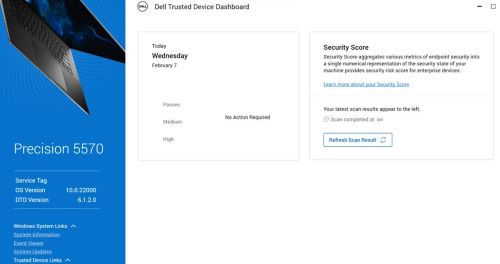
참고: 보안 평가는 Windows 시작 후 15분 후에 실행됩니다.
Windows 이벤트 뷰어 에는 다음 이벤트가 포함될 수 있습니다.
- BIOS 검증 : 13(네트워크 연결 오류)
참고: 자세한 내용은 Dell Trusted Device service.log 파일을 참조하십시오.
- Dell Trusted Device가 날짜\시간에> 서비스 태그 123XYZ0<을 사용하여 컴퓨터에 대한 인텔 ME Verification 검사를 완료했습니다.
결과: 오류. 네트워크 연결 오류가 발생했습니다.
- Dell Trusted Device가 날짜\시간에> 서비스 태그 123XYZ0<을 사용하여 컴퓨터에 대한 CVE(Common Vulnerabilities and Exposures) 스캔을 완료했습니다.
결과: 오류. 네트워크 연결 오류가 발생했습니다.
다음 위치에 있는 Dell Trusted Device용 Dell Trusted service.log 에서 다음을 수행합니다.
%programdata%\Dell\TrustedDevice\services.log 다음과 같은 오류가 표시될 수 있습니다.
CVEVERIFY: Inner exception - The underlying connection was closed: Could not establish trust relationship for the SSL/TLS secure channel.
CVEVERIFY: Inner exception - The remote certificate is invalid according to the validation procedure.
CVEVERIFY: CVE Verification: ERROR. A network connection error occurred
CVEVERIFY: Final CVE Verification result: NetworkConnectionError
BIOSSERVER: Network issue - The underlying connection was closed: Could not establish trust relationship for the SSL/TLS secure channel. (exception status: UnknownError)
BIOSSERVER: Failed to perform the BIOS Server, status=0
BIOS: BIOS Verification : ERROR. A network connection error occurred
BIOS: Unable to trigger live image capture due to missing server response data
BIOS: BIOS Verification: 13 (Network Connectivity Error)
Cause
오프호스트 검증 작업을 위해 컴퓨터가 Dell의 클라우드 서비스에 제한적으로 연결되었거나 연결되지 않았을 수 있습니다.
Resolution
- 모든 포트 및 네트워크 이름이 Dell Trusted Device 설치 및 관리자 가이드>요구 사항>포트 섹션에 정의된 대로 허용 목록에 추가되어 있는지 확인합니다.
- Dell Trusted Device는 Dell Trusted Device 애플리케이션에 내장된 알려진 인증서에 대해 인증서 고정을 사용합니다. 일부 트래픽 셰이핑 보안 솔루션은 이 유효성 검사를 방지할 수 있습니다. 트래픽 셰이핑 애플리케이션 또는 프록시 구성에서 dell.trusteddevice.service.exe허용 목록에 추가합니다.
지원 부서에 문의하려면 Dell Data Security 국제 지원 전화번호를 참조하십시오.
온라인으로 기술 지원 요청을 생성하려면 TechDirect로 이동하십시오.
추가 정보 및 리소스를 보려면 Dell 보안 커뮤니티 포럼에 참여하십시오.
Affected Products
Dell Threat DefenseArticle Properties
Article Number: 000225839
Article Type: Solution
Last Modified: 21 May 2026
Version: 5
Find answers to your questions from other Dell users
Support Services
Check if your device is covered by Support Services.