Connectrix DCNM: Sådan overfører du flere Active Directory-brugergrupper til flere roller som LDAP-godkendelsestilstand
Summary: Sådan overfører du flere Active Directory-brugergrupper til flere roller som LDAP-godkendelsestilstand (Lightweight Directory Access Protocol).
This article applies to
This article does not apply to
This article is not tied to any specific product.
Not all product versions are identified in this article.
Instructions
I feltet Knyt til DCNM-rolle skal du angive navnet på den DCNM-rolle, der knyttes til brugeren.
Hvis du vil knytte flere Active Directory-brugergrupper til flere roller, skal du bruge følgende format:
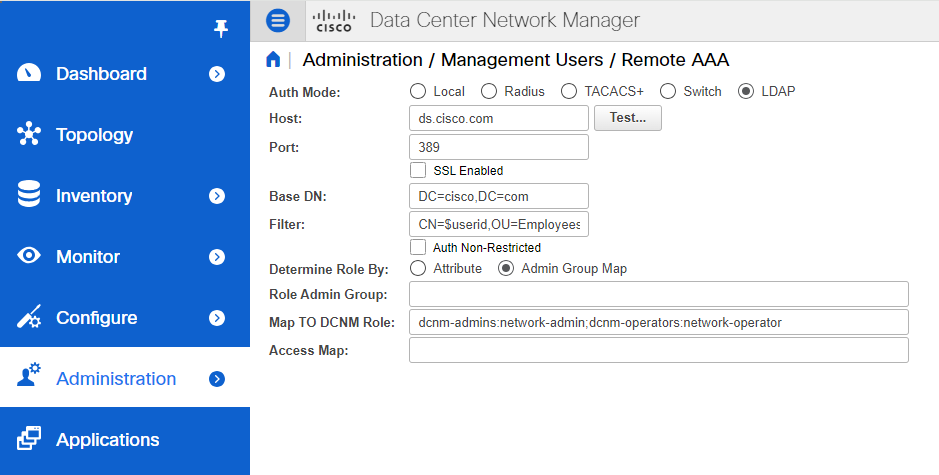
Generelt er netværksadministrator eller netværksoperatør den mest typiske rolle.
For eksempel:
Role Admin Group: dcnm-admins
Map to DCNM Role: network-admin
Dette eksempel tilknytter Active Directory-brugergruppen dcnm-admins til netværksadministratorrollen.

Hvis du vil knytte flere Active Directory-brugergrupper til flere roller, skal du bruge følgende format:
Role Admin Group:
Map To DCNM Role: dcnm-admins:network-admin;dcnm-operators:network-operatorAffected Products
Connectrix MDS-Series Data Center Network ManagerArticle Properties
Article Number: 000226240
Article Type: How To
Last Modified: 11 Sept 2024
Version: 2
Find answers to your questions from other Dell users
Support Services
Check if your device is covered by Support Services.