Connectrix DCNM:如何將多個 Active Directory 使用者群組對應至多個角色作為 LDAP 驗證模式
Summary: 如何將多個 Active Directory 使用者群組對應至多個角色,以輕量型目錄存取通訊協定 (LDAP) 驗證模式。
This article applies to
This article does not apply to
This article is not tied to any specific product.
Not all product versions are identified in this article.
Instructions
在 對應至 DCNM 角色 欄位中 輸入對應至使用者的 DCNM 角色名稱
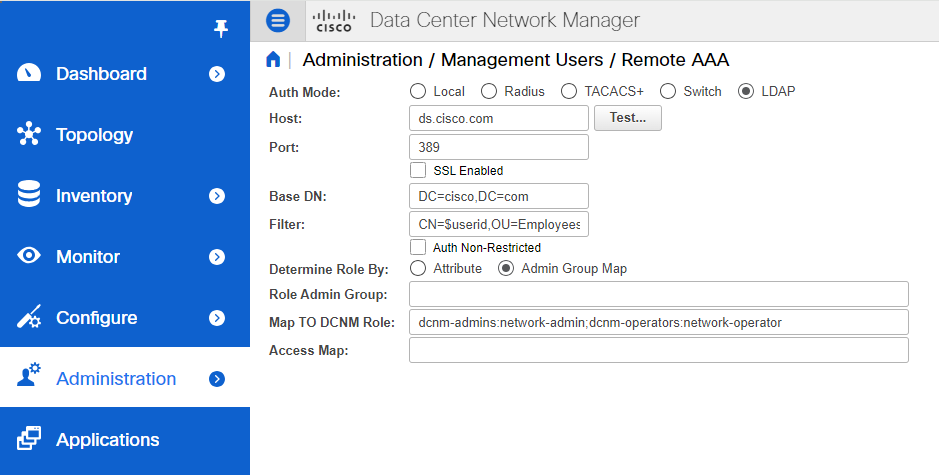
若要將多個 Active Directory 使用者群組對應至多個角色,請使用下列格式:
一般來說,網路管理員或網路操作員是最典型的角色。
比如:
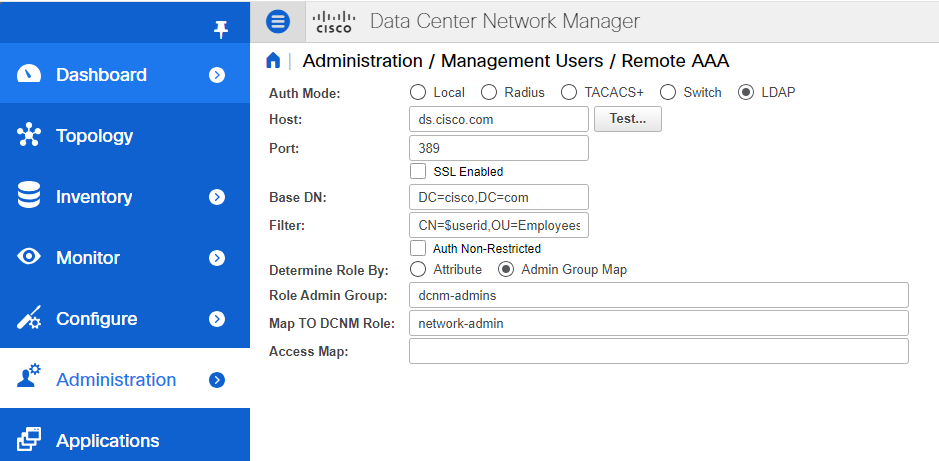
Role Admin Group: dcnm-admins
Map to DCNM Role: network-admin
此範例映射 Active Directory 使用者群組 dcnm-admins 為網路管理員角色。
若要將多個 Active Directory 使用者群組對應至多個角色,請使用下列格式:
Role Admin Group:
Map To DCNM Role: dcnm-admins:network-admin;dcnm-operators:network-operatorAffected Products
Connectrix MDS-Series Data Center Network ManagerArticle Properties
Article Number: 000226240
Article Type: How To
Last Modified: 11 Sept 2024
Version: 2
Find answers to your questions from other Dell users
Support Services
Check if your device is covered by Support Services.