Dell Unity: "Port Speed is Inconsistent on SP A and SP B" Warning on Ethernet Ports (User Correctable)
Summary: One or more input/output module Ethernet ports display a warning: "Port Speed is inconsistent on SP A and SP B."
This article applies to
This article does not apply to
This article is not tied to any specific product.
Not all product versions are identified in this article.
Symptoms
As the image below illustrates, hovering the mouse pointer over the port displays a warning.

Figure 1: Warning on the port that the speed is inconsistent on SP A and SP B
The speed of the port is set to Auto, and this cannot be adjusted.
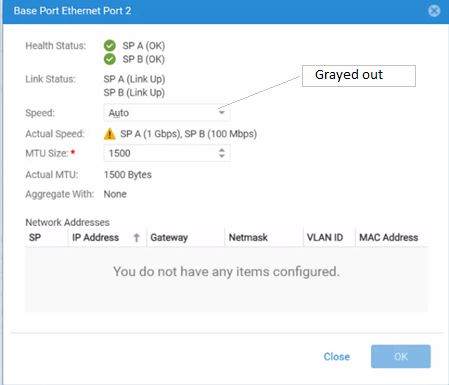
Figure 2: The speed of the port is set to Auto and cannot be changed.
Figure 1: Warning on the port that the speed is inconsistent on SP A and SP B
The speed of the port is set to Auto, and this cannot be adjusted.
Figure 2: The speed of the port is set to Auto and cannot be changed.
Cause
A bad cable or switch port may cause this alert.
Resolution
To check if the problem is with the port or the cable, move the cable to a different switch port. If the problem persists, the cable may be to blame. If the problem is resolved when the cable is moved, the original switch port is the problem. Replace the switch port.
Contact Dell support for further investigation.
Contact Dell support for further investigation.
Affected Products
Dell EMC Unity FamilyArticle Properties
Article Number: 000227957
Article Type: Solution
Last Modified: 27 Aug 2024
Version: 1
Find answers to your questions from other Dell users
Support Services
Check if your device is covered by Support Services.