VxRail: vCenter vSphere Client 새로 고침 버튼이 계속 회전함
Summary: vSphere Client의 새로 고침 버튼이 계속 회전하는 vCenter Server입니다.
This article applies to
This article does not apply to
This article is not tied to any specific product.
Not all product versions are identified in this article.
Symptoms
vCenter Server의 vSphere Client에 있는 새로 고침 버튼이 계속 회전합니다.

Cause
이 문제는 VMware CEIP(Customer Service Improvement Program)에 참여했지만 모든 VMware 사이트/인터넷 액세스가 차단되어 발생합니다.
Resolution
이 문제를 해결하려면 CEIP를 그대로 두고 vCenter Server를 재시작하여 문제를 해결하십시오.
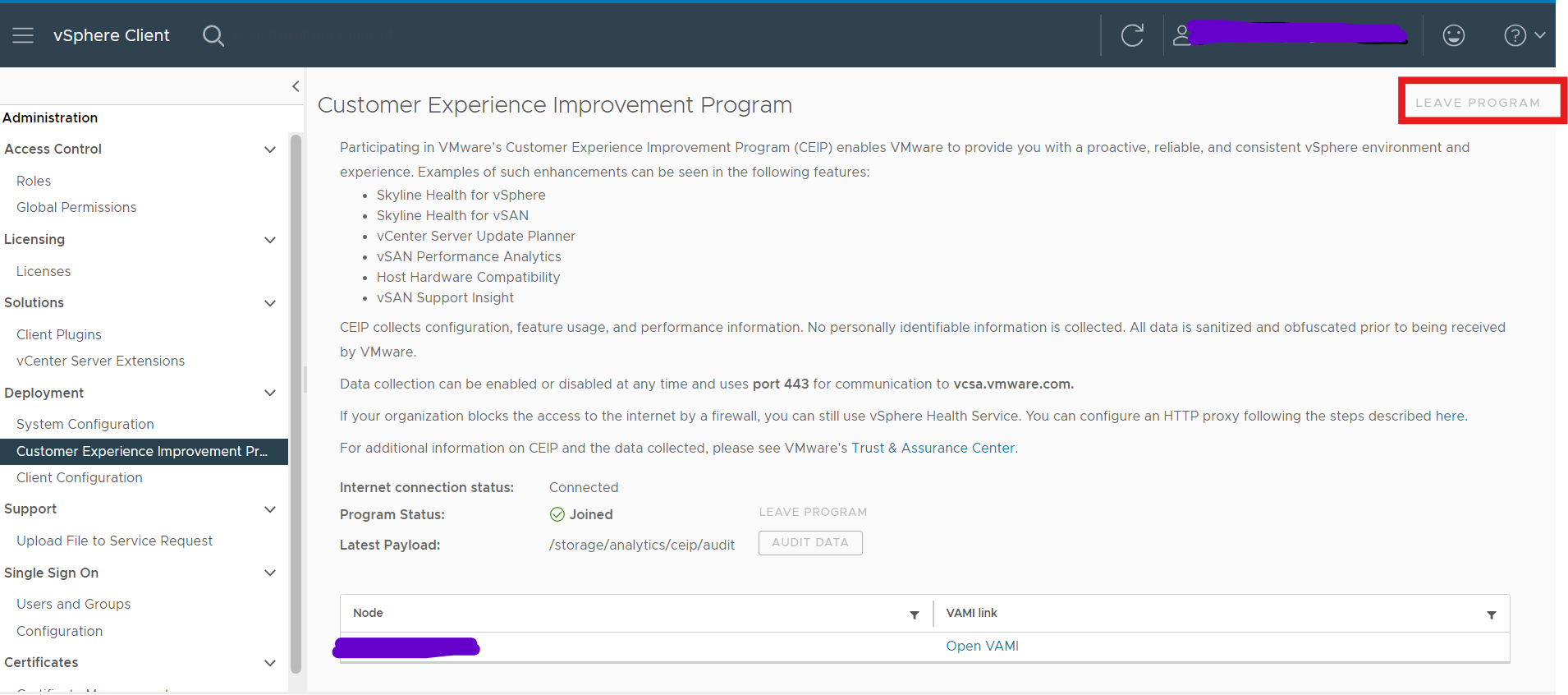
- 관리자 계정의 자격 증명을 사용하여 vCenter Server에 로그인합니다.
- vSphere Client 홈 페이지에서 Administration을 클릭합니다.
- 배포에서 사용자 환경 개선 프로그램을 클릭합니다
- CEIP에 가입하려면 가입을 클릭하고 프로그램에서 탈퇴하려면CEIP 탈퇴를 클릭합니다.
- vCenter Server 재시작
Affected Products
VxRail, VxRail Appliance Family, VxRail Appliance SeriesArticle Properties
Article Number: 000228894
Article Type: Solution
Last Modified: 05 Aug 2026
Version: 2
Find answers to your questions from other Dell users
Support Services
Check if your device is covered by Support Services.