OpenManage Enterprise: CyberArk connection error
Summary: OpenManage Enterprise is unable to connect to the CyberArk Central Credential Provider (CCP).
This article applies to
This article does not apply to
This article is not tied to any specific product.
Not all product versions are identified in this article.
Symptoms
When configuring OpenManage Enterprise (OME) to use the CyberArk Integration, the test Connection returns the following error message.
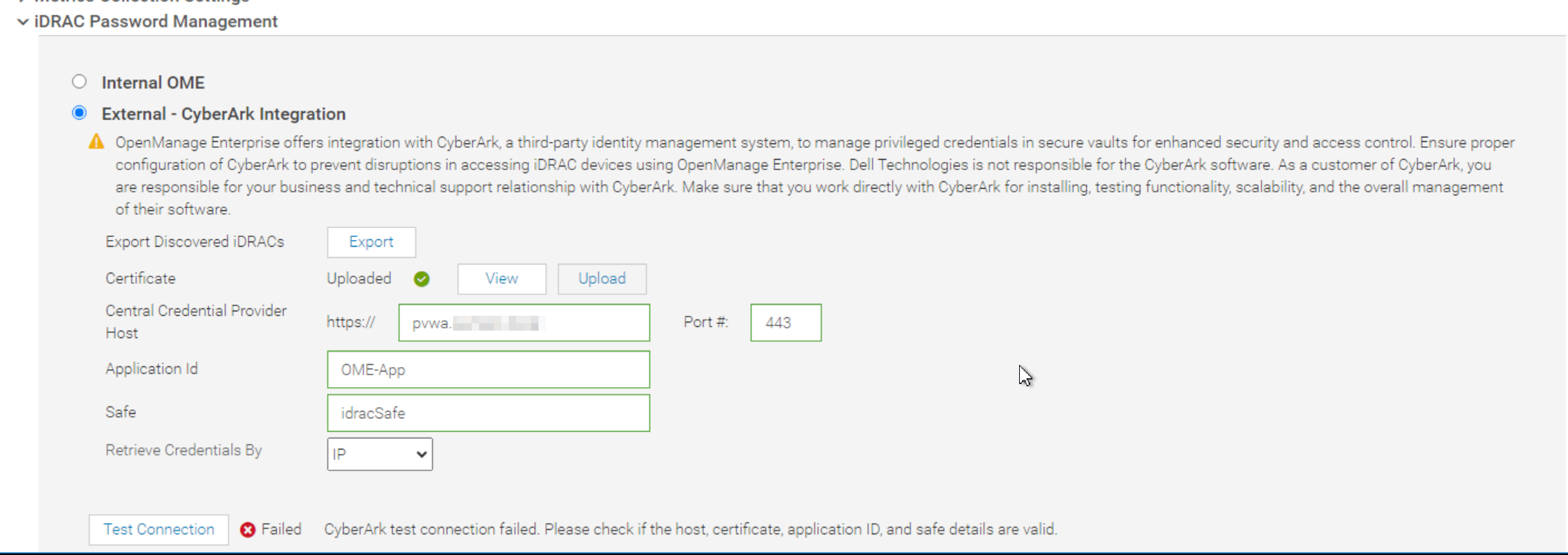
The application logs show the following certificate path error.
[WARN ] 2024-09-19 21:11:46.053 [ajp-nio-0:0:0:0:0:0:0:1-8009-exec-12] CertificateHelper - validateCertChain - Unknown revocation status
[WARN ] 2024-09-19 21:11:46.261 [ajp-nio-0:0:0:0:0:0:0:1-8009-exec-12] CertificateHelper - validateServerAndClientEku: Client & Server authentication EKU present in leaf certificate.
[ERROR] 2024-09-19 21:13:46.232 [ajp-nio-0:0:0:0:0:0:0:1-8009-exec-8] CyberarkManagerImpl - verifyConnectionToCyberark: exception occurred while verifying the connection to cyberark. Message: I/O error on GET request for "https://pvwa.sumers.local:443/AIMWebservice/api/Accounts": PKIX path building failed: sun.security.provider.certpath.SunCertPathBuilderException: unable to find valid certification path to requested target; nested exception is javax.net.ssl.SSLHandshakeException: PKIX path building failed: sun.security.provider.certpath.SunCertPathBuilderException: unable to find valid certification path to requested target
Cause
This issue occurs because the CA certs from the certificate uploaded to OpenManage Enterprise for CyberArk are not loaded into the trust store while creating the SSL Context for the HTTPS connection.
Resolution
This issue is addressed in the upcoming OpenManage Enterprise 4.3 Release.
Affected Products
Dell OpenManage Enterprise, Dell EMC OpenManage EnterpriseArticle Properties
Article Number: 000231597
Article Type: Solution
Last Modified: 23 Mar 2026
Version: 4
Find answers to your questions from other Dell users
Support Services
Check if your device is covered by Support Services.