An Error is Displayed Setting-up Dell Video Conferencing Room Solutions for Microsoft Teams Rooms
Summary: This article provides information about a generic error "Microsoft Teams Room device isn’t certified" message that is displayed while setting up Dell Video Conferencing Room Solutions (VCRS) for the first time. ...
This article applies to
This article does not apply to
This article is not tied to any specific product.
Not all product versions are identified in this article.
Symptoms
Affected Products:
- ProSupport for Solutions - Video Conferencing
Affected Operating Systems:
- Windows 11 IoT Enterprise 22H2 (Teams-Rooms solution)
Note: VCRS is a bundle that includes the OptiPlex 7000 XE Micro or the OptiPlex 7080 XE Micro with factory installed Teams Room in Kiosk mode and Logitech Tab Controller.
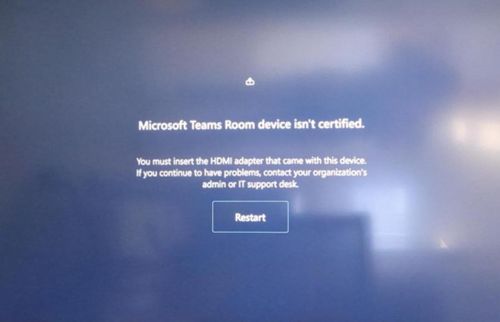
A user of VCRS for Microsoft Teams Room might experience a generic Microsoft Teams Room device isn’t certified error setting-up for the first time.
Cause
VCRS for Microsoft Teams requires the Logitech Tap Controller with theOptiplex 7000 XE Micro hardware.
Resolution
Ensure to use the VCRS bundle (at minimum OptiPlex 7000 or 7080 Micro XE + Tap Controller) when configuring the VCRS for Microsoft Teams.
For more information, reference Dell Video Conferencing Room Solutions
Additional Information
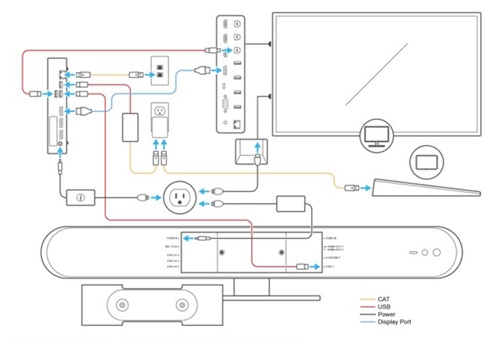
The below image shows the connection overview for Logitech Rally Bar Huddle from the setup manual:
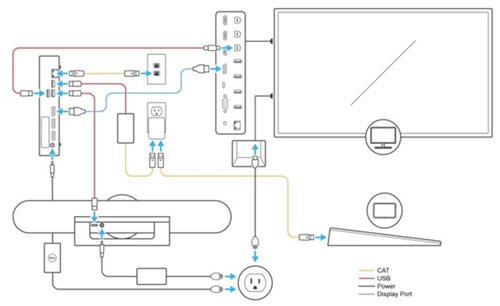
The below image shows the connection overview for Logitech Meet Up from the setup manual:
For support on Logitech Rally Bar Huddle and Logitech Meet Up reference the Logitech site below:

Affected Products
Dell ProSupport for Solutions - Video ConferencingArticle Properties
Article Number: 000256896
Article Type: Solution
Last Modified: 22 May 2026
Version: 4
Find answers to your questions from other Dell users
Support Services
Check if your device is covered by Support Services.