PowerFlex Management Platform - import existing PowerFlex Manager 3.x fails with error 400 "Failed to login to appliance"
Summary: PowerFlex Management Platform - import existing PowerFlex Manager 3.x fails with error 400 "Failed to login to appliance"
This article applies to
This article does not apply to
This article is not tied to any specific product.
Not all product versions are identified in this article.
Symptoms
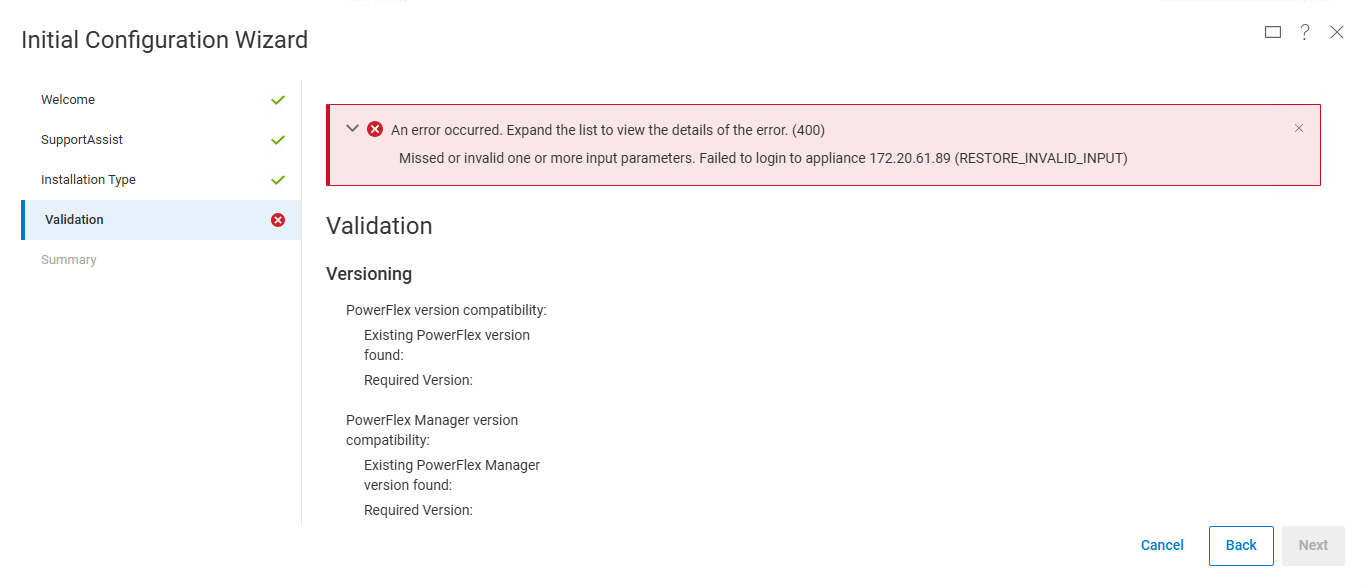
Import an existing PowerFlex Manager 3.x instance fails from Initial Configuration Wizard with following message:
An error occurred. Expand the list to view the details of the error. (400)Missed or invalid one or more input parameters. Failed to login to appliance 172.20.61.89 (RESTORE_INVALID_INPUT)
ASMManager log reports message "Certificates do not conform to algorithm constraints" and/or "Algorithm constraints check failed on signature":
kubectl -n powerflex logs "$(kubectl -n powerflex get pods -l "app.kubernetes.io/name=asmmanager" -o name)" | grep -E 'appliance|Caused by:'2025-04-18 09:13:49,999 [https-jsse-nio-9080-exec-2] (LCMService.java:423) [DEBUG] Performing validation for PFXM import, appliance IP=172.20.61.892025-04-18 09:13:50,026 [https-jsse-nio-9080-exec-2] (LCMUtilities.java:660) [ERROR] Failed to login to appliance 172.20.61.89Caused by: javax.net.ssl.SSLHandshakeException: Certificates do not conform to algorithm constraintsCaused by: java.security.cert.CertificateException: Certificates do not conform to algorithm constraintsCaused by: java.security.cert.CertPathValidatorException: Algorithm constraints check failed on signature algorithm: SHA1withRSA2025-04-18 09:13:50,029 [https-jsse-nio-9080-exec-2] (LCMService.java:440) [ERROR] appliance validation failed (get version)com.dell.asm.i18n2.exception.AsmCheckedException: Missed or invalid one or more input parameters. Failed to login to appliance 172.20.61.89displayMessage=Missed or invalid one or more input parameters. Failed to login to appliance 172.20.61.89Caused by: com.dell.asm.rest.common.exception.LocalizedWebApplicationException: HTTP 400 Bad Request
PowerFlex Manager 3.x instance may return valid SSL certificates chain:
curl -kv https://172.20.61.89 2>&1 | grep "Certificate level"* Certificate level 0: Public key type RSA (2048/112 Bits/secBits), signed using sha256WithRSAEncryption* Certificate level 1: Public key type RSA (2048/112 Bits/secBits), signed using sha256WithRSAEncryption
Cause
PowerFlex Manager 3.x appliance was upgraded from older version before import.
Suspecting initial install using "SHA1withRSA" algorithm to generate SSL certificates which could be still present on the appliance.
[ Cause undetermined / under investigations ]
Resolution
Reset all SSL certificates to default on PowerFlex Manager 3.x appliance and retry import operation.
To reset certificates on PowerFlex Manager 3.x appliance:
sudo -i
cd /opt/Dell/ssl
rake reset_ca
rm /etc/pki/tls/certs/localhost.crt
reboot
Details are available in KB article: PowerFlex Manager 3.X - How to renew the default SSL certificate (000191512)
Impacted Versions
PowerFlex Manager 4.x
Affected Products
PowerFlex rack, PowerFlex Appliance, PowerFlex custom node, ScaleIO, PowerFlex SoftwareArticle Properties
Article Number: 000309766
Article Type: Solution
Last Modified: 24 Apr 2025
Version: 1
Find answers to your questions from other Dell users
Support Services
Check if your device is covered by Support Services.