Alienware Area-51에서 Alienware Command Center FX 설정이 작동하지 않음
Summary: Alienware Command Center의 FX 탭에 수행된 변경 사항이 Alienware Area-51 컴퓨터 표시등에 표시되지 않는 문제를 해결하는 방법에 대해 알아봅니다.
This article applies to
This article does not apply to
This article is not tied to any specific product.
Not all product versions are identified in this article.
Symptoms
Alienware Command Center 버전 6.9.15.0의 FX 탭에서 변경하면 Alienware 컴퓨터 표시등의 변경 사항이 표시되지 않을 수 있습니다. 경우에 따라 FX 탭이 Alienware Command Center에서 누락될 수 있습니다.
해당되는 플랫폼:
- Alienware 18 Area-51 AA18250
- Alienware Area-51 AAT2250
- Alienware Area-51 AAT2265
영향을 받는 소프트웨어:
- Alienware Command Center 버전 6.9.15.0
영향을 받는 운영 체제:
- Windows 11
Cause
이 문제는 출고 시 설치된 이미지에 Alienware Command Center를 설치하는 동안 호환성 문제 또는 종속성 누락으로 인해 발생할 수 있습니다.
Resolution
- 설정에서 설치된 앱으로 이동하여 Alienware Command Center의 복구 프로세스를 시작합니다.
- Alienware Command Center 애플리케이션을 선택하고 수정 옵션을 선택하여 복구 기능에 액세스합니다.
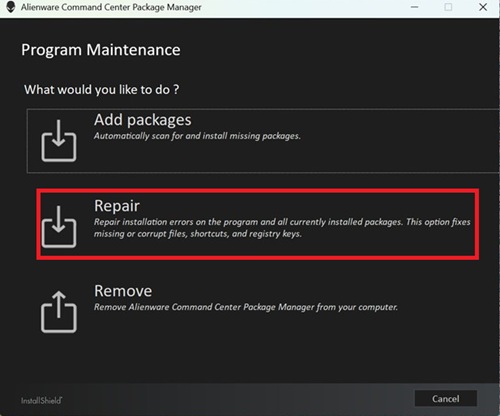
- 복구를 선택하고 ALIENFX 구성 요소를 선택하여 조명 효과 기능을 복원합니다.
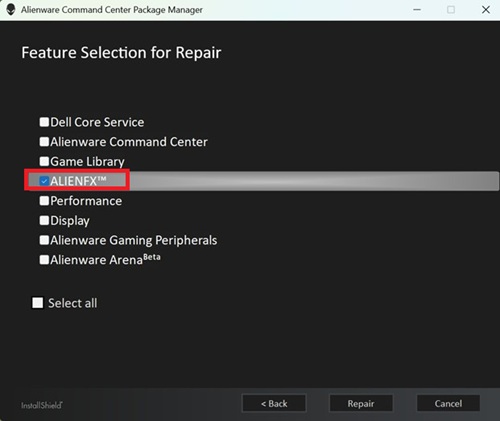
- 화면의 단계에 따라 복구를 완료합니다.
- 컴퓨터를 재부팅하고 이제 FX 탭이 Alienware Command Center에 표시되는지 확인합니다.
- FX 탭이 여전히 보이지 않으면 최신 버전의 Alienware Command Center로 업데이트하십시오. Alienware Command Center를 최신 버전으로 업데이트하는 방법에 대한 자세한 내용은 Alienware Command Center 설명서 및 문서의 지원에서 사용자 가이드를 참조하십시오.
Affected Products
Alienware 18 Area-51 AA18250, Alienware Area-51 AAT2250, Alienware Area-51 AAT2265Article Properties
Article Number: 000373023
Article Type: Solution
Last Modified: 29 Jul 2026
Version: 5
Find answers to your questions from other Dell users
Support Services
Check if your device is covered by Support Services.