PowerProtect Data Manager:配置灾难恢复复制目标系统时出错 |博士
Summary: 由于源和目标 PowerProtect Data Manager 系统之间的版本不匹配,DM5500 源系统上的灾难恢复配置失败。
This article applies to
This article does not apply to
This article is not tied to any specific product.
Not all product versions are identified in this article.
Symptoms
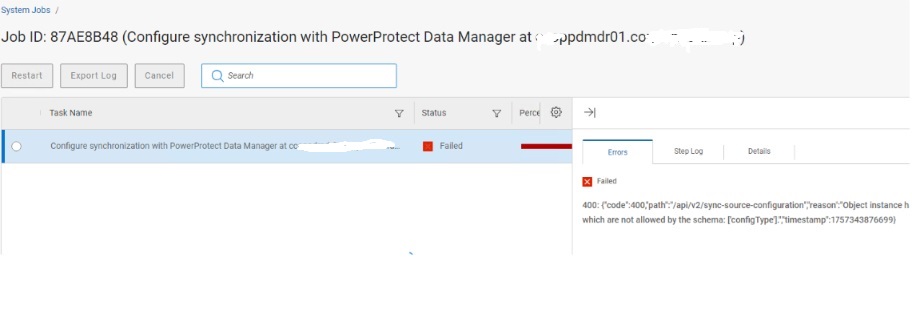
在配置从 DM5500 到 PowerProtect Data Manager 目标的灾难恢复时,在 “配置同步作业 ”步骤中,该过程失败。
- 此问题在 DM5500 作为源、PowerProtect Data Manager 作为目标时观察到,但它也可能发生在两个 DM5500 系统或两个 PowerProtect Data Manager 系统之间。
- 显示的错误消息:
{"code":400,"path":"/api/v2/sync-source-configuration","reason":"Object instance has properties which are not allowed by the schema: ['configType'].","timestamp":1757343876699}
屏幕截图:
Cause
源和目标 PowerProtect Data Manager 系统之间的版本不匹配会导致此问题:
- 来源:运行 PowerProtect Data Manager 版本 19.19.0-27 的 DM5500
- 目标:运行版本 19.19.0-15 的 PowerProtect Data Manager 系统
较新的 DM5500 一体机包括 configType 属性在其 REST API 旧目标系统架构无法识别的有效负载。这会导致 400 Bad Request 期间出错 /api/v2/sync-source-configuration call
日志分析还显示:
configType: null in the payloadMultiple BeanCreationNotAllowedException warnings
如果 DM5500 和 PowerProtect Data Manager 系统的版本不一致,则在任意组合中都可能出现此问题。
Resolution
将目标 PowerProtect Data Manager 系统升级到版本 19.19.0-20 或更高版本。
- PowerProtect Data Manager 版本 19.19.0-20 和 19.19.0-27 与灾难恢复配置兼容。
- 版本对齐后,同步作业应成功完成。
Additional Information
/var/log/brs/replmgr/sync.log 显示:
[c.e.b.s.o.s.i.ConfigureSyncServiceImpl.checkSystemVersion(512)][512 ] - checkSystemVersion - remote ver: 19.19.0-15 and local ver: 19.19.0-27 <==== PLEASE NOTE Source and Destination revisions are not the same!
Affected Products
PowerProtect Data Manager Appliance, PowerProtect Data Manager, PowerProtect DM5500, PowerProtect SoftwareArticle Properties
Article Number: 000386160
Article Type: Solution
Last Modified: 21 Nov 2025
Version: 2
Find answers to your questions from other Dell users
Support Services
Check if your device is covered by Support Services.