Data Domain: Data Domain에서 규정 준수 또는 거버넌스를 활성화하는 방법
Summary: 이 문서에서는 Data Domain에서 규정 준수 또는 거버넌스 모드를 설정하는 프로세스에 대해 설명합니다. 설정 중에 직면 한 과제는 스크린 샷과 함께 단계별로 표시됩니다.
This article applies to
This article does not apply to
This article is not tied to any specific product.
Not all product versions are identified in this article.
Instructions
보안 사용자 생성(CLI): 보안 역할은 규정 준수 작업에 필요하므로 이 역할이 있는 사용자를 생성합니다.
user add <username> role security보안 인증 활성화(CLI): 보안 역할이 할당된 사용자가 있는 자격 증명으로 로그인하여 권한 부여를 활성화합니다.
authorization policy set security-officer enabled규정 준수 확인이 활성화 또는 비활성화되었습니다.
system retention-lock compliance status
시스템 규정 준수 구성(CLI): 시스템 레벨 규정 준수 구성을 실행하고 이를 위해서는 보안 사용자 자격 증명이 필요합니다.
system retention-lock compliance configure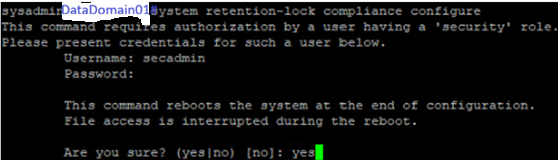
참고: 이 프로세스에서 시스템이 자동으로 재부팅됩니다.
통합 Dell Remote Access Controller 사용자를 생성하여 규정 준수 모드를 활성화합니다. 이 중 2명은 운영자 역할이고 2명은 읽기 전용입니다. 암호를 기록해 둡니다.
user iDrac create
규정 준수 모드 활성화(CLI): 재부팅 후 규정 준수 모드를 활성화합니다. 시스템 날짜 변경 제한 및 날짜 변경 빈도에 대해 기본 옵션을 아니요 로 선택합니다.
system retention-lock compliance enable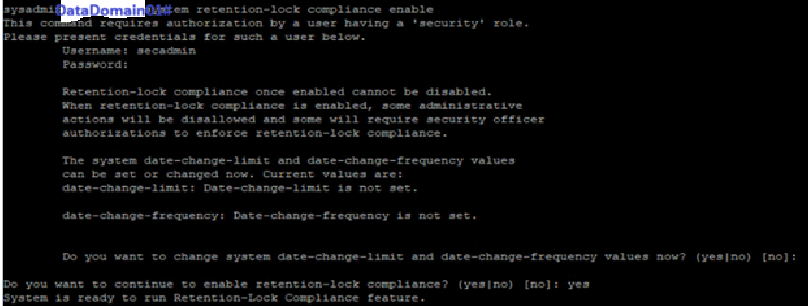
Yes를 선택하면 DD에서 강화 매개변수를 구성해야 하며, 그 중 한 부분이 날짜 변경 빈도입니다.
MTree Retention Lock 활성화(CLI): 특정 MTree에서 잠금을 설정합니다.
mtree retention-lock enable mode compliance mtree <mtree-path>
Additional Information
Data Domain 규정 준수 또는 거버넌스 모드 활성화
Affected Products
Data DomainArticle Properties
Article Number: 000427580
Article Type: How To
Last Modified: 02 Mar 2026
Version: 1
Find answers to your questions from other Dell users
Support Services
Check if your device is covered by Support Services.