Data Domain: Naleving of governance inschakelen op Data Domain
Summary: In dit artikel wordt het proces uitgelegd voor het instellen van de nalevings- of governancemodus op een Data Domain. Uitdagingen die zich tijdens de installatie voordoen, worden stap voor stap weergegeven met screenshots. ...
This article applies to
This article does not apply to
This article is not tied to any specific product.
Not all product versions are identified in this article.
Instructions
Beveiligingsgebruiker (CLI) maken: Maak een gebruiker met de beveiligingsrol, omdat deze rol vereist is voor nalevingsacties.
user add <username> role securitySecurity Authorization (CLI) inschakelen: Meld u aan met referenties waaraan een beveiligingsrol is toegewezen aan de gebruiker om autorisatie in te schakelen.
authorization policy set security-officer enabledControle van naleving is in- of uitgeschakeld.
system retention-lock compliance status
System Compliance (CLI) configureren: Voer de nalevingsconfiguratie op systeemniveau uit, hiervoor zijn referenties van beveiligingsgebruikers vereist.
system retention-lock compliance configure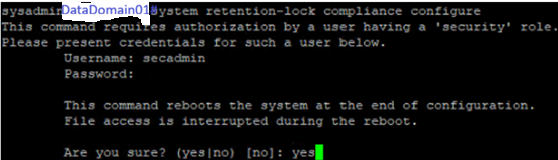
Opmerking: Het systeem wordt hierbij automatisch opnieuw opgestart.
Maak geïntegreerde Dell Remote Access Controller-gebruikers om de nalevingsmodus in te schakelen, twee met de rol van operator en twee alleen-lezen. Noteer de wachtwoorden.
user iDrac create
Compliance Mode (CLI) inschakelen: Schakel na het opnieuw opstarten de nalevingsmodus in. Kies voor de standaardoptie Nee voor systeemdatumwijzigingslimiet en datumwijzigingsfrequentie.
system retention-lock compliance enable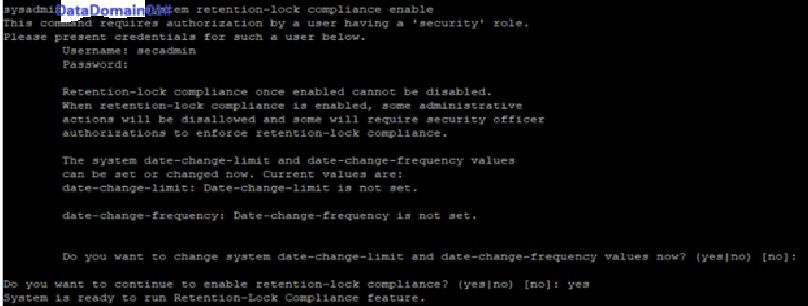
Als we Ja selecteren, moeten we hardeningparameters configureren op DD, waarvan één onderdeel de frequentie van datumwijziging is.
MTree Retention Lock (CLI) inschakelen: Schakel de vergrendeling in op een specifieke MTree.
mtree retention-lock enable mode compliance mtree <mtree-path>
Additional Information
Data Domain Compliance of activering van de beheermodus
Affected Products
Data DomainArticle Properties
Article Number: 000427580
Article Type: How To
Last Modified: 02 Mar 2026
Version: 1
Find answers to your questions from other Dell users
Support Services
Check if your device is covered by Support Services.