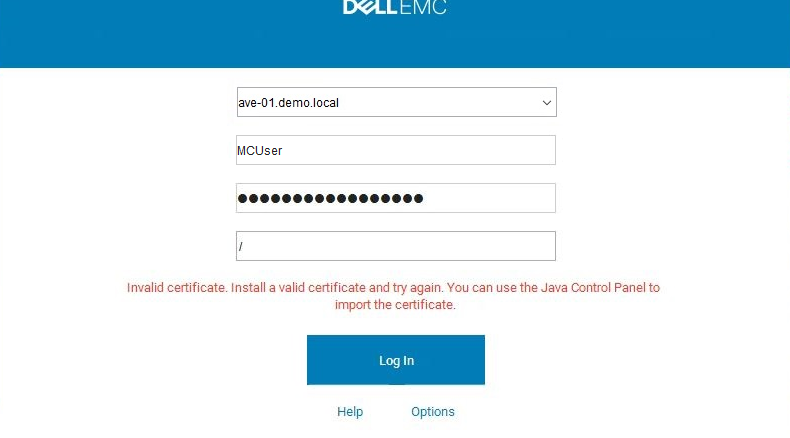
Avamar Error: Invalid Certificate, Install a valid certificate and try again, you can use the Java Control Panel to import certificate
Summary: Unable to login Avamar Java console
This article applies to
This article does not apply to
This article is not tied to any specific product.
Not all product versions are identified in this article.
Symptoms
When logging in to the Avamar Administrator GUI, it fails with Error: "Invalid Certificate, Install a valid certificate and try again, you can use the Java Control Panel to import certificate"
Cause
The login process between the Avamar client and Avamar server makes use of Java RMI which requires functioning DNS in order to work properly.
Resolution
In mcserver logs, you will see the exceptions with RMI TCP connections
08/06-12:08:29.00955 [RMI TCP Connection(647167)-10.xxx.xx.xxx#11555903] sun.rmi.transport.tcp.TCPTransport$ConnectionHandler.run0
FINE: RMI TCP Connection(647167)-10.xxx.xx.xxx: terminated with exception:
java.net.SocketException: Connection reset
at java.net.SocketInputStream.read(Unknown Source)
at java.net.SocketInputStream.read(Unknown Source)
at com.rsa.sslj.x.ap.c(Unknown Source)
at com.rsa.sslj.x.ap.a(Unknown Source)
at com.rsa.sslj.x.ap.b(Unknown Source)
at com.rsa.sslj.x.ap.b(Unknown Source)
at com.rsa.sslj.x.al.read(Unknown Source)
at java.io.BufferedInputStream.fill(Unknown Source)
at java.io.BufferedInputStream.read(Unknown Source)
at java.io.DataInputStream.readInt(Unknown Source)
at sun.rmi.transport.tcp.TCPTransport$ConnectionHandler.run0(Unknown Source)
at sun.rmi.transport.tcp.TCPTransport$ConnectionHandler.lambda$run$0(Unknown Source)
at java.security.AccessController.doPrivileged(Native Method)
at sun.rmi.transport.tcp.TCPTransport$ConnectionHandler.run(Unknown Source)
at java.util.concurrent.ThreadPoolExecutor.runWorker(Unknown Source)
at java.util.concurrent.ThreadPoolExecutor$Worker.run(Unknown Source)
at java.lang.Thread.run(Unknown Source)
On the Avamar utility node, edit the file /usr/local/avamar/var/mc/server_data/prefs/mcserver.xml
Search for the following entry key and set the value to false.
<entry key="rmi_over_ssl" value="true" />
Restart the MCS service
mcserver.sh --restart
NOTE: With RMI SSL disabled passwords and application data will flow between the client and server in plain text
08/06-12:08:29.00955 [RMI TCP Connection(647167)-10.xxx.xx.xxx#11555903] sun.rmi.transport.tcp.TCPTransport$ConnectionHandler.run0
FINE: RMI TCP Connection(647167)-10.xxx.xx.xxx: terminated with exception:
java.net.SocketException: Connection reset
at java.net.SocketInputStream.read(Unknown Source)
at java.net.SocketInputStream.read(Unknown Source)
at com.rsa.sslj.x.ap.c(Unknown Source)
at com.rsa.sslj.x.ap.a(Unknown Source)
at com.rsa.sslj.x.ap.b(Unknown Source)
at com.rsa.sslj.x.ap.b(Unknown Source)
at com.rsa.sslj.x.al.read(Unknown Source)
at java.io.BufferedInputStream.fill(Unknown Source)
at java.io.BufferedInputStream.read(Unknown Source)
at java.io.DataInputStream.readInt(Unknown Source)
at sun.rmi.transport.tcp.TCPTransport$ConnectionHandler.run0(Unknown Source)
at sun.rmi.transport.tcp.TCPTransport$ConnectionHandler.lambda$run$0(Unknown Source)
at java.security.AccessController.doPrivileged(Native Method)
at sun.rmi.transport.tcp.TCPTransport$ConnectionHandler.run(Unknown Source)
at java.util.concurrent.ThreadPoolExecutor.runWorker(Unknown Source)
at java.util.concurrent.ThreadPoolExecutor$Worker.run(Unknown Source)
at java.lang.Thread.run(Unknown Source)
On the Avamar utility node, edit the file /usr/local/avamar/var/mc/server_data/prefs/mcserver.xml
Search for the following entry key and set the value to false.
<entry key="rmi_over_ssl" value="true" />
Restart the MCS service
mcserver.sh --restart
NOTE: With RMI SSL disabled passwords and application data will flow between the client and server in plain text
Affected Products
AvamarArticle Properties
Article Number: 000191264
Article Type: Solution
Last Modified: 22 Sep 2025
Version: 4
Find answers to your questions from other Dell users
Support Services
Check if your device is covered by Support Services.