Avamar:Simple Network Management Protocol (SNMP)クエリーでAvamar MIB階層がどのようにアドレス指定されるかについての概要
Summary: Avamar Simple Network Management Protocol (SNMP) Management Information Base (MIB)ファイルを使用して Avamar をクエリーすると、情報の階層が表示されます。
This article applies to
This article does not apply to
This article is not tied to any specific product.
Not all product versions are identified in this article.
Instructions
次のコマンドは、Avamar使用率の値をクエリーします。
snmpbulkwalk -On -c public -v2c <ip-address> .1.3.6.1.4.1.15597.1.1.3.2.5
.1.3.6.1.4.1.15597.1.1.3.2.5 = INTEGER: 27
一連の数値は、次の 2 つのセクションに分けることができます。
-
-
-
青色の数字は、Avamar管理情報ベース(MIB)を表します
.1.3.6.1.4.1.15597 -
緑色の数字は、「gettable」情報の階層を示しています。
.1.1.3.2.5
-
-
これにより、次のように解決されます。 Software, MCS, dpn, dpnData, utilization.
これは、MIB テキスト ファイルのスクリーンショット (/usr/local/avamar/doc/AVAMAR-MCS-MIB.txtを使用):
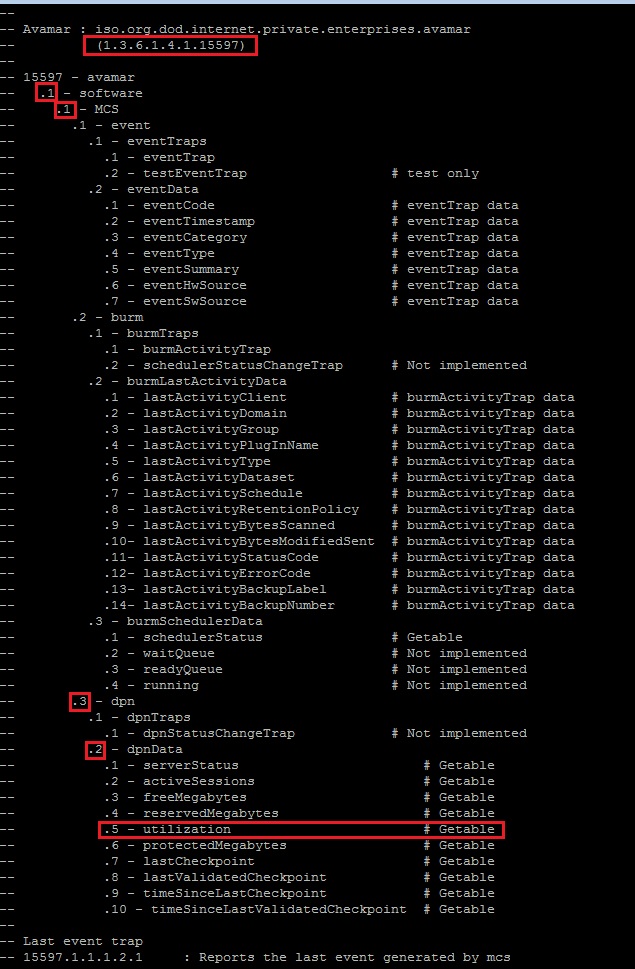
注:コマンドの実行に失敗した場合は、「Avamar:Avamar Serverに対するsnmpwalkコマンドの失敗」を参照してください
Affected Products
AvamarProducts
AvamarArticle Properties
Article Number: 000019169
Article Type: How To
Last Modified: 21 Nov 2025
Version: 7
Find answers to your questions from other Dell users
Support Services
Check if your device is covered by Support Services.