Avamar:在簡易網路管理通訊協定 (SNMP) 查詢中如何處理 Avamar MIB 階層的簡短概觀
Summary: 使用 Avamar 簡單網路管理通訊協定 (SNMP) 管理資訊庫 (MIB) 檔案查詢 Avamar 時,會看到資訊階層。
This article applies to
This article does not apply to
This article is not tied to any specific product.
Not all product versions are identified in this article.
Instructions
下列命令查詢 Avamar 使用率值:
snmpbulkwalk -On -c public -v2c <ip-address> .1.3.6.1.4.1.15597.1.1.3.2.5
.1.3.6.1.4.1.15597.1.1.3.2.5 = INTEGER: 27
數位序列可以分為兩部分:
-
-
-
藍色的數字代表 Avamar 管理資訊庫 (MIB)
.1.3.6.1.4.1.15597 -
綠色數位顯示「可獲取」信息的層次結構。
.1.1.3.2.5
-
-
這解析為: Software, MCS, dpn, dpnData, utilization.
這可以通過使用MIB文字檔的螢幕截圖突出顯示層次結構的級別(/usr/local/avamar/doc/AVAMAR-MCS-MIB.txt):
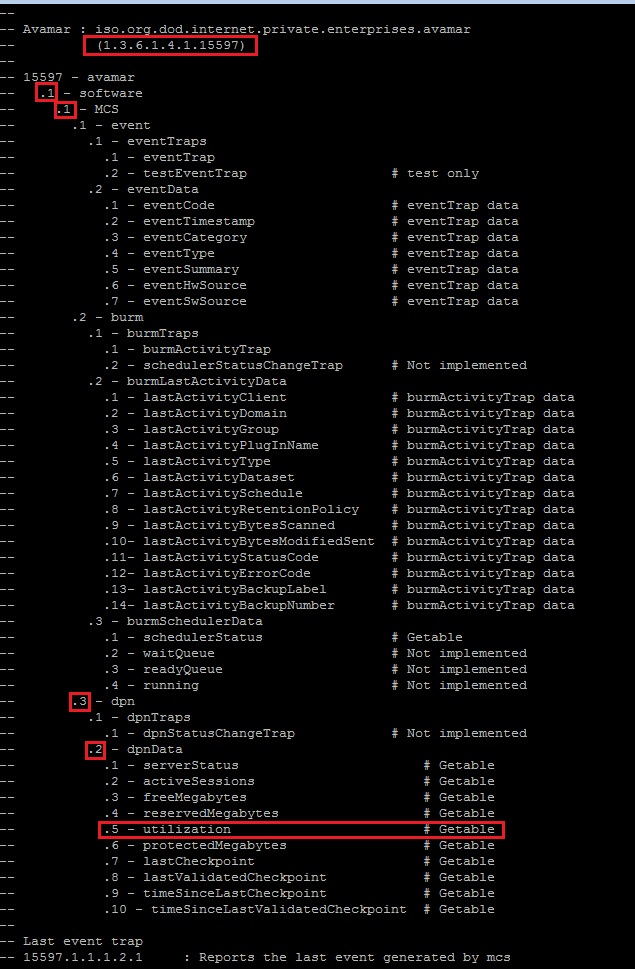
注意:如果命令無法執行,請參閱 Avamar:snmpwalk 命令無法至 Avamar Server
Affected Products
AvamarProducts
AvamarArticle Properties
Article Number: 000019169
Article Type: How To
Last Modified: 21 Nov 2025
Version: 7
Find answers to your questions from other Dell users
Support Services
Check if your device is covered by Support Services.