Avamar:如何在简单网络管理协议 (SNMP) 查询中寻址 Avamar MIB 层次结构的简要概述
Summary: 使用 Avamar 简单网络管理协议 (SNMP) 管理信息库 (MIB) 文件查询 Avamar 时,会看到信息层次结构。
This article applies to
This article does not apply to
This article is not tied to any specific product.
Not all product versions are identified in this article.
Instructions
以下命令查询 Avamar 利用率值:
snmpbulkwalk -On -c public -v2c <ip-address> .1.3.6.1.4.1.15597.1.1.3.2.5
.1.3.6.1.4.1.15597.1.1.3.2.5 = INTEGER: 27
该系列数字可以分为两个部分:
-
-
-
蓝色数字表示 Avamar 管理信息库 (MIB)
.1.3.6.1.4.1.15597 -
绿色数字表示“gettable”信息的层次结构。
.1.1.3.2.5
-
-
这可解决为: Software, MCS, dpn, dpnData, utilization.
这可以通过使用 MIB 文本文件的屏幕截图突出显示层次结构的级别来直观地看到这一点。/usr/local/avamar/doc/AVAMAR-MCS-MIB.txt):
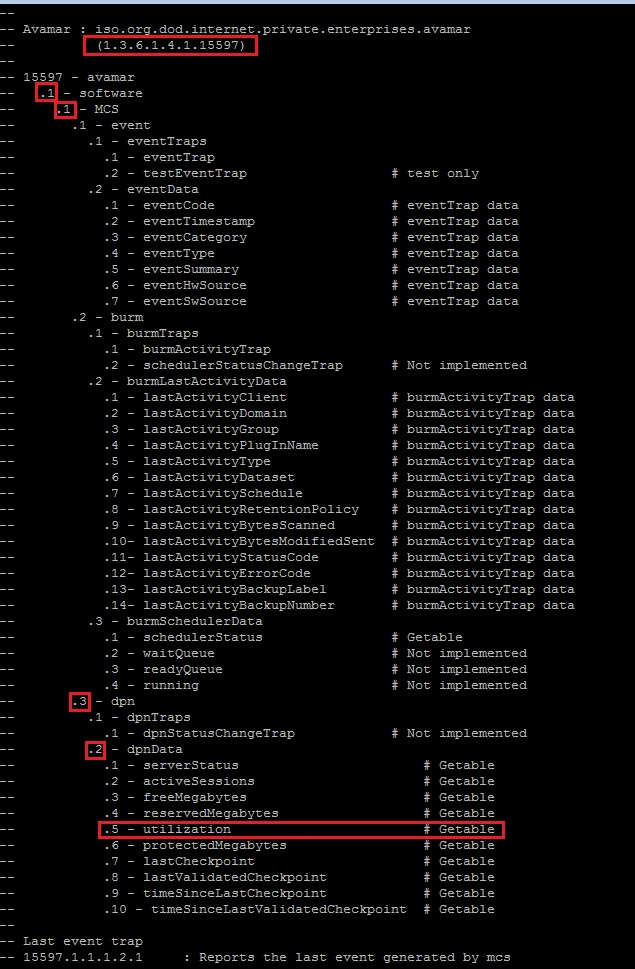
提醒:如果命令无法运行,请参阅 Avamar:对 Avamar Server 执行 snmpwalk 命令失败
Affected Products
AvamarProducts
AvamarArticle Properties
Article Number: 000019169
Article Type: How To
Last Modified: 21 Nov 2025
Version: 7
Find answers to your questions from other Dell users
Support Services
Check if your device is covered by Support Services.