NVP-vProxy: How-To Remove the Dell EMC NetWorker plug-in from vCenter Server
Summary: NetWorker vProxy plug-in for vCenter "Dell EMC NetWorker" can be used to manage Virtual Machine (VM) backups and restores from the vSphere client. To remove the Dell EMC NetWorker plug-in from your vCenter server, follow these steps. ...
This article applies to
This article does not apply to
This article is not tied to any specific product.
Not all product versions are identified in this article.
Instructions
Before you begin, take a snapshot/backup of the vCenter server before making changes.
This KB is for removing the vProxy based "Dell EMC NetWorker" vSphere plug-in. For instructions on removing the legacy "EMC Backup and Recovery" plug-in, see NetWorker: How-To Remove VBA EMC Backup and Recovery (EBR) plug-in from vCenter Server
- Log in to the vCenter mob extension manager at
https://<vCenter FQDN or IP>/mob/?moid=ExtensionManager- Use your normal vCenter web client credentials
- Unregister the following plug-in extensions:
com.dell.emc.nwcom.emc.networker.backupcom.emc.networker.recovercom.emc.vproxy.visdTo remove the extension, click Invoke Method after entering the extension name in the string field. A message appears stating Method Invocation Result: Void.
Example: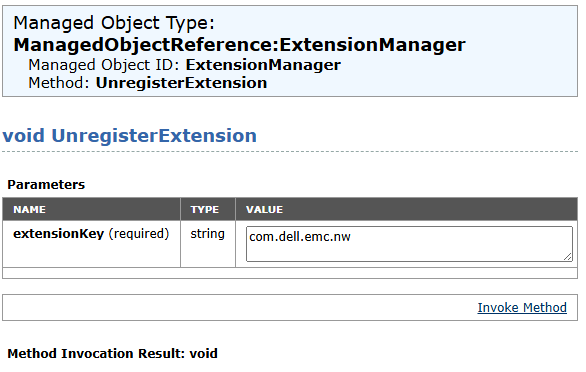
- Check the following locations on the vCenter server, remove any entries associated with
DellorEMC.
WARNING: Double check all commands before removing files from the vCenter server. This process must be completed by the VMware vCenter Administrator.
/etc/vmware-vpx/locale//etc/vmware-vpx/extensions//etc/vmware/vsphere-ui/vc-packages/vsphere-client-serenity//etc/vmware/vsphere-ui/cmCatalog/
Example of vCenter 8.0.3 with NetWorker 19.12.x plug-in installed:
root@vcsa [ ~ ]# ls -ltr /etc/vmware-vpx/extensions/ | grep "com.emc\|com.dell"
drwxr-xr-x. 3 vpxd cis  4096 Jun 10  2024 com.emc.networker.backup
drwxr-xr-x. 3 vpxd cis  4096 Jun 10  2024 com.emc.networker.recover
drwxr-xr-x  3 vpxd cis  4096 Sep  3 21:31 com.emc.vproxy.visd
drwxr-xr-x  3 vpxd cis  4096 Jan  9 21:15 com.dell.emc.nw

root@vcsa [ ~ ]# ls -l /etc/vmware-vpx/locale/ | grep "com.emc\|com.dell"
-rw-r--r--  1 vpxd root   40151 Feb  3 14:50 com.dell.emc.nw_catalog.zip
-rw-r--r--. 1 vpxd root     372 Feb  3 14:48 com.emc.networker.backup_catalog.zip
-rw-r--r--. 1 vpxd root     377 Feb  3 14:48 com.emc.networker.recover_catalog.zip
-rw-r--r--  1 vpxd root     325 Sep  3 21:31 com.emc.vproxy.visd_catalog.zip

root@vcsa [ ~ ]# ls -ltr /etc/vmware/vsphere-ui/vc-packages/vsphere-client-serenity | grep com.dell*
drwxr-xr-x 2 vsphere-ui users 4096 Feb  3 14:51 com.dell.emc.nw-19.12.0.82

root@vcsa [ ~ ]# ls -l /etc/vmware/vsphere-ui/cmCatalog/ | grep "dell\|emc"
-rw-r--r-- 1 vsphere-ui users   40151 Feb  3 15:03 com.vmware.cis.com.dell.emc.nw.zip
-rw-r--r-- 1 vsphere-ui users     372 Feb  3 15:03 com.vmware.cis.com.emc.networker.backup.zip
-rw-r--r-- 1 vsphere-ui users     377 Feb  3 15:03 com.vmware.cis.com.emc.networker.recover.zip
-rw-r--r-- 1 vsphere-ui users     325 Jan 15 15:20 com.vmware.cis.com.emc.vproxy.visd.zip
- Restart the vSphere web client service
service-control --stop vsphere-uiservice-control --start vsphere-uiservice-control --status vsphere-ui
- Clear browser cache and cookies
- Open a fresh browser.
- Log back into vCenter web client at
https://<vCenter FQDN or IP>
NOTE: For further assistance, engage with VMware support, removing a vCenter plugin occurs directly within VMware without NetWorker server functionality or involvement.
Additional Information
Articles specific to plugin installation issues:
- NetWorker: vCenter plug-in and VCUI login fail with "vCenter not registered with NetWorker server"
- NVP-vProxy: Unable to install vCenter plug-in after replacing NetWorker certificate
- NVP vProxy: vSphere Web Client Plugin Reports Successful Installation, But Does Not Appear
- NVP: Unable to install vCenter plugin in a multihomed environment
- NVP-vProxy Plugin Install from NMC fails with message failed to install vCenter plug-in
Affected Products
NetWorkerProducts
NetWorker FamilyArticle Properties
Article Number: 000222946
Article Type: How To
Last Modified: 20 May 2026
Version: 4
Find answers to your questions from other Dell users
Support Services
Check if your device is covered by Support Services.