How to Force a Dell Encryption Sweep on Windows
Summary: This article describes how to force an encryption sweep on an endpoint using Dell Encryption Enterprise (formerly Dell Data Protection | Enterprise Edition) or Dell Encryption Personal (formerly Dell Data Protection | Personal Edition). ...
This article applies to
This article does not apply to
This article is not tied to any specific product.
Not all product versions are identified in this article.
Symptoms
Affected Products:
- Dell Encryption Enterprise
- Dell Data Protection | Enterprise
- Dell Encryption Personal
- Dell Data Protection | Personal Edition
Affected Operating Systems:
- Windows
Cause
Not Applicable
Resolution
Dell Encryption Enterprise and Dell Encryption Personal may use windows system probe (WSProbe.exe) to force a sweep of the entire machine to ensure compliance with the latest encryption policy.
Warning: Encryption sweeps may cause slight performance degradation. Dell Technologies recommends only running
WSProbe.exe as needed.
To run WSProbe.exe:
- Go to
C:\Program Files\Dell\Dell Data Protection\Encryption.
Note:
- The directory may differ if changed during installation.
WSProbe.exeis only in version 7.3 and later of the software. For earlier versions, contact Dell Data Security ProSupport.
- Double-click
WSProbe.exe.
Note: If using CLI, the drive letter should be specified (for example,
WSProbe.exe C:\).
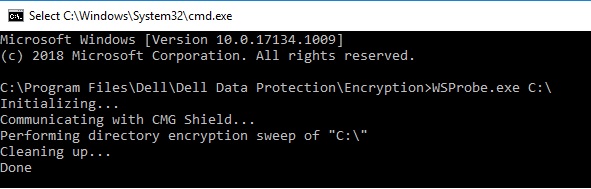
Figure 1: (English Only) Type WSProbe.exe C:\
To contact support, reference Dell Data Security International Support Phone Numbers.
Go to TechDirect to generate a technical support request online.
For additional insights and resources, join the Dell Security Community Forum.
Affected Products
Dell EncryptionArticle Properties
Article Number: 000130499
Article Type: Solution
Last Modified: 03 abr 2024
Version: 11
Find answers to your questions from other Dell users
Support Services
Check if your device is covered by Support Services.