Come gestire lo storage in PowerPath per Windows
Summary: Se il cliente segnala che i dischi non sono visibili e nelle opzioni di visualizzazione Powermt si noti che l'array di storage risulta non gestito, Come renderlo gestito
This article applies to
This article does not apply to
This article is not tied to any specific product.
Not all product versions are identified in this article.
Instructions
In alcuni scenari, quando un cliente segnala di non essere in grado di notare alcun disco fornito dall'array di storage in PowerPath. Quando si esegue powermt display options, se si nota che l'array di storage è "Unmanaged", in un ambiente Windows con PowerPath. Seguire il piano d'azione consigliato in questo articolo della Knowledge Base per impostare lo stesso come "Gestito".
Di seguito è riportato uno scenario in cui il cliente ha presentato i dischi dell'array di storage Symmetrix e ha segnalato di non essere in grado di rilevare alcun disco in PowerPath dopo l'aggiornamento.
L'output delle " opzioni di visualizzazione powermt " mostra:
** OPZIONI DI VISUALIZZAZIONE POWERMT **
Mostra nomi CLARiiON LUN: Monitoraggio della latenza True
Path: Disattivato
Mantieni le informazioni sul percorso: In
Performance Monitor: disabilitato
AutoStandby: I/O per errore (iopf): periodo di aging iopf abilitato
: Limite 1 D
IOPF : 6000
Auto Host Registration: disabled
Storage
System Class Attributes
------------ ----------
Symmetrix periodic autorestore = on
reactive autorestore = on
status = unmanaged
proximity based autostandby = on
proximity based autostandby threshold = default
CLARiiON periodic autorestore = on
reactive autorestore = on
status = unmanaged
proximity based autostandby = N/A
Invista periodic autorestore = on
reactive autorestore = on
status = managed
proximity based autostandby = N/A
Hitachi periodic autorestore = on
reactive autorestore = on
status = unmanaged
proximity based autostandby = N/A
HP xp periodic autorestore = on
reactive autorestore = on
status = unmanaged
proximity based autostandby = N/A
Ess periodic autorestore = on
reactive autorestore = on
status = unmanaged
proximity based autostandby = N/A
Generic periodic autorestore = on
reactive autorestore = on
status = managed
proximity based autostandby = N/A
VPLEX periodic autorestore = on
reactive autorestore = on
status = managed
proximity based autostandby = on
proximity based autostandby threshold = default
VNX periodic autorestore = on
reactive autorestore = on
status = unmanaged
proximity based autostandby = N/A
NetApp periodic autorestore = on
reactive autorestore = on
status = unmanaged
proximity based autostandby = N/A
XtremIO periodic autorestore = on
reactive autorestore = on
status = managed
proximity based autostandby = N/A
Unity periodic autorestore = on
reactive autorestore = on
status = unmanaged
proximity based autostandby = N/A
SC periodic autorestore = on
reactive autorestore = on
status = managed
proximity based autostandby = off
Notice how some of the storage array and especially Symmetrix here is "unmanaged"
Here are the steps along with the screenshot from our lab server , how to make it "Managed"
Open Control Panel :
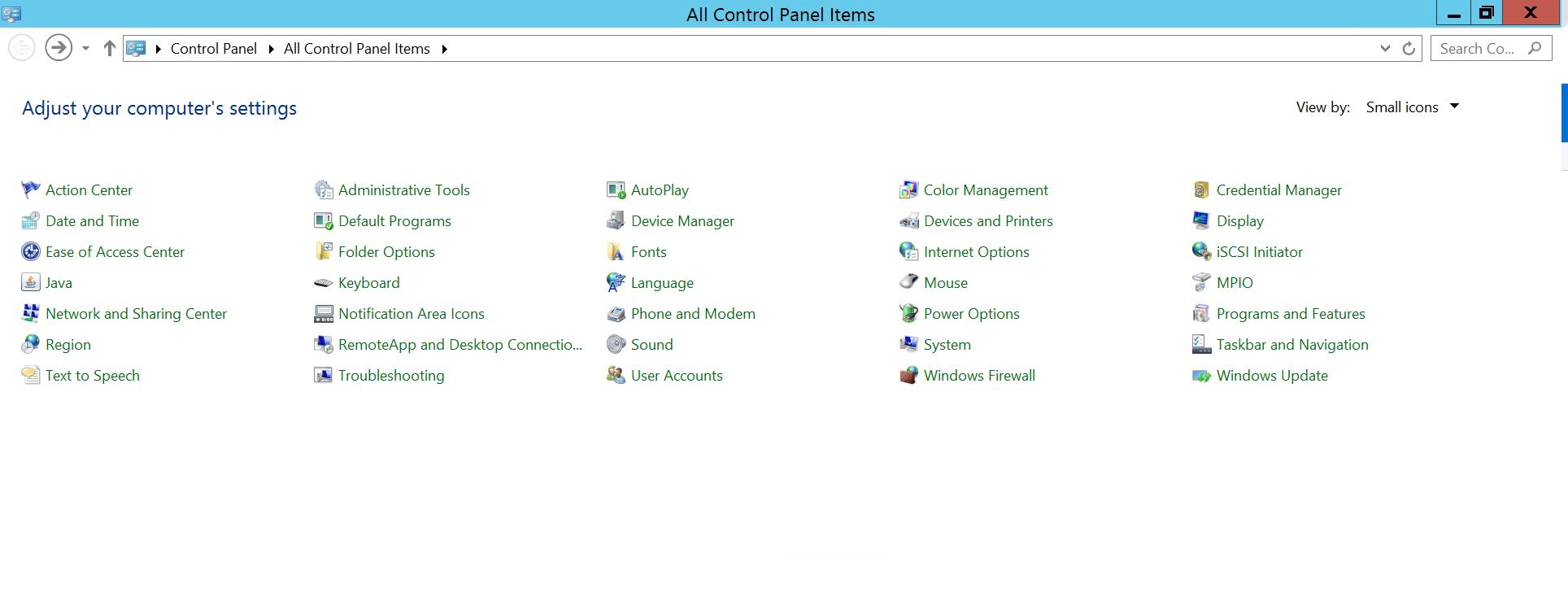
Selezionare Programmi e funzionalità
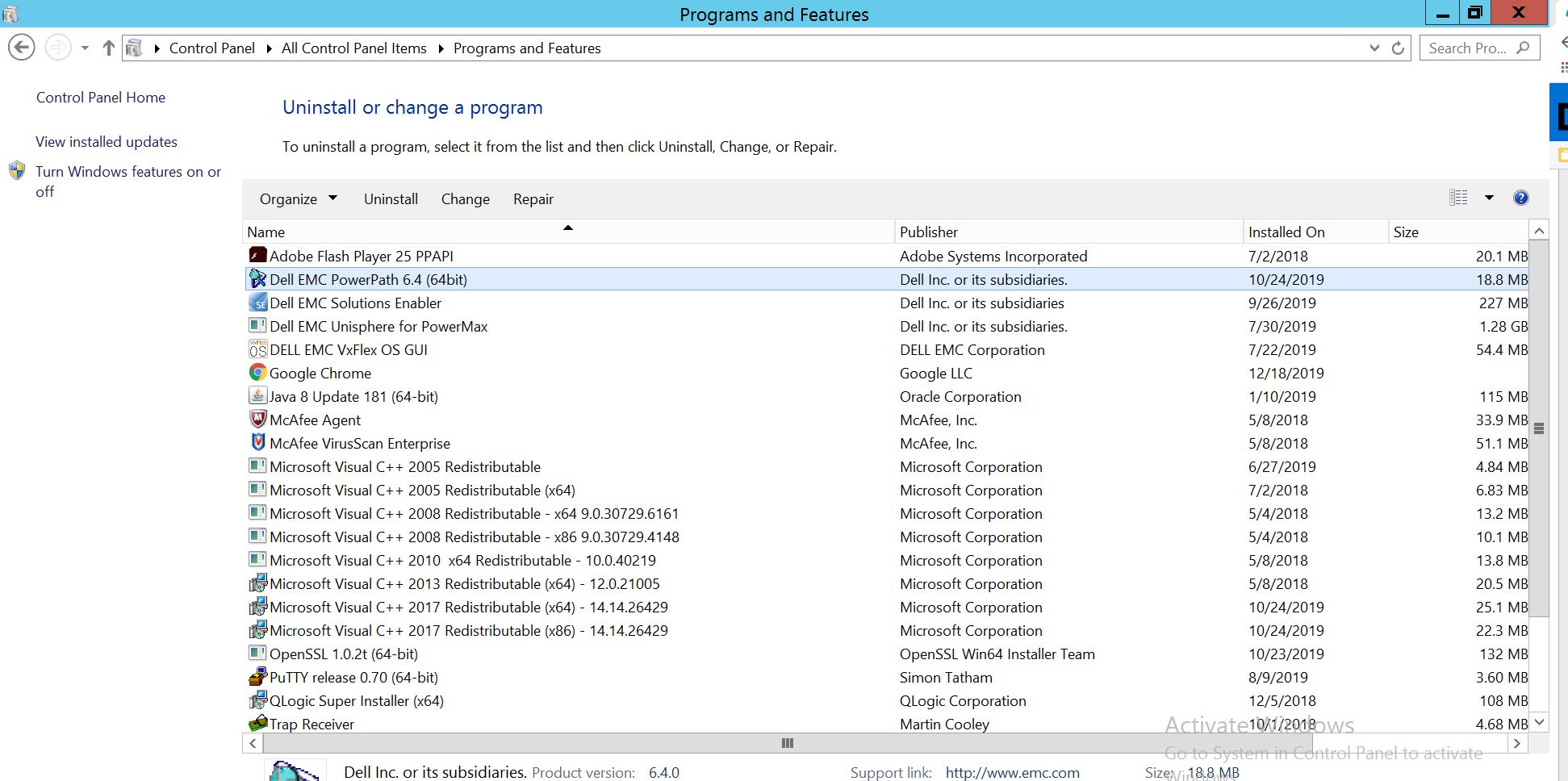
Selezionare PowerPath e scegliere Modifica/Cambia, per aprire il prompt del programma di installazione:
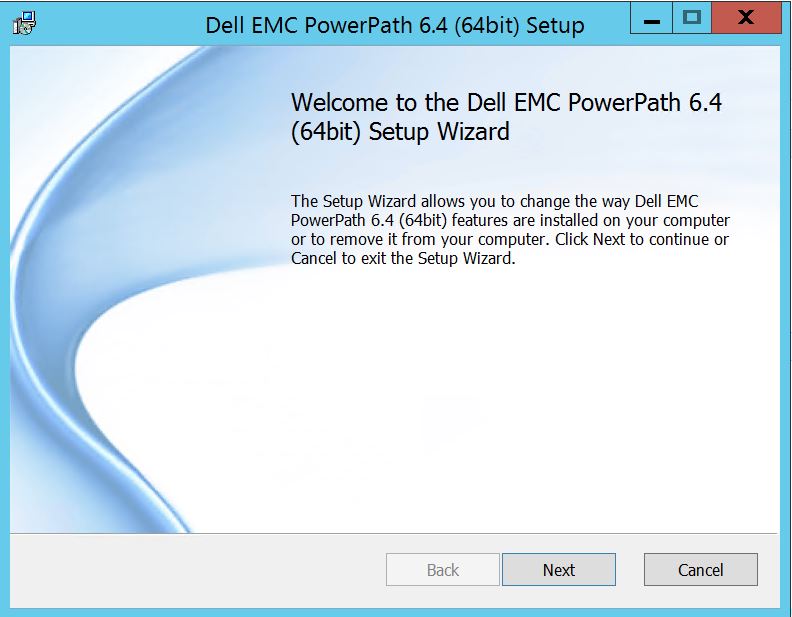
Fare clic su Avanti e seguire la modifica di selezione:
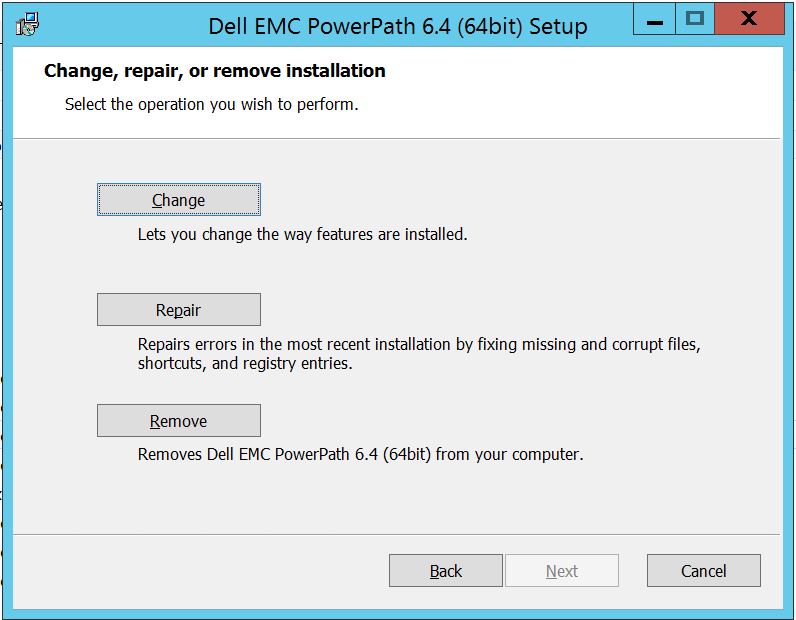
Che ti porterà a Configurazione personalizzata:
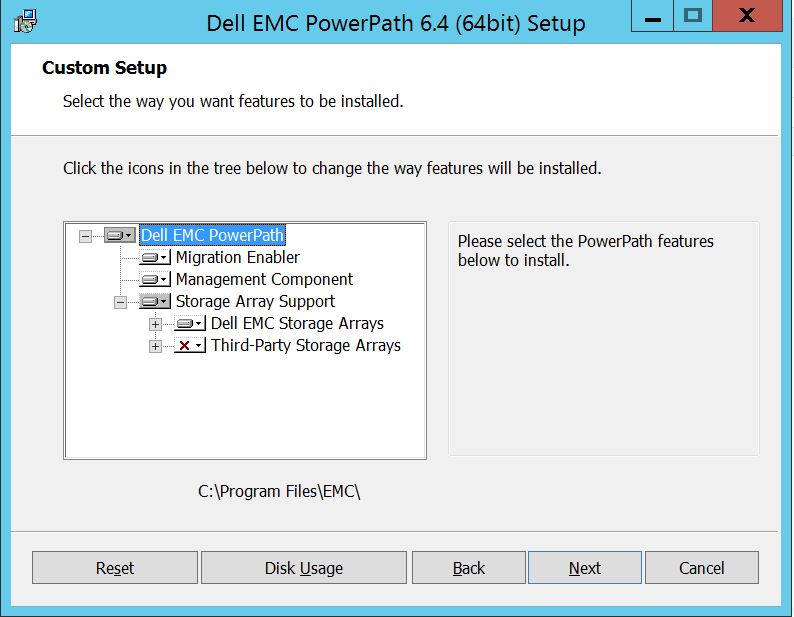
Ora è possibile espandere il supporto agli array di storage, se non lo si è già fatto, ed espandere anche gli array di storage Dell EMC che visualizzeranno tutti gli array di storage supportati in PowerPath:
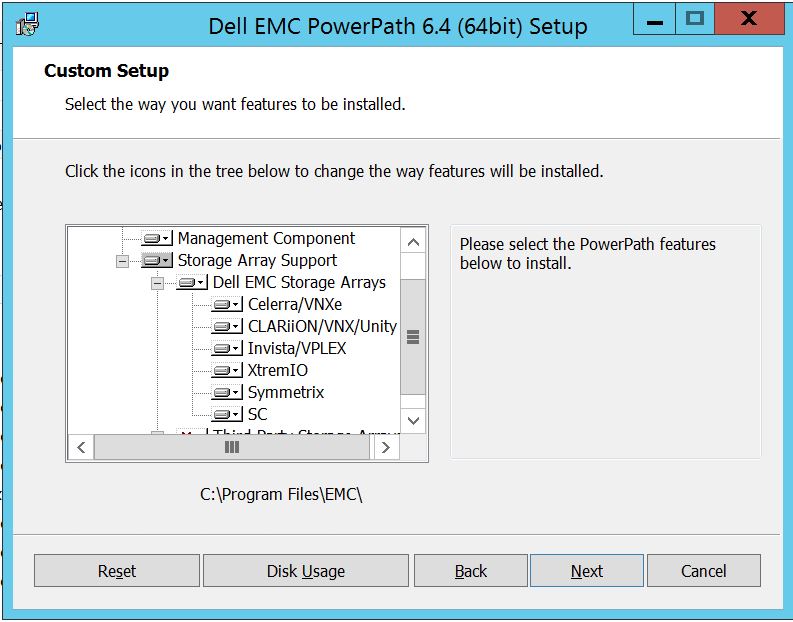
È possibile utilizzare ulteriormente il piccolo tasto giù vicino a qualsiasi storage. Prendiamo ad esempio Symmetrix. Verranno inoltre mostrate 2 opzioni:
1. Verrà installato sul disco
rigido locale 2. L'intera funzione verrà installata sul disco
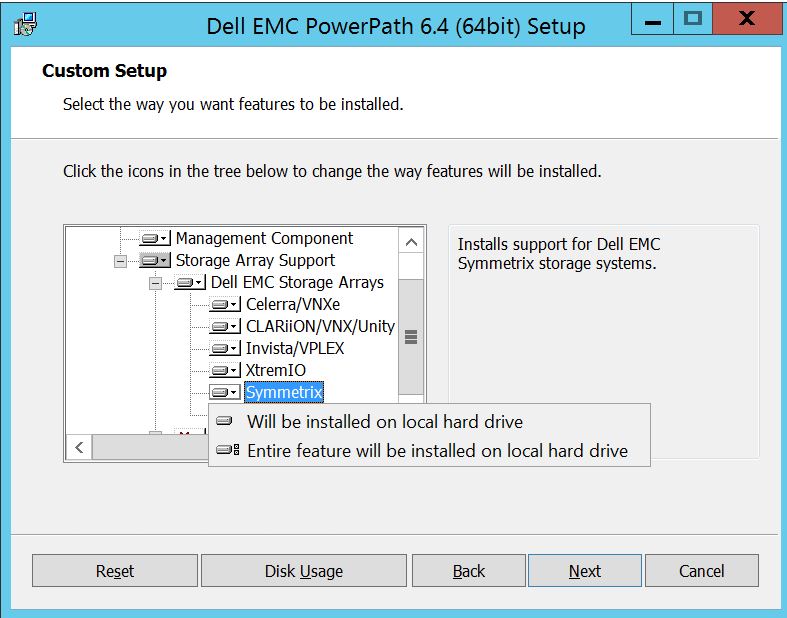
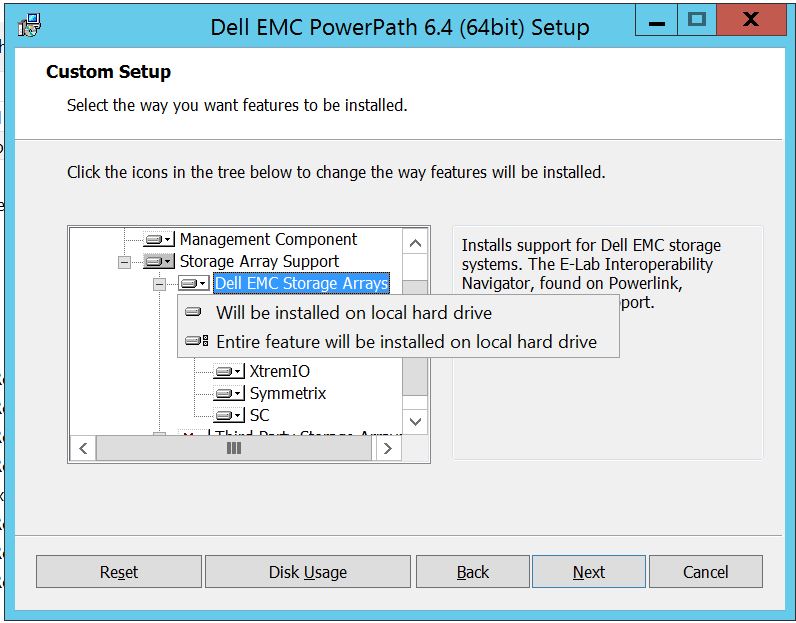
rigido localeSe si desidera gestire tutto l'array di storage Dell EMC (impostazione predefinita
), è possibile eseguire la stessa operazione anche nel menu a discesa Dell EMC Storage Array:
Una volta completato, selezionare Cliccare su
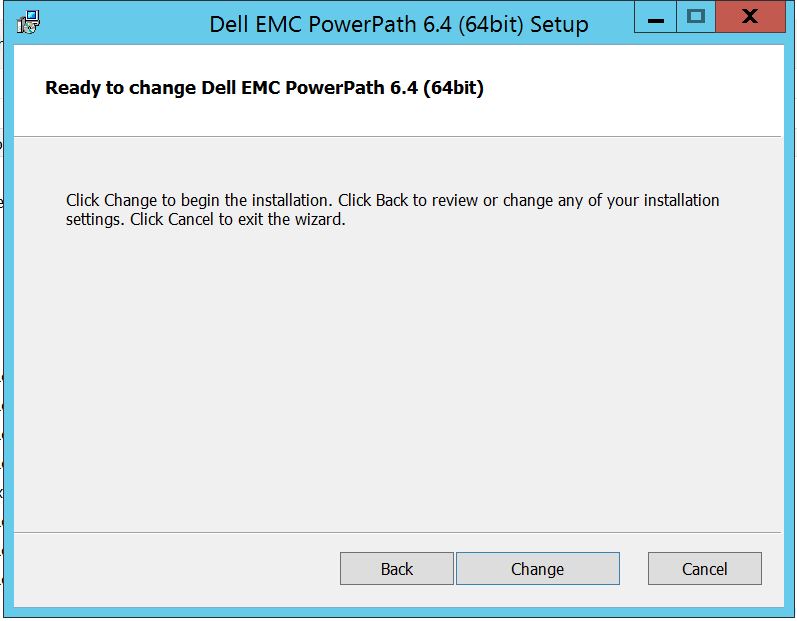
Change per completare le modifiche necessarie:
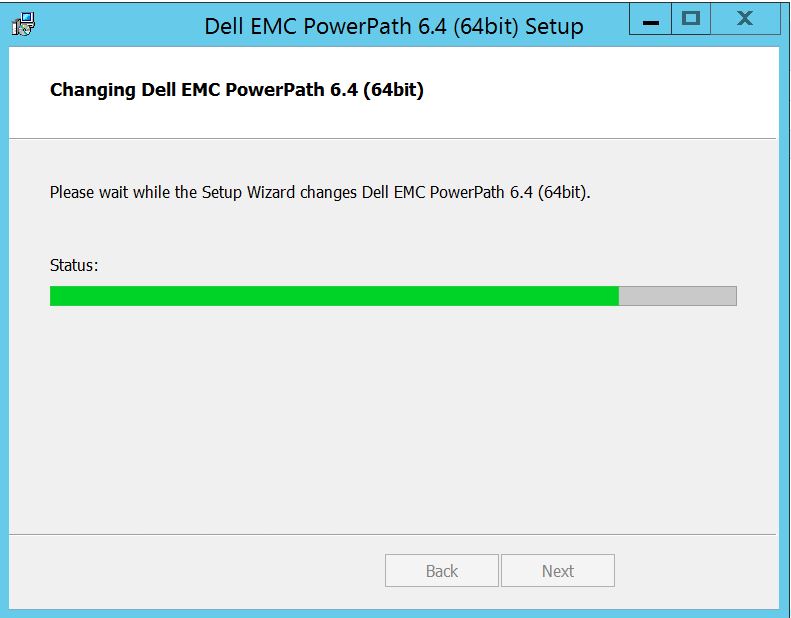
Post che dovresti vedere qui in cui puoi selezionare "Finish "
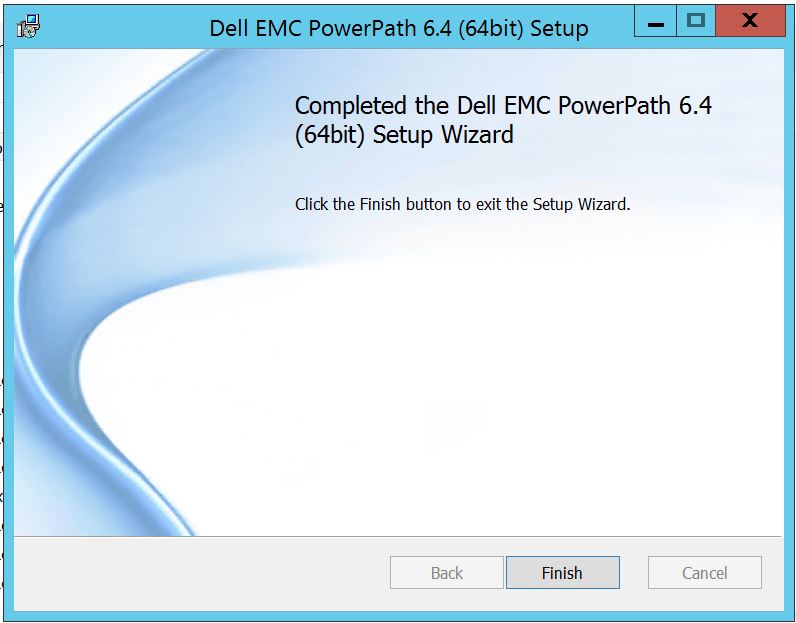 Dopo la fine otterrai un pop-up che chiede il riavvio, seleziona per riavviare il server poiché le modifiche devono essere implementate a livello di server che renderà quindi visibili i dischi dell'array di storage in PowerPath.
Dopo il riavvio, quando si esegue powermt display options, ecco come apparirà l'output:
** OPZIONI DI VISUALIZZAZIONE POWERMT **
Mostra nomi CLARiiON LUN: Monitoraggio della latenza True
Path: Disattivato
Mantieni le informazioni sul percorso: In
Performance Monitor: disabilitato
AutoStandby: I/O per errore (iopf): periodo di aging iopf abilitato
: Limite 1 D
IOPF : 6000
Storage
System Class Attributes
------------ ----------
Symmetrix periodic autorestore = on
reactive autorestore = on
status = managed
proximity based autostandby = off
auto host registration = enabled
app finger printing = enabled
device to array performance report = enabled
device in use to array report = enabled
CLARiiON periodic autorestore = on
reactive autorestore = on
status = managed
proximity based autostandby = N/A
auto host registration = disabled
app finger printing = N/A
device to array performance report = N/A
device in use to array report = N/A
Invista periodic autorestore = on
reactive autorestore = on
status = managed
proximity based autostandby = N/A
auto host registration = N/A
app finger printing = N/A
device to array performance report = N/A
device in use to array report = N/A
Hitachi periodic autorestore = on
reactive autorestore = on
status = unmanaged
proximity based autostandby = N/A
auto host registration = N/A
app finger printing = N/A
device to array performance report = N/A
device in use to array report = N/A
HP xp periodic autorestore = on
reactive autorestore = on
status = unmanaged
proximity based autostandby = N/A
auto host registration = N/A
app finger printing = N/A
device to array performance report = N/A
device in use to array report = N/A
Ess periodic autorestore = on
reactive autorestore = on
status = unmanaged
proximity based autostandby = N/A
auto host registration = N/A
app finger printing = N/A
device to array performance report = N/A
device in use to array report = N/A
Generic periodic autorestore = on
reactive autorestore = on
status = managed
proximity based autostandby = N/A
auto host registration = N/A
app finger printing = N/A
device to array performance report = N/A
device in use to array report = N/A
VPLEX periodic autorestore = on
reactive autorestore = on
status = managed
proximity based autostandby = on
proximity based autostandby threshold = default
auto host registration = N/A
app finger printing = N/A
device to array performance report = N/A
device in use to array report = N/A
VNX periodic autorestore = on
reactive autorestore = on
status = managed
proximity based autostandby = N/A
auto host registration = disabled
app finger printing = N/A
device to array performance report = N/A
device in use to array report = N/A
NetApp periodic autorestore = on
reactive autorestore = on
status = unmanaged
proximity based autostandby = N/A
auto host registration = N/A
app finger printing = N/A
device to array performance report = N/A
device in use to array report = N/A
XtremIO periodic autorestore = on
reactive autorestore = on
status = managed
proximity based autostandby = N/A
auto host registration = N/A
app finger printing = N/A
device to array performance report = N/A
device in use to array report = N/A
Unity periodic autorestore = on
reactive autorestore = on
status = managed
proximity based autostandby = N/A
auto host registration = disabled
app finger printing = N/A
device to array performance report = N/A
device in use to array report = N/A
SC periodic autorestore = on
reactive autorestore = on
status = managed
proximity based autostandby = N/A
auto host registration = N/A
app finger printing = N/A
device to array performance report = N/A
device in use to array report = N/A
Di seguito è riportato uno scenario in cui il cliente ha presentato i dischi dell'array di storage Symmetrix e ha segnalato di non essere in grado di rilevare alcun disco in PowerPath dopo l'aggiornamento.
L'output delle " opzioni di visualizzazione powermt " mostra:
** OPZIONI DI VISUALIZZAZIONE POWERMT **
Mostra nomi CLARiiON LUN: Monitoraggio della latenza True
Path: Disattivato
Mantieni le informazioni sul percorso: In
Performance Monitor: disabilitato
AutoStandby: I/O per errore (iopf): periodo di aging iopf abilitato
: Limite 1 D
IOPF : 6000
Auto Host Registration: disabled
Storage
System Class Attributes
------------ ----------
Symmetrix periodic autorestore = on
reactive autorestore = on
status = unmanaged
proximity based autostandby = on
proximity based autostandby threshold = default
CLARiiON periodic autorestore = on
reactive autorestore = on
status = unmanaged
proximity based autostandby = N/A
Invista periodic autorestore = on
reactive autorestore = on
status = managed
proximity based autostandby = N/A
Hitachi periodic autorestore = on
reactive autorestore = on
status = unmanaged
proximity based autostandby = N/A
HP xp periodic autorestore = on
reactive autorestore = on
status = unmanaged
proximity based autostandby = N/A
Ess periodic autorestore = on
reactive autorestore = on
status = unmanaged
proximity based autostandby = N/A
Generic periodic autorestore = on
reactive autorestore = on
status = managed
proximity based autostandby = N/A
VPLEX periodic autorestore = on
reactive autorestore = on
status = managed
proximity based autostandby = on
proximity based autostandby threshold = default
VNX periodic autorestore = on
reactive autorestore = on
status = unmanaged
proximity based autostandby = N/A
NetApp periodic autorestore = on
reactive autorestore = on
status = unmanaged
proximity based autostandby = N/A
XtremIO periodic autorestore = on
reactive autorestore = on
status = managed
proximity based autostandby = N/A
Unity periodic autorestore = on
reactive autorestore = on
status = unmanaged
proximity based autostandby = N/A
SC periodic autorestore = on
reactive autorestore = on
status = managed
proximity based autostandby = off
Notice how some of the storage array and especially Symmetrix here is "unmanaged"
Here are the steps along with the screenshot from our lab server , how to make it "Managed"
Open Control Panel :
Selezionare Programmi e funzionalità
Selezionare PowerPath e scegliere Modifica/Cambia, per aprire il prompt del programma di installazione:
Fare clic su Avanti e seguire la modifica di selezione:
Che ti porterà a Configurazione personalizzata:
Ora è possibile espandere il supporto agli array di storage, se non lo si è già fatto, ed espandere anche gli array di storage Dell EMC che visualizzeranno tutti gli array di storage supportati in PowerPath:
È possibile utilizzare ulteriormente il piccolo tasto giù vicino a qualsiasi storage. Prendiamo ad esempio Symmetrix. Verranno inoltre mostrate 2 opzioni:
1. Verrà installato sul disco
rigido locale 2. L'intera funzione verrà installata sul disco
rigido localeSe si desidera gestire tutto l'array di storage Dell EMC (impostazione predefinita
), è possibile eseguire la stessa operazione anche nel menu a discesa Dell EMC Storage Array:
Una volta completato, selezionare Cliccare su
Change per completare le modifiche necessarie:
Post che dovresti vedere qui in cui puoi selezionare "Finish "
Dopo la fine otterrai un pop-up che chiede il riavvio, seleziona per riavviare il server poiché le modifiche devono essere implementate a livello di server che renderà quindi visibili i dischi dell'array di storage in PowerPath.
Dopo il riavvio, quando si esegue powermt display options, ecco come apparirà l'output:
** OPZIONI DI VISUALIZZAZIONE POWERMT **
Mostra nomi CLARiiON LUN: Monitoraggio della latenza True
Path: Disattivato
Mantieni le informazioni sul percorso: In
Performance Monitor: disabilitato
AutoStandby: I/O per errore (iopf): periodo di aging iopf abilitato
: Limite 1 D
IOPF : 6000
Storage
System Class Attributes
------------ ----------
Symmetrix periodic autorestore = on
reactive autorestore = on
status = managed
proximity based autostandby = off
auto host registration = enabled
app finger printing = enabled
device to array performance report = enabled
device in use to array report = enabled
CLARiiON periodic autorestore = on
reactive autorestore = on
status = managed
proximity based autostandby = N/A
auto host registration = disabled
app finger printing = N/A
device to array performance report = N/A
device in use to array report = N/A
Invista periodic autorestore = on
reactive autorestore = on
status = managed
proximity based autostandby = N/A
auto host registration = N/A
app finger printing = N/A
device to array performance report = N/A
device in use to array report = N/A
Hitachi periodic autorestore = on
reactive autorestore = on
status = unmanaged
proximity based autostandby = N/A
auto host registration = N/A
app finger printing = N/A
device to array performance report = N/A
device in use to array report = N/A
HP xp periodic autorestore = on
reactive autorestore = on
status = unmanaged
proximity based autostandby = N/A
auto host registration = N/A
app finger printing = N/A
device to array performance report = N/A
device in use to array report = N/A
Ess periodic autorestore = on
reactive autorestore = on
status = unmanaged
proximity based autostandby = N/A
auto host registration = N/A
app finger printing = N/A
device to array performance report = N/A
device in use to array report = N/A
Generic periodic autorestore = on
reactive autorestore = on
status = managed
proximity based autostandby = N/A
auto host registration = N/A
app finger printing = N/A
device to array performance report = N/A
device in use to array report = N/A
VPLEX periodic autorestore = on
reactive autorestore = on
status = managed
proximity based autostandby = on
proximity based autostandby threshold = default
auto host registration = N/A
app finger printing = N/A
device to array performance report = N/A
device in use to array report = N/A
VNX periodic autorestore = on
reactive autorestore = on
status = managed
proximity based autostandby = N/A
auto host registration = disabled
app finger printing = N/A
device to array performance report = N/A
device in use to array report = N/A
NetApp periodic autorestore = on
reactive autorestore = on
status = unmanaged
proximity based autostandby = N/A
auto host registration = N/A
app finger printing = N/A
device to array performance report = N/A
device in use to array report = N/A
XtremIO periodic autorestore = on
reactive autorestore = on
status = managed
proximity based autostandby = N/A
auto host registration = N/A
app finger printing = N/A
device to array performance report = N/A
device in use to array report = N/A
Unity periodic autorestore = on
reactive autorestore = on
status = managed
proximity based autostandby = N/A
auto host registration = disabled
app finger printing = N/A
device to array performance report = N/A
device in use to array report = N/A
SC periodic autorestore = on
reactive autorestore = on
status = managed
proximity based autostandby = N/A
auto host registration = N/A
app finger printing = N/A
device to array performance report = N/A
device in use to array report = N/A
Affected Products
PowerPath for WindowsProducts
PowerPath for WindowsArticle Properties
Article Number: 000158477
Article Type: How To
Last Modified: 17 Oct 2025
Version: 4
Find answers to your questions from other Dell users
Support Services
Check if your device is covered by Support Services.