Dell Unity: Eicar Malware Testing on Unity NAS Gets a Network Error
Summary: User tested with Eicar malware testing in Unity NAS server which is showing a Network error "There is a problem accessing \\172.xx.xx.xx\abc (NasIP \testfolder)." This error is user correctable. ...
This article applies to
This article does not apply to
This article is not tied to any specific product.
Not all product versions are identified in this article.
Symptoms
The EICAR Anti-Virus Test File or EICAR test file is a computer file developed by the European Institute for Computer Anti-Virus Research (EICAR) and Computer Anti-Virus Research Organization (CARO) to test the response of computer anti-virus (AV) programs.
The user is an AV third-party engine that is Sophos Central Intercept X.

The user is an AV third-party engine that is Sophos Central Intercept X.
There is a problem accessing \\172.xx.xx.xx\abc  (NasIP \testfolder )
You have received this message because an event that has occurred on your Unity system requires your attention. The alert is:
"The virus checker server 172.xx.xx.xx has encountered an error and is no longer operational.(Error: OFFLINE, httpStatus: 1006 Connection Disconnected)"
The virus checker server 172.xx.xx.xx has encountered an error and is no longer operational.(Error: ERROR_AVINTERFACE)"
"No virus checker server is available."
Cause
This error is a clear indication that the Windows Server running the third-party AV software and Cava Agent was not available to provide services during the timeframe of the alert. If the Unity Appliance is otherwise healthy, the issue may be either network-outage related or a Windows-Server issue, or possibly an AV Services related issue. The user or a Windows administrator must examine the 'Windows alert log' for a clear root cause.
Resolution
Troubleshooting steps from Unity:
- Search in Unity log location:
EMCSystemBackup.log  - cd /EMC/C4core/log/
grep -i infect EMCSystemBackup.log
grep -i blocked EMCSystemBackup.log

c4_safe_ktrace.log – cd /EMC/C4core/log/
grep -i "virus checker" c4_safe_ktrace.log
zgrep -i "virus checker" /EMC/C4core/log/c4_safe_ktrace.log*
Uemcli svc_cava service script with NAS server name provides CAVA version and name of anti-virus engine.
Nas server name/IP : OV-xx-x-xxx-xx-001/ 172.xx.xx.xx
AV server IP address: 172.xx.xx.xx
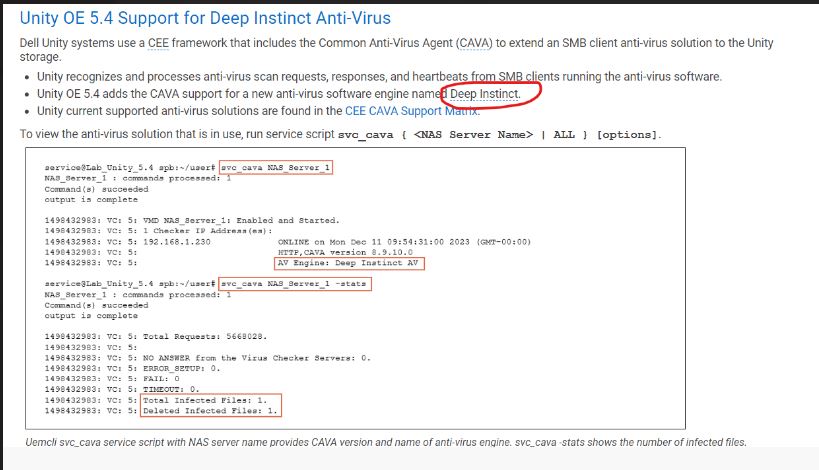
List of commands:
Command Usage: svc_cava
svc_cava { <NAS_Server_Name> | ALL }
 [-h | --help]
 | <no option>
 | -stats
 | [ -set accesstime={ now | none | [[[[yy]mm]dd]hh]mm[.ss] }]
 | [ -fsscan [<fs_mountpath> { -list | -create | -delete } ]
Example : svc_cava -stats
svc_cava nas1 -stats
svc_cava nas1
Command usage:
08:38:39 root@DE4142343780xx spa:/EMC/C4Core/log# svc_cava OV-xxx-x-xxx-xx-001 -stats
OV-xxx-x-xxx-xx-001 : commands processed: 1
command(s) succeeded
output is complete
1712653384: VC: 5: Total Requests: 0.
1712653384: VC: 5:
1712653384: VC: 5: NO ANSWER from the Virus Checker Servers: 0.
1712653384: VC: 5: ERROR_SETUP: 0.
1712653384: VC: 5: FAIL: 0.
1712653384: VC: 5: TIMEOUT: 0.
1712653384: VC: 5:
1712653384: VC: 5: 0 files in the collector queue.
1712653384: VC: 5: 0 files processed by the AV threads.
Command succeeded
- Download the viruschecker.config file and verify whether the shutdown=no or shutdown=viruschecking is showing:
Open the Unity UI > Storage > NAS server > Security > Anti-virus > Retrieve Current Configuration (view the file)
- Update the viruschecker.conf value (Upload New Configuration) and apply the changes:
# Example: OV-xxx-x-xxx-xx-001
#
masks=*.EXE:*.COM:*.DOC:*.DOT:*.XL?:*.MD?:*.VXD:*.386:*.SYS:*.BIN:*.ppt:*docx:*.rar:*.zip:*.txt
excl=pagefile.sys:*.tmp
# masks=*.RTF:*.OBD:*.DLL:*.SCR:*.OBT:*.PP?:*.POT:*.OLE:*.SHS:*.MPP
# masks=*.MPT:*.XTP:*.XLB:*.CMD:*.OVL:*.DEV
# masks=*.ZIP:*.TAR:*.ARJ:*.ARC:*.Z
addr=172.xx.xx.xx >> AV Server IP address
shutdown=no (update the value to shutdown=viruschecking and upload the viruschecker.conf file to unity GUI)
# Stops SMB/CIFS if no AV machine available.(No Windows clients can access any Unity share)
08:18:51 root@DE414234378xxx spa:/cores/service/user# svc_cava OV-xxx-x-xxx-xx-001
OV-xxx-x-xxx-xx-001: commands processed: 1
command(s) succeeded
output is complete
1712650760: VC: 5: OV-xxx-x-xxx-xx-001: Enabled and Started.
1712650760: VC: 5: 1 Checker IP Address(es):
1712650760: VC: 5: 172.xx.xx.xx                                   ONLINE at Tue Apr  9 08:19:14 2024 (GMT-00:00)
1712650760: VC: 5:                                                HTTP, CAVA version: 8.9.10.0
1712650760: VC: 5:                                                AV Engine: Microsoft Antivirus ( Third party AV Engine )
1712650760: VC: 5:                                                Remediation Window: 30 seconds
1712650760: VC: 5:                                                Server Name: 172.xx.xx.xx
1712650760: VC: 5:                                                Last time signature updated: Tue Apr  9 05:29:36 2024 (GMT-00:00)
1712650760: VC: 5:
1712650760: VC: 5: 15 File Mask(s):
1712650760: VC: 5: *.EXE *.COM *.DOC *.DOT *.XL? *.MD? *.VXD *.386 *.SYS *.BIN *.PPT *DOCX *.RAR
1712650760: VC: 5: *.ZIP *.TXT
1712650760: VC: 5: 2 Excluded File(s):
1712650760: VC: 5: PAGEFILE.SYS *.TMP
1712650760: VC: 5: Share \\ov-yml-p-ser-fs-001.yoma.com.mm\CHECK$.
1712650760: VC: 5: RPC request timeout=25000 milliseconds.
1712650760: VC: 5: RPC retry timeout=5000 milliseconds.
1712650760: VC: 5: High water mark=200.
1712650760: VC: 5: Low water mark=50.
1712650760: VC: 5: Scan all virus checkers every 10 seconds.
1712650760: VC: 5: When all virus checkers are offline:
1712650760: VC: 5: Continue to work with Virus Checking and CIFS.
1712650760: VC: 5: Scan on read disable.
1712650760: VC: 5: MS-RPC User: OV-xxx-x-xxx-xx-001-FS$
1712650760: VC: 5: MS-RPC ClientName: ov-xxx-x-xxx-xx-001.abc
 Command succeeded
The issue was resolved, and CAVA started working properly after changing the network IP.
Recommendation troubleshooting:
- Confirm viruschecker.conf settings. (shutdown=viruschecking)
- Confirm that The CAVA service is running with the AV user account.
- Confirm the installed Anti-Virus (Sophos, TrendMicro, McAfee, and so forth) service is running with the local system account.
-
Confirm that the AV user is a member of the local admin group on each AV server.
-
Confirm that the anti-virus and CEE are installed using the correct order, CEE first, then anti-virus
-
Reboot the CAVA services
-
Reboot the AV server once
-
Confirm that the CAVA servers have one network interface only.
-
Confirm with the user whether the client computer is assigned with the same or different network IPs of NAS servers (always recommended that it is in the same network)
1712650760: VC: 5:                                                HTTP, CAVA version: 8.9.10.0
1712650760: VC: 5:                                                AV Engine: Microsoft Antivirus ( Third party AV Engine )
Best Practices:
- Do not set up Policy VirusChecking=No as this may lead to Blocked Threads and is not considered best practice.
- Do not use a Single AV server as this is not recommended.
- Do not use a single AV server for multiple platforms as this is not recommended and should be considered unsupported.
If the issue still persists, the user must engage the third-party anti-virus vendor support for further assistance.
Additional Information
See the below documents for more information:

Affected Products
Dell EMC Unity Family |Dell EMC Unity All Flash, Dell EMC Unity FamilyArticle Properties
Article Number: 000224432
Article Type: Solution
Last Modified: 16 Oct 2025
Version: 3
Find answers to your questions from other Dell users
Support Services
Check if your device is covered by Support Services.